







Question: I want to debug this SQL code below and screenshot the output ER diagram And correct the diagrams if there are errors Mapping CREATE TABLE
I want to debug this SQL code below and screenshot the output
ER diagram
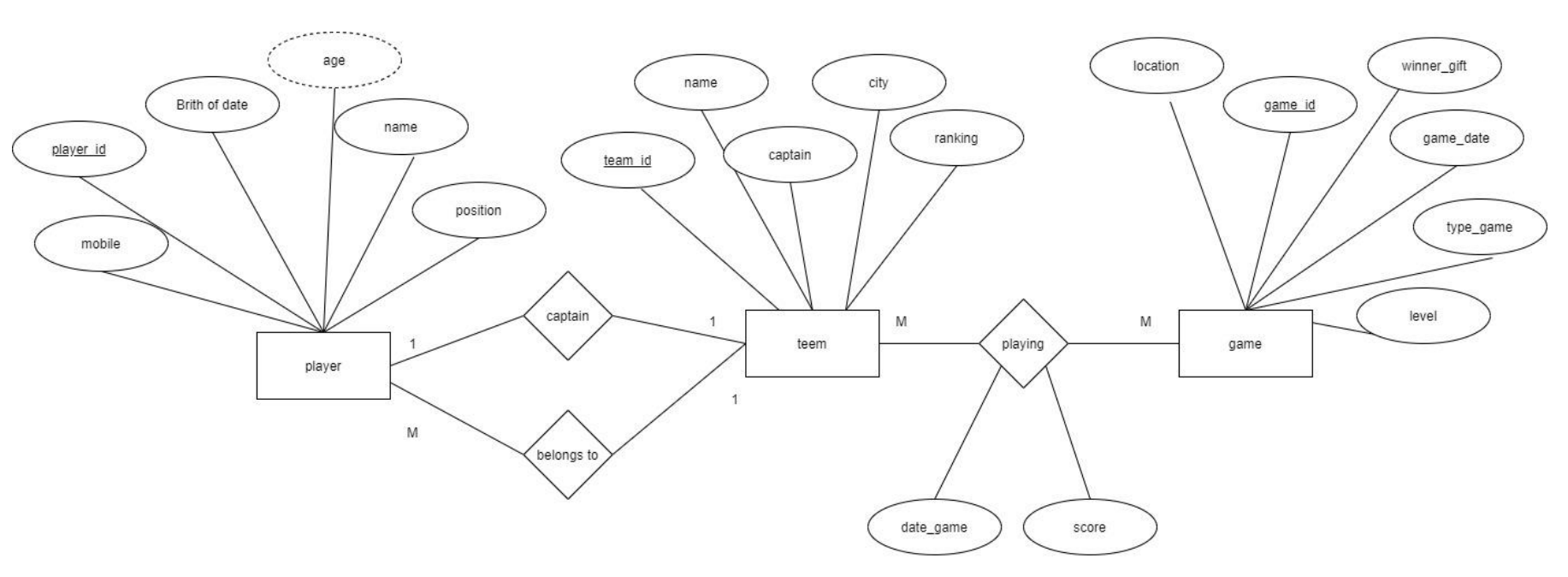
And correct the diagrams if there are errors
Mapping
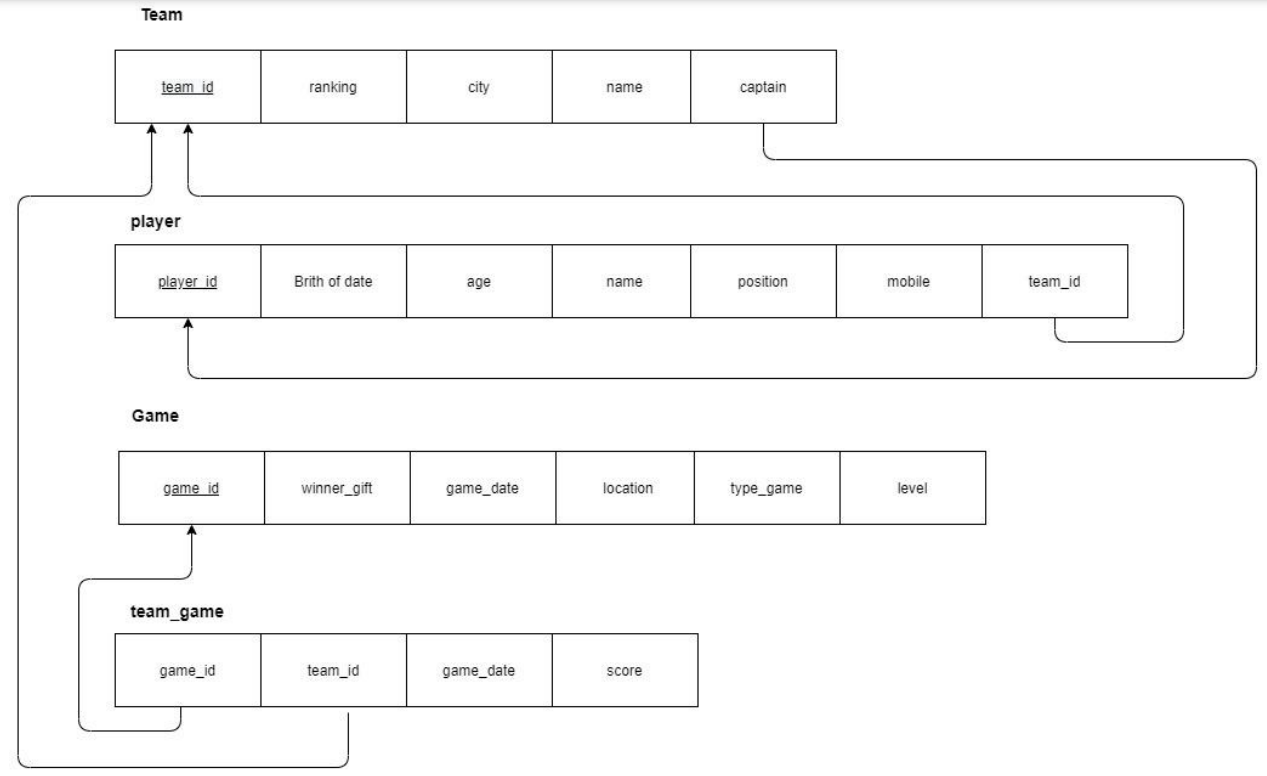
CREATE TABLE Teams ( TeamID INTEGER NOT NULL, TeamID INTEGER NOT NULL, TeamName VARCHAR(255) NOT NULL, City VARCHAR(255) NOT NULL, Captain VARCHAR(255) NOT NULL, position VARCHAR(255) NOT NULL, Rank INTEGER NOT NULL, PRIMARY KEY (TeamID) ); CREATE TABLE Players ( PlayerID INTEGER NOT NULL AUTO_INCREMENT, PlayerName VARCHAR(255) NOT NULL, Birth Date DATE NOT NULL, Mobile VARCHAR(20) NOT NULL, Age INTEGER AS (YEAR(CURRENT_TIMESTAMP) - YEAR(BirthDate)) );
TeamID INTEGER NOT NULL, PRIMARY KEY (PlayerID), FOREIGN KEY (TeamID) REFERENCES Teams (TeamID) ON DELETE CASCADE -- Foreign Key Constraint. ); CREATE TABLE Games ( GameID INTEGER NOT NULL AUTO_INCREMENT, TypeOfGame VARCHAR(255) NOT NULL, GameLevel VARCHAR(255) NOT NULL, Location VARCHAR(255), WinnerGift VARCHAR(255), ); CREATE TABLE Games ( GameID INTEGER, TeamID INTEGER, GameDate DATE NOT NULL, TeamScore INTEGER DEFAULT 0, FOREIGN KEY (TeamID) REFERENCES Teams(TeamID), FOREIGN KEY (GameID) REFERENCES Game(GameID) );
Team \begin{tabular}{|l|l|l|l|l|} \hline team id & ranking & city & name & captain \\ \hline \end{tabular} player \begin{tabular}{|c|c|c|c|c|c|c|} \hline player id & Brith of date & age & name & position & mobile \\ \hline \end{tabular} Game \begin{tabular}{|l|l|l|l|l|l|} \hline game id & winner_gift & game_date & location & type_game & level \\ \hline \end{tabular} team_game \begin{tabular}{|l|l|l|l|} \hline game_id & team_id & game_date & score \\ \hline \end{tabular}
Step by Step Solution
There are 3 Steps involved in it

Get step-by-step solutions from verified subject matter experts
 Study Help