



Question: i want to install keras-gpu but i keep getting this issue ? why ? A mac -bash 80x24 ith each other: Output in format: Requested
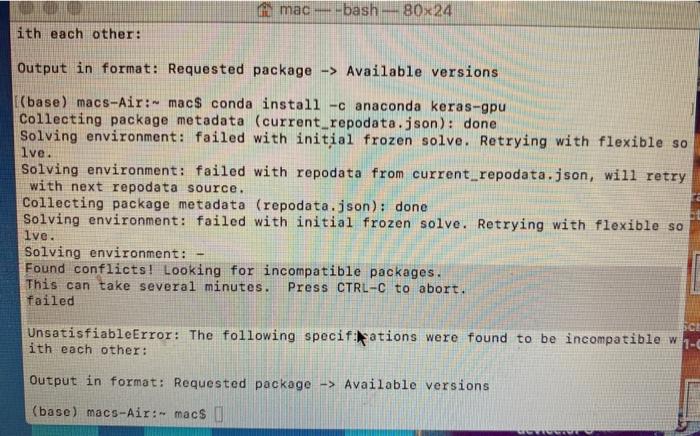
A mac -bash 80x24 ith each other: Output in format: Requested package -> Available versions [(base) macs-Air: mac$ conda install -c anaconda keras-gpu Collecting package metadata (current_repodata.json): done Solving environment: failed with initial frozen solve. Retrying with flexible so lve. Solving environment: failed with repodata from current_repodata.json, will retry with next repodata source. Collecting package metadata (repodata.json): done Solving environment: failed with initial frozen solve. Retrying with flexible so lve. Solving environment: Found conflicts! Looking for incompatible packages. This can take several minutes. Press CTRL-C to abort. failed UnsatisfiableError: The following specifikations were found to be incompatible w ith each other: Output in format: Requested package -> Available versions (base) macs-Air:- macs ET NGU A mac -bash 80x24 ith each other: Output in format: Requested package -> Available versions [(base) macs-Air: mac$ conda install -c anaconda keras-gpu Collecting package metadata (current_repodata.json): done Solving environment: failed with initial frozen solve. Retrying with flexible so lve. Solving environment: failed with repodata from current_repodata.json, will retry with next repodata source. Collecting package metadata (repodata.json): done Solving environment: failed with initial frozen solve. Retrying with flexible so lve. Solving environment: Found conflicts! Looking for incompatible packages. This can take several minutes. Press CTRL-C to abort. failed UnsatisfiableError: The following specifikations were found to be incompatible w ith each other: Output in format: Requested package -> Available versions (base) macs-Air:- macs ET NGU
Step by Step Solution
There are 3 Steps involved in it

Get step-by-step solutions from verified subject matter experts