







Question: I want to make a calculator program in Java GUI like Picture 1 and 2. The main calculator shall have a Settings button. The pressing
I want to make a calculator program in Java GUI like Picture 1 and 2.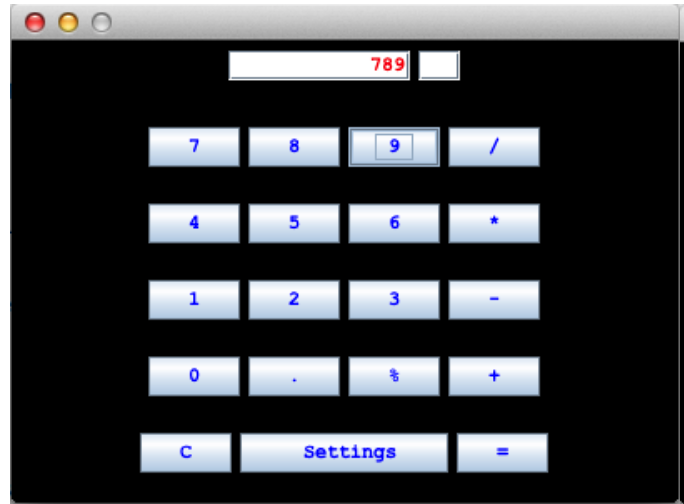
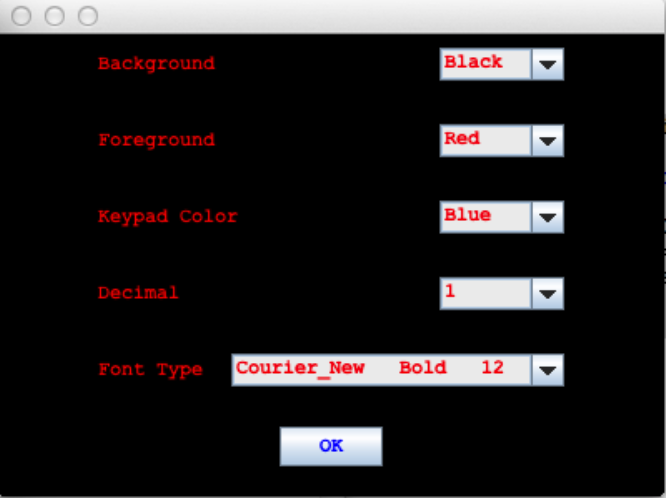
- The main calculator shall have a Settings button.
- The pressing of Settings button shall bring the Settings window.
- Settings window shall allow users chose Background color, Foreground color, Keypad Color, Font Type, Number of digits after decimal point.
- Settings window shall have Ok button. (You can use any proper SWING component to implement)
- The pressing of Ok button in the Settings window shall bring the Main calculator window.
- The current Settings shall affect the look and feel of the Main window.
- (Please note: Your design not necessarily exactly similar to the ones in the Figures.)
789 5 1 2 3 Settings Background Black Foreground Red Keypad Color Blue Decimal 1 Font Type Courier_New Bold 12 OK 789 5 1 2 3 Settings Background Black Foreground Red Keypad Color Blue Decimal 1 Font Type Courier_New Bold 12 OK
Step by Step Solution
There are 3 Steps involved in it
1 Expert Approved Answer
Step: 1 Unlock

Question Has Been Solved by an Expert!
Get step-by-step solutions from verified subject matter experts
Step: 2 Unlock
Step: 3 Unlock
 Study Help