







Question: I want you just to correct my code, do not write new just fix the problems - do not use elif, only if-else - make
I want you just to correct my code, do not write new just fix the problems
- do not use elif, only if-else
- make the alignment and formating exactly the same as the sample run, you can see that the output is indented below the input maybe you will need to use (%d, %s)
- also in my code there is a problem if I write -10000000 the output will be negative not negative large as the sample run
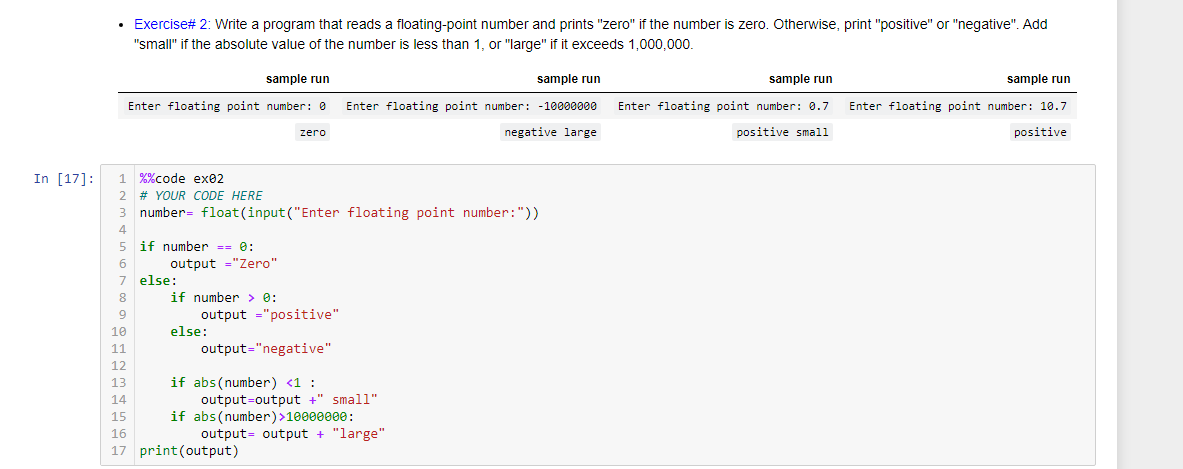
number= float(input("Enter floating point number:"))
if number == 0: output ="Zero" else: if number > 0: output ="positive" else: output="negative" if abs(number) 10000000: output= output + "large" print(output)
Exercise# 2: Write a program that reads a floating-point number and prints "zero" if the number is zero. Otherwise, print "positive" or "negative". Add "small" if the absolute value of the number is less than 1, or "large" if it exceeds 1,000,000. sample run sample run sample run sample run Enter floating point number: 0 Enter floating point number: -10000000 Enter floating point number: 0.7 Enter floating point number: 10.7 zero negative large positive small positive In [17]: 5 1 %%code ex02 2 # YOUR CODE HERE 3 number= float(input("Enter floating point number:")) 4 if number == @: 6 output = "Zero" 7 else: 8 if number> : 9 output ="positive" 10 else: 11 output="negative" 12 13 if abs(number) 10000000: 16 output= output + "large" 17 print (output)
Step by Step Solution
There are 3 Steps involved in it

Get step-by-step solutions from verified subject matter experts
 Study Help