







Question: I would like to create a separate python file named Studentfiles.py where it stores each student's courses by i d# (student_id) and their billing info
I would like to create a separate python file named Studentfiles.py where it stores each student's courses by id# (student_id) and their billing info into a text file to pass it back to the program and be printed out. You can do it with or without using pickle.
Here are the python modules i have currently:
student.py:
import billing
import registration
def add_course(student_id, c_roster, c_max_size):
# Adds a student to a course
course = input("Enter the course you want to add: ")
if course not in c_roster:
print("Course not found\n")
return
if student_id in c_roster[course]:
print("You are already enrolled in that course.\n")
return
if len(c_roster[course]) >= c_max_size[course]:
print("Course already full.\n")
return
c_roster[course].append(student_id)
print("Course added\n")
def drop_course(student_id, c_roster):
# Drops a student from a course
course = input("Enter the course you want to drop: ")
if course not in c_roster:
print("Course not found\n")
return
if student_id not in c_roster[course]:
print("You are not enrolled in that course.\n")
return
c_roster[course].remove(student_id)
print("Course dropped\n")
def list_courses(student_id, c_roster):
# Lists the courses a student is registered for
count = 0
print("Courses registered: ")
for course in c_roster:
if student_id in c_roster[course]:
print(course)
count += 1
print("Total number:", count, "\n")
------------------------------------------------------------------------------------------------------------------------------------------------------
billing.py:
import registration
import student
def calculate_hours_and_bill(student_id, s_in_state, c_rosters, c_hours):
"""Calculates the course hours and cost of enrollment."""
hours = 0
for course in c_rosters:
if student_id in c_rosters[course]:
hours += c_hours[course]
if s_in_state[student_id]:
cost = hours * 225
else:
cost = hours * 850
return hours, cost
def display_hours_and_bill(hours, cost):
"""Displays the course hours and cost of enrollment."""
print("Course load:", hours, "credit hours")
print(f"Enrollment cost: ${cost:.2f} \n")
------------------------------------------------------------------------------------------------------------------------------------------------------
registration.py:
import student
import billing
def main():
# Initialize the lists of things that need to be checked against.
student_list = [('1001', '111'), ('1002', '222'), ('1003', '333'), ('1004', '444')]
student_in_state = {'1001': True, '1002': False, '1003': True, '1004': False}
course_hours = {'CSC101': 3, 'CSC102': 4, 'CSC103': 5, 'CSC104': 3}
course_roster = {'CSC101': ['1004', '1003'],
'CSC102': ['1001'],
'CSC103': ['1002'],
'CSC104': []}
course_max_size = {'CSC101': 3, 'CSC102': 2, 'CSC103': 1, 'CSC104': 3}
# Marg wrote this next part on impulse without looking at the rest of the program.
# Somehow, his code didn't have that many errors in it, and it worked.
# Somehow, he got his teammates to agree to letting him replace what was already in this file with it.
login_success = False # Initialize login success variable.
# Since it is initially false, the following While loop will execute at least one time.
while login_success == False: # While the login function returns False
student_id = input("Enter ID to log in, or 0 to quit: ")
if student_id != '0': # Checks if ID number is 0 so it can appropriately quit when needed
if not student_id.isdigit() or not len(student_id) == 4: # Input validation! Jakub's idea! :)
# If the ID number is invalid, you just get sent back to the loop's start
print("Invalid ID number. ID numbers are four digits.")
continue
login_success = login(student_id, student_list) # Check login
if login_success == False: # If the login failed, return to start of loop to log in again
continue
response = ' ' # Initialize response variable for while loop
while response != '0': # Checks if the user wants to quit.
response = input("Enter 1 to add course, 2 to drop course, 3 to list courses, 4 to show bill, 0 to exit: ") # Ask user what function they want to call
if response == "1": # On selecting Add a course, add_course function is called
student.add_course(student_id, course_roster, course_max_size)
continue # These "continue"s allow returning to the menu after the function executes
elif response == "2": # On selecting Drop a course, drop_course function is called
student.drop_course(student_id, course_roster)
continue
elif response == "3": # On selecting List Courses, list_courses function is called
student.list_courses(student_id, course_roster)
continue
elif response == "4": # On selecting Show bill, calculate_hours & display_hours functions are called
hours, cost = billing.calculate_hours_and_bill(student_id, student_in_state,
course_roster, course_hours)
billing.display_hours_and_bill(hours, cost)
continue
elif response == '0': # End session with 0
login_success = False
print("Session ended.\n")
break # Go back to login
else: # If you did not enter one of the acceptable numbers, you are sent back to the menu.
print("The number you have entered does not correspond with one of the options.")
print("Please try again.")
continue
else: # End program
print("Quitting...")
break
def login(student_id, s_list):
# PIN input
pin = input(f"Enter PIN: ")
# Input validation. Jakub's idea, simply implemented a slight bit differently.
while not pin.isdigit() or not len(pin) == 3: # Making sure the PIN is a 3 digit number
print("Your PIN must be numeric and three digits long.")
pin = input(f"\nEnter PIN: ")
if (student_id, pin) in s_list: # If the pair is in the list, then return True
print(f"ID and PIN verified\n")
return True
else: # If the pair isn't in the list, return False
print(f"ID or PIN incorrect\n")
return False
if __name__ == "__main__":
main()
Sample Output:
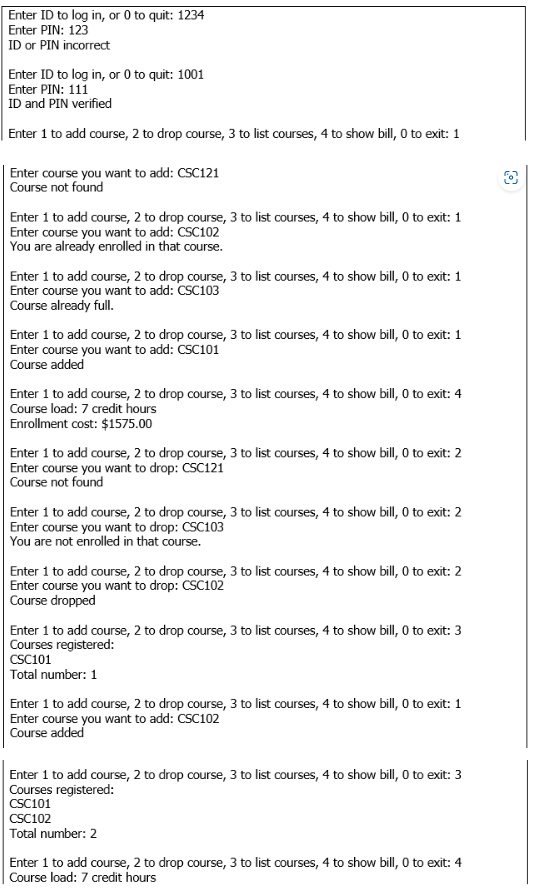
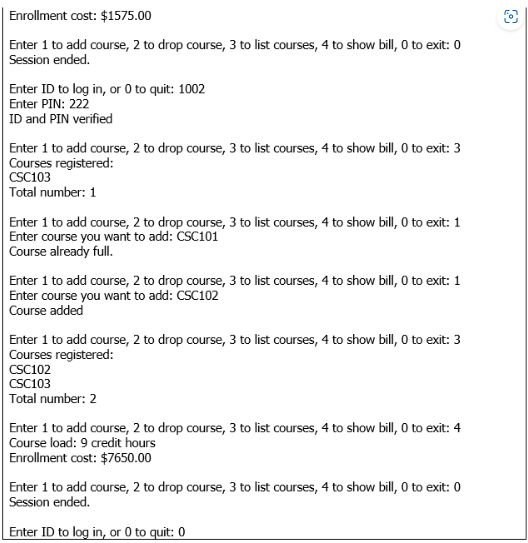
Enter ID to log in, or 0 to quit: 1234 Enter PIN: 123 ID or PIN incorrect Enter ID to log in, or 0 to quit: 1001 Enter PIN: 111 ID and PIN verified Enter 1 to add course, 2 to drop course, 3 to list courses, 4 to show bill, 0 to exit: 1 Enter course you want to add: CSC121 Course not found Enter 1 to add course, 2 to drop course, 3 to list courses, 4 to show bill, 0 to exit: 1 Enter course you want to add: CSC102 You are already enrolled in that course. Enter 1 to add course, 2 to drop course, 3 to list courses, 4 to show bill, 0 to exit: 1 Enter course you want to add: CSC103 Course already full. Enter 1 to add course, 2 to drop course, 3 to list courses, 4 to show bill, 0 to exit: 1 Enter course you want to add: CSC101 Course added Enter 1 to add course, 2 to drop course, 3 to list courses, 4 to show bill, 0 to exit: 4 Course load: 7 credit hours Enrollment cost: $1575.00 Enter 1 to add course, 2 to drop course, 3 to list courses, 4 to show bill, 0 to exit: 2 Enter course you want to drop: CSC121 Course not found Enter 1 to add course, 2 to drop course, 3 to list courses, 4 to show bill, 0 to exit: 2 Enter course you want to drop: CSC103 You are not enrolled in that course. Enter 1 to add course, 2 to drop course, 3 to list courses, 4 to show bill, 0 to exit: 2 Enter course you want to drop: CSC102 Course dropped Enter 1 to add course, 2 to drop course, 3 to list courses, 4 to show bill, 0 to exit: 3 Courses registered: CSC101 Total number: 1 Enter 1 to add course, 2 to drop course, 3 to list courses, 4 to show bill, 0 to exit: 1 Enter course you want to add: CSC102 Course added Enter 1 to add course, 2 to drop course, 3 to list courses, 4 to show bill, 0 to exit: 3 Courses registered: CSC101 CSC102 Total number: 2 Enter 1 to add course, 2 to drop course, 3 to list courses, 4 to show bill, 0 to exit: 4 Course load: 7 credit hours
Step by Step Solution
There are 3 Steps involved in it

Get step-by-step solutions from verified subject matter experts
 Study Help