







Question: I would really like some help with my Visual basic Programming assignment here. My professor has been out sick for 2 weeks and gave this
I would really like some help with my Visual basic Programming assignment here. My professor has been out sick for 2 weeks and gave this to us so I am lost as to how to add and keep new employees saved.
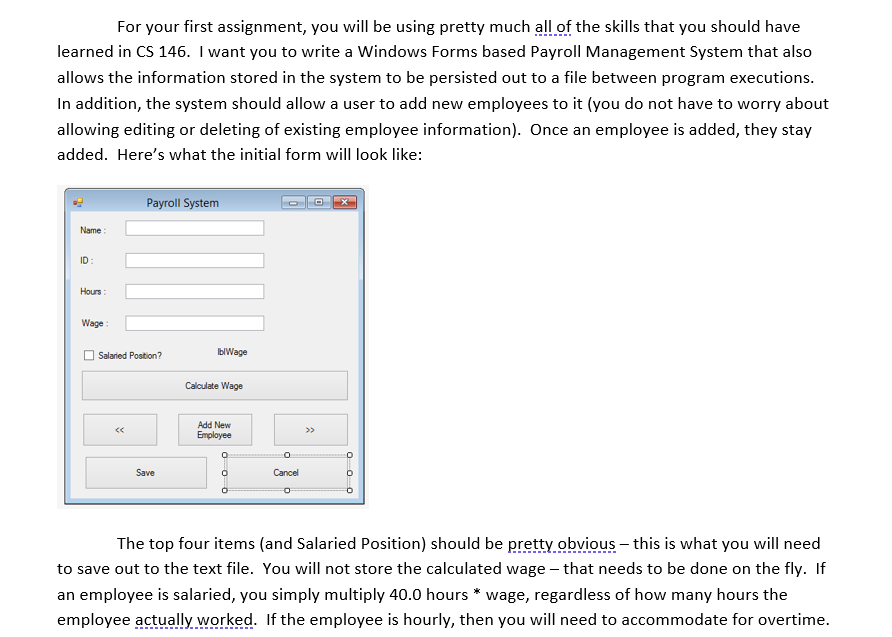
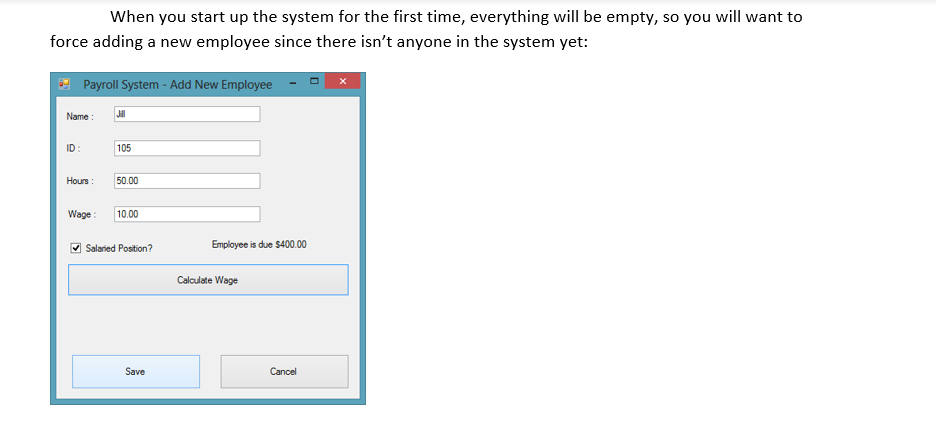
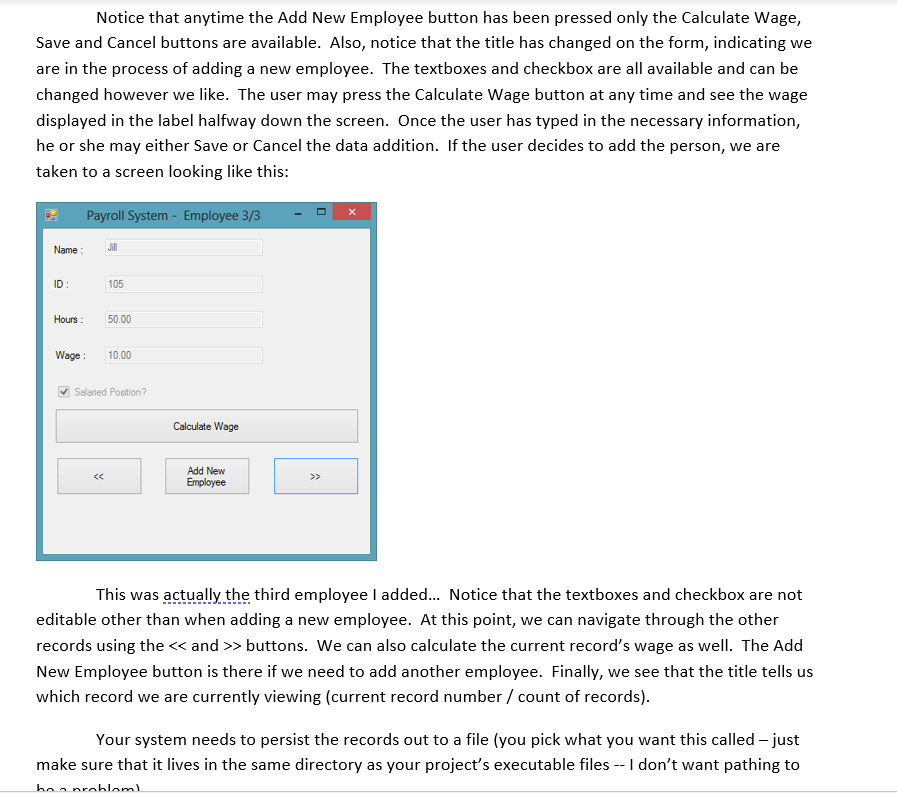
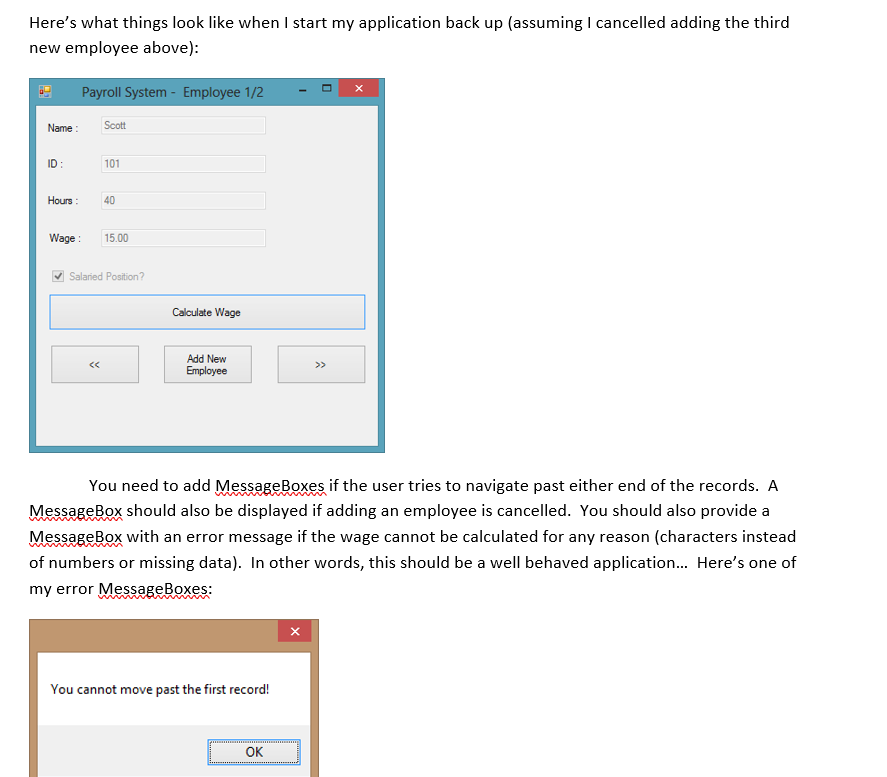
For your first assignment, you will be using pretty much all of the skills that you should have learned in CS 146. I want you to write a Windows Forms based Payroll Management System that also allows the information stored in the system to be persisted out to a file between program executions. In addition, the system should allow a user to add new employees to it (you do not have to worry about allowing editing or deleting of existing employee information). Once an employee is added, they stay added. Here's what the initial form will look like: Payroll System Name: ID: Hours: Wage: Salaried Position? b Wage Calculate Wage Add New Employee >> o o Save Cancel 0 0 0 O The top four items (and Salaried Position) should be pretty obvious - this is what you will need to save out to the text file. You will not store the calculated wage - that needs to be done on the fly. If an employee is salaried, you simply multiply 40.0 hours * wage, regardless of how many hours the employee actually worked. If the employee is hourly, then you will need to accommodate for overtime. When you start up the system for the first time, everything will be empty, so you will want to force adding a new employee since there isn't anyone in the system yet: Payroll System - Add New Employee Name: JI ID: 105 Hours: 50.00 Wage 10.00 Salaried Position? Employee is due $400.00 Calculate Wage Save Cancel Notice that anytime the Add New Employee button has been pressed only the Calculate Wage, Save and Cancel buttons are available. Also, notice that the title has changed on the form, indicating we are in the process of adding a new employee. The textboxes and checkbox are all available and can be changed however we like. The user may press the Calculate Wage button at any time and see the wage displayed in the label halfway down the screen. Once the user has typed in the necessary information, he or she may either Save or Cancel the data addition. If the user decides to add the person, we are taken to a screen looking like this: Payroll System - Employee 3/3 Name : Jill ID: 105 Hours: 50.00 Wage: 10.00 Salaried Position? Calculate Wage Add New Employee This was actually the third employee I added... Notice that the textboxes and checkbox are not editable other than when adding a new employee. At this point, we can navigate through the other records using the > buttons. We can also calculate the current record's wage as well. The Add New Employee button is there if we need to add another employee. Finally, we see that the title tells us which record we are currently viewing (current record number / count of records). Your system needs to persist the records out to a file (you pick what you want this called - just make sure that it lives in the same directory as your project's executable files -- I don't want pathing to bannrabloml Here's what things look like when I start my application back up (assuming I cancelled adding the third new employee above): Payroll System - Employee 1/2 Name: Scott ID: 101 Hours: 40 Wage : 15.00 Salaried Position? Calculate Wage
Step by Step Solution
There are 3 Steps involved in it

Get step-by-step solutions from verified subject matter experts
 Study Help