







Question: Iam facing the error student_details function is not being accpeted by interpreter please resolve my problem its urgent from tkinter import * from tkinter import
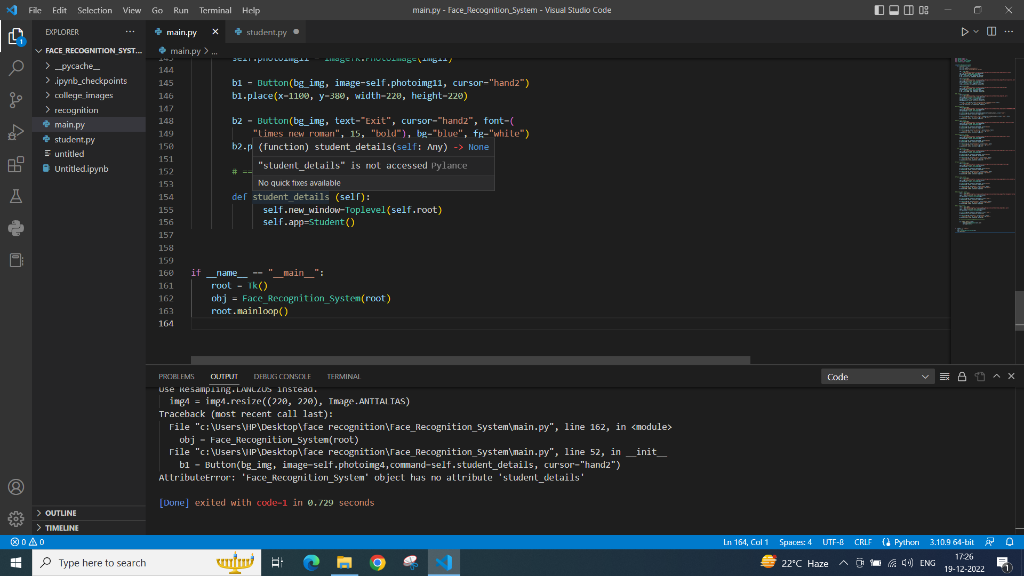
Iam facing the error student_details function is not being accpeted by interpreter please resolve my problem its urgent
from tkinter import *
from tkinter import ttk
from PIL import Image, ImageTk
from student import Student
class Face_Recognition_System:
def __init__(self, root):
self.root = root
self.root.geometry("1920x1080+0+0")
self.root.title("face Recognition system")
img = Image.open(
r"C:\Users\HP\Desktop\face recognition\Face_Recognition_System\college_images\Stanford.jpg")
img = img.resize((500, 130), Image.ANTIALIAS)
self.photoimg = ImageTk.PhotoImage(img)
f_lbl = Label(self.root, image=self.photoimg)
f_lbl.place(x=0, y=0, width=510, height=130)
img1 = Image.open(
r"C:\Users\HP\Desktop\face recognition\Face_Recognition_System\college_images\facialrecognition.png")
img1 = img1.resize((500, 130), Image.ANTIALIAS)
self.photoimg1 = ImageTk.PhotoImage(img1)
f_lbl = Label(self.root, image=self.photoimg1)
f_lbl.place(x=500, y=0, width=530, height=130)
img2 = Image.open(
r"C:\Users\HP\Desktop\face recognition\Face_Recognition_System\college_images\u.jpg")
img2 = img2.resize((500, 130), Image.ANTIALIAS)
self.photoimg2 = ImageTk.PhotoImage(img2)
f_lbl = Label(self.root, image=self.photoimg2)
f_lbl.place(x=1000, y=0, width=550, height=130)
# Bg image
img3 = Image.open(
r"C:\Users\HP\Desktop\face recognition\Face_Recognition_System\college_images\bg.jpg")
img3 = img3.resize((1530, 710), Image.ANTIALIAS)
self.photoimg3 = ImageTk.PhotoImage(img3)
bg_img = Label(self.root, image=self.photoimg3)
bg_img.place(x=0, y=130, width=1530, height=710)
title_lbl = Label(bg_img, text="FACE RECOGNITION ATTENDENCE SYSTEM", font=(
"times new roman", 35, "bold"), bg="white", fg="blue")
title_lbl.place(x=0, y=0, width=1530, height=45)
# Student Button
img4 = Image.open(
r"C:\Users\HP\Desktop\face recognition\Face_Recognition_System\college_images\iStock-182059956_18390_t12.jpg")
img4 = img4.resize((220, 220), Image.ANTIALIAS)
self.photoimg4 = ImageTk.PhotoImage(img4)
b1 = Button(bg_img, image=self.photoimg4,command=self.student_details, cursor="hand2")
b1.place(x=200, y=100, width=220, height=220)
b2 = Button(bg_img, text="Student Details",command=self.student_details, cursor="hand2", font=(
"times new roman", 15, "bold"), bg="blue", fg="white")
b2.place(x=200, y=300, width=220, height=40)
# Detect face Button
img5 = Image.open(
r"C:\Users\HP\Desktop\face recognition\Face_Recognition_System\college_images\face_detector1.jpg")
img5 = img5.resize((220, 220), Image.ANTIALIAS)
self.photoimg5 = ImageTk.PhotoImage(img5)
b1 = Button(bg_img, image=self.photoimg5, cursor="hand2")
b1.place(x=500, y=100, width=220, height=220)
b2 = Button(bg_img, text="Face Detector", cursor="hand2", font=(
"times new roman", 15, "bold"), bg="blue", fg="white")
b2.place(x=500, y=300, width=220, height=40)
# Attendence face Button
img6 = Image.open(
r"C:\Users\HP\Desktop\face recognition\Face_Recognition_System\college_images eport.jpg")
img6 = img6.resize((220, 220), Image.ANTIALIAS)
self.photoimg6 = ImageTk.PhotoImage(img6)
b1 = Button(bg_img, image=self.photoimg6, cursor="hand2")
b1.place(x=800, y=100, width=220, height=220)
b2 = Button(bg_img, text="Attendence", cursor="hand2", font=(
"times new roman", 15, "bold"), bg="blue", fg="white")
b2.place(x=800, y=300, width=220, height=40)
# Help face Button
img7 = Image.open(
r"C:\Users\HP\Desktop\face recognition\Face_Recognition_System\college_images\help-desk-customer-care-team-icon-blue-square-button-isolated-reflected-abstract-illustration-89657179.jpg")
img7 = img7.resize((220, 220), Image.ANTIALIAS)
self.photoimg7 = ImageTk.PhotoImage(img7)
b1 = Button(bg_img, image=self.photoimg7, cursor="hand2")
b1.place(x=1100, y=100, width=220, height=220)
b2 = Button(bg_img, text="Help Desk", cursor="hand2", font=(
"times new roman", 15, "bold"), bg="blue", fg="white")
b2.place(x=1100, y=300, width=220, height=40)
# Train face Button
img8 = Image.open(
r"C:\Users\HP\Desktop\face recognition\Face_Recognition_System\college_images\Train.jpg")
img8 = img8.resize((220, 220), Image.ANTIALIAS)
self.photoimg8 = ImageTk.PhotoImage(img8)
b1 = Button(bg_img, image=self.photoimg8, cursor="hand2")
b1.place(x=200, y=380, width=220, height=220)
b2 = Button(bg_img, text="Train Data", cursor="hand2", font=(
"times new roman", 15, "bold"), bg="blue", fg="white")
b2.place(x=200, y=580, width=220, height=40)
# Photos face Button
img9 = Image.open(
r"C:\Users\HP\Desktop\face recognition\Face_Recognition_System\college_images\opencv_face_reco_more_data.jpg")
img9 = img9.resize((220, 220), Image.ANTIALIAS)
self.photoimg9 = ImageTk.PhotoImage(img9)
b1 = Button(bg_img, image=self.photoimg9, cursor="hand2")
b1.place(x=500, y=380, width=220, height=220)
b2 = Button(bg_img, text="Photo", cursor="hand2", font=(
"times new roman", 15, "bold"), bg="blue", fg="white")
b2.place(x=500, y=580, width=220, height=40)
# Develper face Button
img10 = Image.open(
r"C:\Users\HP\Desktop\face recognition\Face_Recognition_System\college_images\Team-Management-Software-Development.jpg")
img10 = img10.resize((220, 220), Image.ANTIALIAS)
self.photoimg10 = ImageTk.PhotoImage(img10)
b1 = Button(bg_img, image=self.photoimg10, cursor="hand2")
b1.place(x=800, y=380, width=220, height=220)
b2 = Button(bg_img, text="Developer", cursor="hand2", font=(
"times new roman", 15, "bold"), bg="blue", fg="white")
b2.place(x=800, y=580, width=220, height=40)
# Exit face Button
img11 = Image.open(
r"C:\Users\HP\Desktop\face recognition\Face_Recognition_System\college_images\exit.jpg")
img11 = img11.resize((220, 220), Image.ANTIALIAS)
self.photoimg11 = ImageTk.PhotoImage(img11)
b1 = Button(bg_img, image=self.photoimg11, cursor="hand2")
b1.place(x=1100, y=380, width=220, height=220)
b2 = Button(bg_img, text="Exit", cursor="hand2", font=(
"times new roman", 15, "bold"), bg="blue", fg="white")
b2.place(x=1100, y=580, width=220, height=40)
# ===============Function Buttons==============
def student_details (self):
self.new_window=Toplevel(self.root)
self.app=Student()
if __name__ == "__main__":
root = Tk()
obj = Face_Recognition_System(root)
root.mainloop()
b1 - Dutton(bg_ing, image-self.photoimg11, cursor-"hand2") bl.place (x1100,y=380, width-226, height-220) b2 - Button(bg_ing, text-" Exit", cursor="hand2", font-l "Limes rew rumari", 15, "bold"), be-"blue", fa-"while") b2.p (function) student_details(self: Nny) None "sLudenl_delails" is nol accessed pylance No quik twes available der student details (self): self.new_window-Toplevel (self. noot) self. app=student() if _name__-" "nain_": ruol - Tk( ) ohj = Face_Recognition_System(root) root. mainloop() Kesampng. Loul_us instead. MPA = impA. resize ((2),20), Tmage. ANTTAI TAS ) ceback (most recent call last): obj - Face_Recognition_Systen(root) b1 - Button(bg_img, inage-self,photoing4, comnand-self.student_details, cursor-"hand2") ribuletrron: 'Face_Recogrilion_System" object has no allribule 'sludenl_delails' ] exited with code-1 ir ./29 seconds
Step by Step Solution
There are 3 Steps involved in it

Get step-by-step solutions from verified subject matter experts
 Study Help