







Question: identify the errors. 8. Private Sub btnDisplay_Click(...) Handles btnDisplay. Click 'Display the number from 1 to 5 Dim num As Integer Do while num
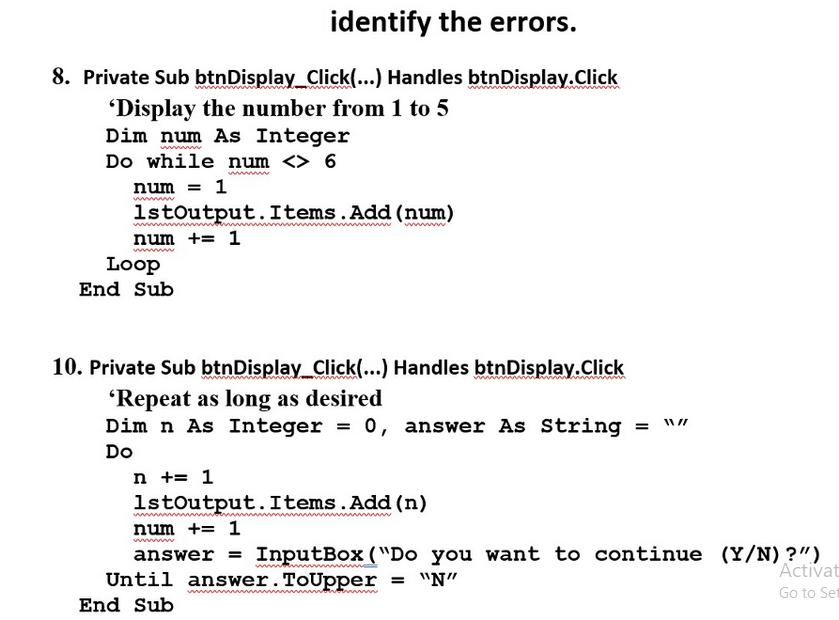
identify the errors. 8. Private Sub btnDisplay_Click(...) Handles btnDisplay. Click 'Display the number from 1 to 5 Dim num As Integer Do while num 6 num = 1 1stOutput. Items.Add(num) num += 1 wwwwww Loop End Sub wwwwwwwwwwww. 10. Private Sub btnDisplay_Click(...) Handles btnDisplay. Click 'Repeat as long as desired Dim n As Integer = 0, answer As String = 11 // Do n += 1 1stOutput. Items.Add(n) num += 1 answer = InputBox ("Do you want to continue (Y/N)?") Until answer. ToUpper = "N" wwwww End Sub Activat Go to Set
Step by Step Solution
There are 3 Steps involved in it
1 Expert Approved Answer
Step: 1 Unlock

Question Has Been Solved by an Expert!
Get step-by-step solutions from verified subject matter experts
Step: 2 Unlock
Step: 3 Unlock
 Study Help