







Question: Identify the information in the dos command. Select Command Prompt Microsoft windows [Version 10,.19844.2086 ] (c) Microsoft Corporation. All rights reserved. : Wusers19153>ipconfig Windows IP
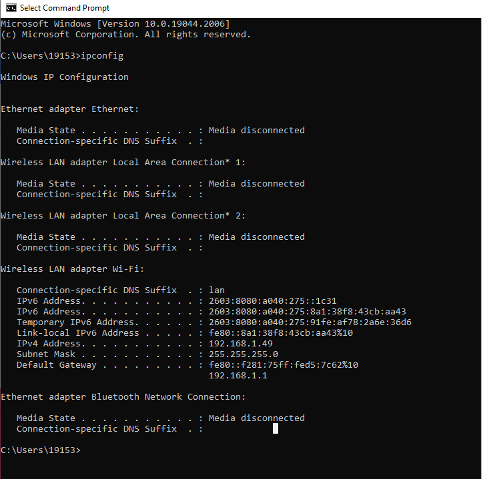 Identify the information in the dos command.
Select Command Prompt Microsoft windows [Version 10,.19844.2086 ] (c) Microsoft Corporation. All rights reserved. : Wusers\19153>ipconfig Windows IP Configuration Ethernet adapter Ethernet: Media State............. . : Media disconnected Connection-specific DN5 suffix : : Wineless LAN adapter Local Area Connection* 1 : Media State, , , , , , , , : Media disconnected Connection-specific DNS Suffix : : Nireless LAN adapter Local Area Connection* 2 ; Media state. . . . . . . . . " : Media disconnected Connection-specific DNS Suffix : : Wireless LAN adapter Wi-Fi: Connection-specific DNS Suffix . : lan IPv6 Address. . .......... . : 2663:8086:2040:275::1631 IPv6 Address, , , , , , , , , , , , , , , , , , , , , Temporary IPv6 Address. . . . . : 2603:9980: a040:275:91fe: af78:2a6e:36d6 Link-local Ipv6 Address. . . . : fe8e::8a1:38f8:43cb:aa43816 IPv4 Address, , , , , , , , , , : 192.168.1.49 Default Gateway . . . . . . " : fe8e: f281:75ff:fed5:7 662%10 192,168,1,1 Ethernet adapter Bluetooth Network Connection: Med1a state. ........... . : Media disconnected Connection-specific DNS Suffix : : c: \users\19153
Step by Step Solution
There are 3 Steps involved in it

Get step-by-step solutions from verified subject matter experts
 Study Help