







Question: If a problem requires a written response in text format, please use your own words to respond to the question. Copying exact statement from the
- If a problem requires a written response in text format, please use your own words to respond to the question. Copying exact statement from the solution manuals and turning it in as ones own statement is recognized as plagiarism.
- The default setting in Excel includes three sheets. To add additional sheets, select Insert in the menu bar and click on Worksheet. Please note there is a difference between assigning one sheet per requirement and one file per requirement. If you assign one file per requirement, a problem with five requirements must be saved five times. This is very time consuming. Make sure to assign one sheet per requirement to avoid this lengthy process.
- Use the formula function of "Excel" to compute an answer. To enter a formula into a cell, place your cursor in that cell and press the equal (=) sign on your keyboard. This sign is located on the top right segment of the keyboard. The equal sign tells the computer that you are entering a formula. You may then add (+), subtract (-), multiply (*), or divide (/) depending on the calculation that needs to be completed. For instance, if you want to add E10 to E11, enter =E10+E11. Once you hit the enter key on your keyboard, the two cells will be added. To subtract, enter =E10-E11 and press the enter key. Alternatively, you may wish to use AutoSum function (located on the toolbar) to add up a range of cells. For example, if you want to add two or more cells, place your cursor in the cell that the total needs to appear and click on the AutoSum symbol. A symbol =SUM() will appear. You may then specify the range of cells that needs to be calculated and press the enter key.If you dont use formulas for all the math functions in an excel assignment, there will be a loss of points.
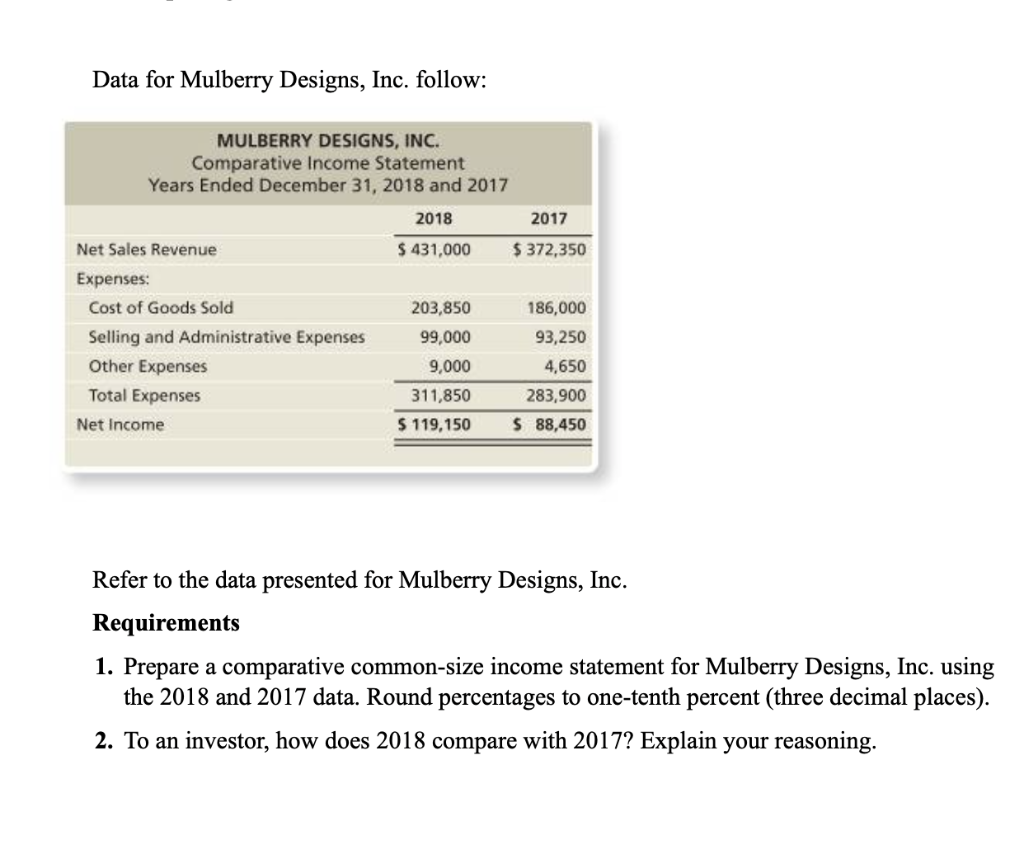
Data for Mulberry Designs, Inc. follow: MULBERRY DESIGNS, INC. Comparative Income Statement Years Ended December 31, 2018 and 2017 2018 2017 Net Sales Revenue $ 431,000 $372,350 Expenses: Cost of Goods Sold 203,850 186,000 Selling and Administrative Expenses 99,000 93,250 Other Expenses 9,000 4,650 Total Expenses 311,850 283,900 Net Income $ 119,150 $ 88,450 Refer to the data presented for Mulberry Designs, Inc. Requirements 1. Prepare a comparative common-size income statement for Mulberry Designs, Inc. using the 2018 and 2017 data. Round percentages to one-tenth percent (three decimal places). 2. To an investor, how does 2018 compare with 2017? Explain your reasoning
Step by Step Solution
There are 3 Steps involved in it

Get step-by-step solutions from verified subject matter experts
 Study Help