







Question: If you can please provide detailed code like the example that will compile like the second picture please. fintex s frede fox Jasan's second as
If you can please provide detailed code like the example that will compile like the second picture please. fintex s frede fox Jasan's second as ingment:
Fhtbr a nang for Studgnt ofla
Pronta ing ler:y tn rinntInir
Challenge Content Screenshot Example:
binler a yrala fue Jasuin"
Inter a srede fox Jasan' g kiixd as istment:
Fntbr a graig fow Sofia" e fiest asedgnmant B
linter a grade los boris"s second as ingment:JU U
Fnter a nanc fal Studant J Joscph
birl.
Wnter & frede fon Josepli second as ignnents id
ol ia Huentre: ga
Pronta ing ler:y tin nonntInir
In the book, we looked at the creation of additional classes, the instantiation of objects of that type in
our Main method, and the use of get and set accessors to modify the values of the private attributes of
our class
as well as other techniques, like constructors
In this lab, you will create your own class, demonstrating an understanding of the basic concepts we
have examined so far.
EXAMPLE PROGRAM
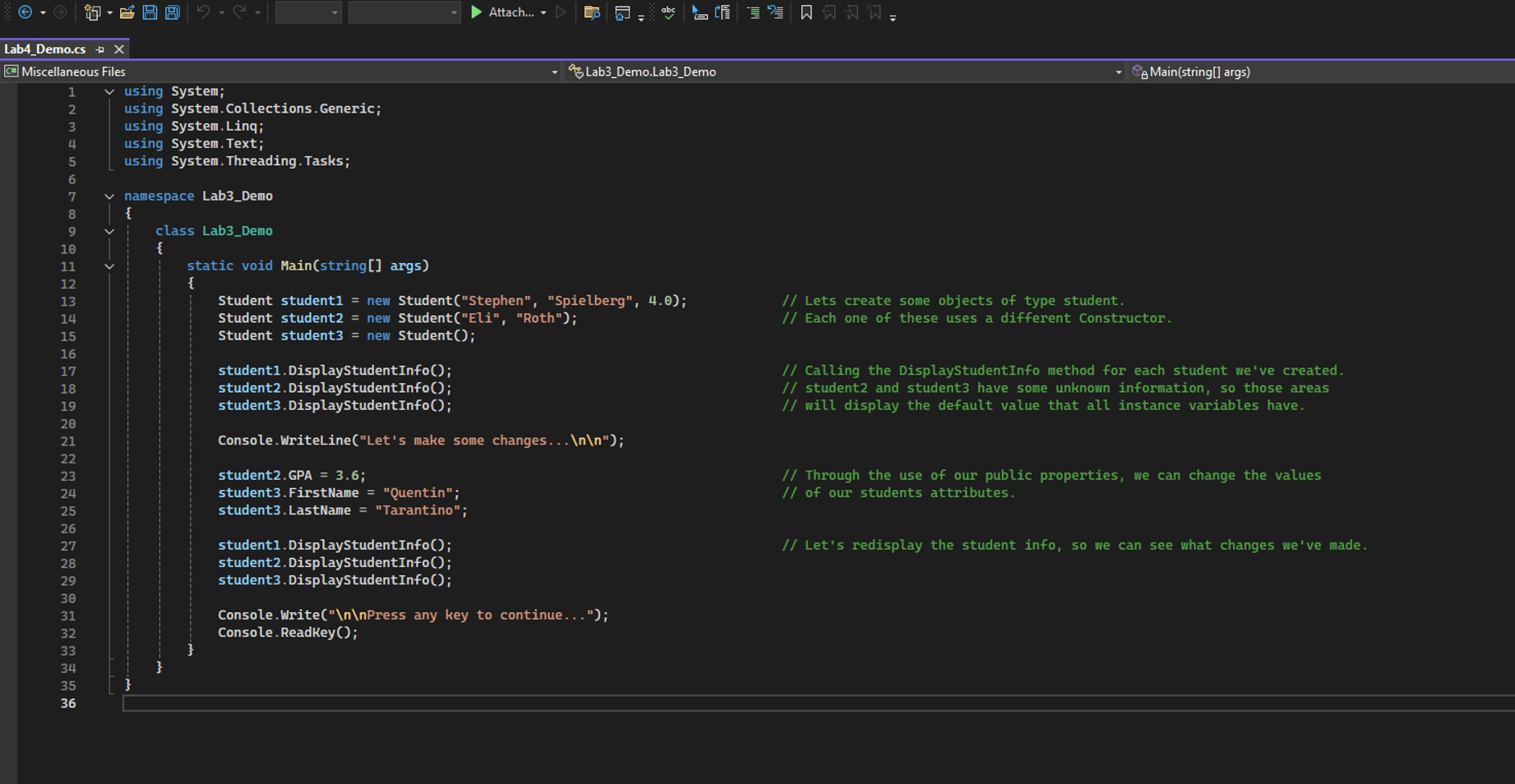
In the example program, I create a new class, Student, with a few attributes, associated properties,
constructors, and a Display method. Download the two files
Lab
Demo.cs contains the main method,
and Student.cs contains the new class
add them to a project, and take some time to make changes and
see what happens.
When you are done, move on to your own program below.
YOUR PROGRAM
For this week
s lab, modify your Lab
submission so that it ask the user to enter the names and grades
of three students
instead of one
You should design a new class to store the information of each of the
three students, complete with attributes for Names, Grades, and Averages and properties for GETting
and SETting those values, Constructors for initializing new Student objects with either no information or
their name already set, and a method for calculating and displaying the average.
When you are done, you will submit BOTH completed
cs files, for both your class and your main
method, via Blackboard.
CHALLENGE
For the challenge component this week, create two methods instead of one. One will be a public
method used for displaying the average. The other should be a private method used to calculate the
average. The public message should call the private message to calculate the average.
Additionally, you should display the final average with only two decimal points
as opposed to the many
that is the default for printing out floating point values in C#
You can achieve this by using one of the
format specifiers included at the end of the Chapter
Powerpoint slides.
G
Miscellaneous Files
using System;
using System.Collections.Generic;
using System.Linq;
using System.Text;
using System.Threading.Tasks;
namespace Lab
Demo
class Lab
Demo
static void Main
string
args
Student student
new Student
Stephen
Spielberg
;
Lets create some objects of type student.
Student student
new Student
Eli
Roth
;
Each one of these uses a different Constructor.
Student student
new Student
;
student
DisplayStudentInfo
;
student
DisplayStudentInfo
;
student
DisplayStudentInfo
;
Calling the DisplayStudentInfo method for each student we've created.
student
and student
have some unknown information, so those areas
will display the default value that all instance variables have.
Console.WriteLine
Let
s make some changes...
;
student
GPA
;
student
FirstName
Quentin;
student
LastName
Tarantino;
student
DisplayStudentInfo
;
student
DisplayStudentInfo
;
student
DisplayStudentInfo
;
Console.Write
Press any key to continue..."
;
Console.ReadKey
;
Miscellaneous Files
using System;
using System.Collections.Generic;
using System.Linq;
using System.Text;
using System.Threading.Tasks;
namespace LabDemo
class LabDemo
static void Mainstring args
Student student new StudentStephen "Spielberg", ; Lets create some objects of type student.
Student student new StudentEli "Roth"; Each one of these uses a different Constructor.
Student student new Student;
studentDisplayStudentInfo;
studentDisplayStudentInfo;
studentDisplayStudentInfo;
Calling the DisplayStudentInfo method for each student we've created.
student and student have some unknown information, so those areas
will display the default value that all instance variables have.
Console.WriteLineLets make some changes...
;
studentGPA ;
studentFirstName "Quentin";
studentLastName "Tarantino";
studentDisplayStudentInfo; Let's redisplay the student info, so we can see what changes we've made.
studentDisplayStudentInfo;
studentDisplayStudentInfo;
Console.Write
Press any key to continue...";
Console.ReadKey;
Step by Step Solution
There are 3 Steps involved in it
1 Expert Approved Answer
Step: 1 Unlock

Question Has Been Solved by an Expert!
Get step-by-step solutions from verified subject matter experts
Step: 2 Unlock
Step: 3 Unlock
 Study Help