







Question: If you format a cell as the image below, what will show in the cell when you type 109.4812? Format Cells Number Alignment Font
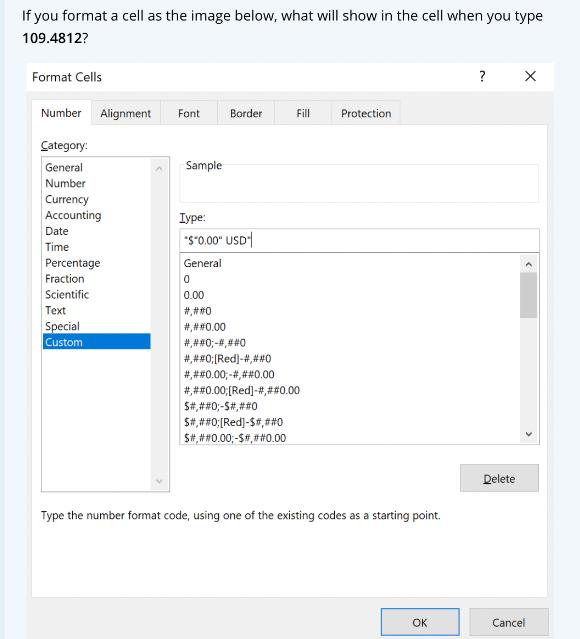
If you format a cell as the image below, what will show in the cell when you type 109.4812? Format Cells Number Alignment Font Category: General Number Currency Accounting Date Time Percentage Fraction Scientific Text Special Custom Sample Border Type: *$"0.00" USD General 0 0.00 #,##0 #,##0.00 #,##0;-#,##0 Fill #,##0;[Red]-#,##0 #,##0.00,-#,##0.00 #,##0.00; [Red] -#,##0.00 S#,##0;-S#,##0 $#,##0;[Red]-$#,##0 $#,##0.00; -$#,##0.00 Protection Type the number format code, using one of the existing codes as a starting point. OK ? Delete X Cancel
Step by Step Solution
There are 3 Steps involved in it
If you format the cell as shown in the image below ... View full answer

Get step-by-step solutions from verified subject matter experts
 Study Help