







Question: ***If you know how to do it all please to do it via Jupyter Notebook*** Your goal is to go to the website http://quotes.toscrape.com/ and
***If you know how to do it all please to do it via Jupyter Notebook***
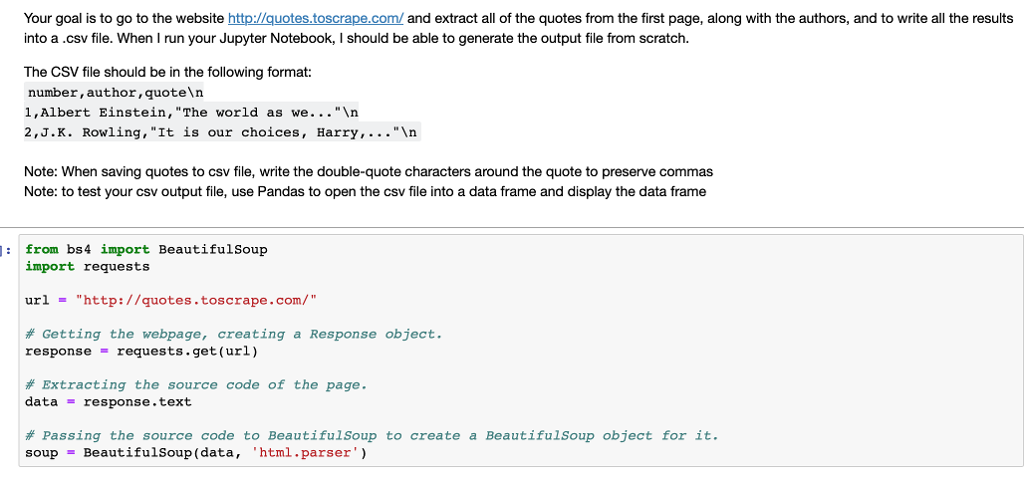
Your goal is to go to the website http://quotes.toscrape.com/ and extract all of the quotes from the first page, along with the authors, and to write all the results into a .csv file. When I run your Jupyter Notebook, I should be able to generate the output file from scratch. The CSV file should be in the following format: number, author,quoteln 1,Albert Einstein, "The world as we.."n 2,J.K. Rowling, "It is our choices, Harry,..."In Note: When saving quotes to csv file, write the double-quote characters around the quote to preserve commas Note: to test your csv output file, use Pandas to open the csv file into a data frame and display the data frame from bs4 import BeautifulSoup import requests url "http://quotes.toscrape.com/" # Getting the webpage, creating a Response object. response requests.get (url) # Extracting the source code of the page. data - response.text # Passing the source code to BeautifulSoup to create a BeautifulSoup object for it. soup.. BeautifulSoup (data, 'html.parser')
Step by Step Solution
There are 3 Steps involved in it

Get step-by-step solutions from verified subject matter experts
 Study Help