







Question: -------------------------------------- #ifndef LAB5_H_INCLUDED #define LAB5_H_INCLUDED #include #include typedef struct chk{ std::string name; int acountNo; float minimum_banlance; float over_limit_charge; float balance; void initialize(std::string name); void display();
--------------------------------------
#ifndef LAB5_H_INCLUDED
#define LAB5_H_INCLUDED
#include
#include
typedef struct chk{
std::string name;
int acountNo;
float minimum_banlance;
float over_limit_charge;
float balance;
void initialize(std::string name);
void display();
void deposit(float m);
void withdraw(float m);
}chk;
#endif // LAB5_H_INCLUDED
-----------------------------------------------------
/*
* Lab5.cpp
*
* NAME:
* STUDENT No:
*/
#include "Lab6_1.h"
#include
#include
using namespace std;
void chk::initialize(string n){
/*
This function is for initializing structure member variables.
Please set the variables to:
minimum balance 1000;
under limit fine 5
balance initialized to 0;
assign user name from the argument n
assign a random integer to account No
*/
name = n;
acountNo = rand()%1000 + 1; //Random integer from 1 to 1000
balance = 0.0;
minimum_banlance = 1000;
over_limit_charge = 5.0;
}
void chk::display(){
/*
this function is for printing the content of the structure, using the following format
User: John Jone
Acount number: 50024077
Balance: 2999
*/
cout
cout
cout
}
void chk::deposit(float m){
/*
This function adds the m to the account balance
*/
balance = balance + m;
}
void chk::withdraw(float m){
/*
This function withdraw amount of money of m
First please check if the balance is sufficient for this time withdraw, if not, print a message such as "There is not sufficent balance to withdraw!", and then exit the function (using return).
Then check if the balance is already lower than the limitation, if yes, withdraw the amount of money m and apply the over limit charge, otherwise just withdraw.
*/
if(balance
{
cout
return;
}
else
{
if( (balance
{
//Withdrawing amount
balance = balance - m;
//Applying charges
balance = (balance) - (over_limit_charge);
}
else
{
//Withdrawing amount
balance = balance - m;
}
}
}
----------------------------------------------------
#include "Lab6_1.h"
#include
#include
#include
using namespace std;
int main(){
// create an acount
chk chk1;
int menu;
float m;
chk1.initialize("John Jone");
/*
// input and select the menu, with the menu items as follows.
Please select a function (0-3):
0---exit
1---display balance
2---deposit
3---withdraw
using while loop keep receive menu input till encouting a 0.
*/
while(1){
// build the menu
cout
cout
cout
cout
cout
cin >> menu;
switch (menu){
case 0:return 0;
case 1:
//display the balance
//here call display function
chk1.display();
break;
case 2:
//deposit
cout
cin >> m;
//here call deposit function
chk1.deposit(m);
break;
case 3:
//withdraw
cout
cin >> m;
//here call withdraw function
chk1.withdraw(m);
break;
}
}
return 0;
}
--------------------------------------------------
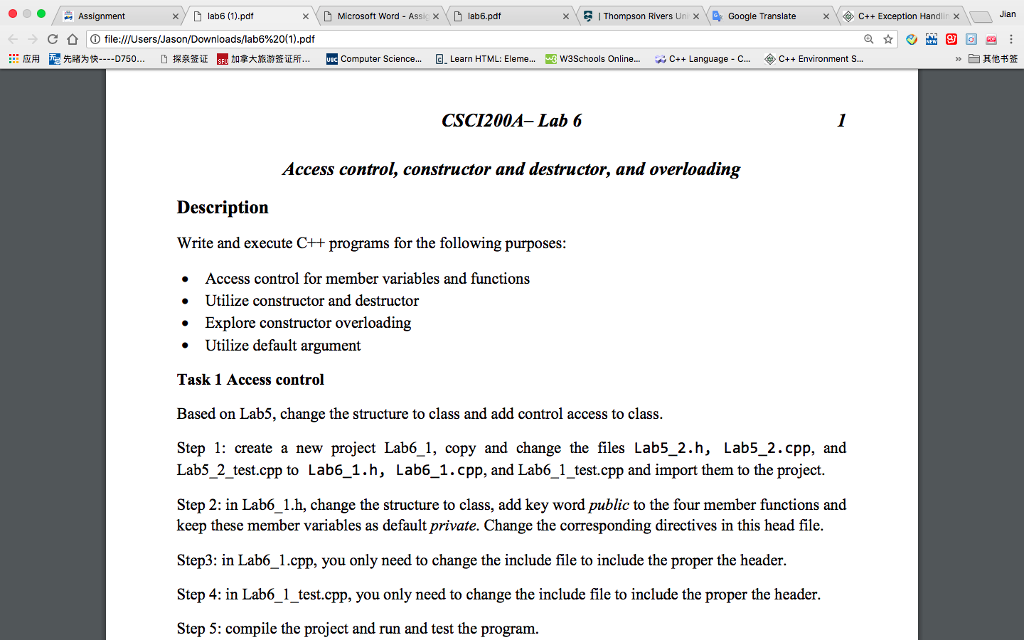
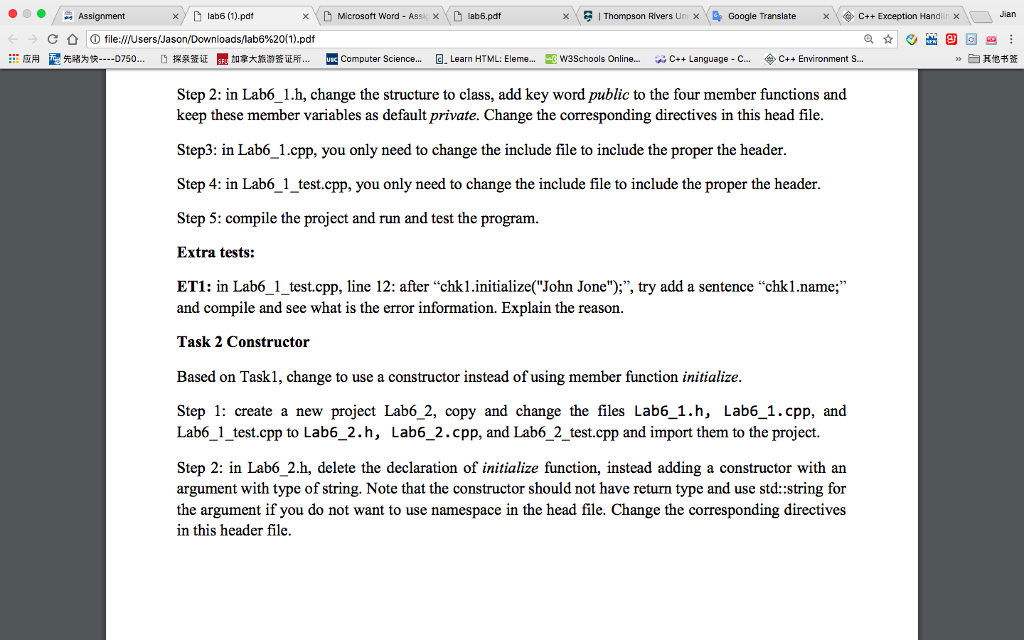
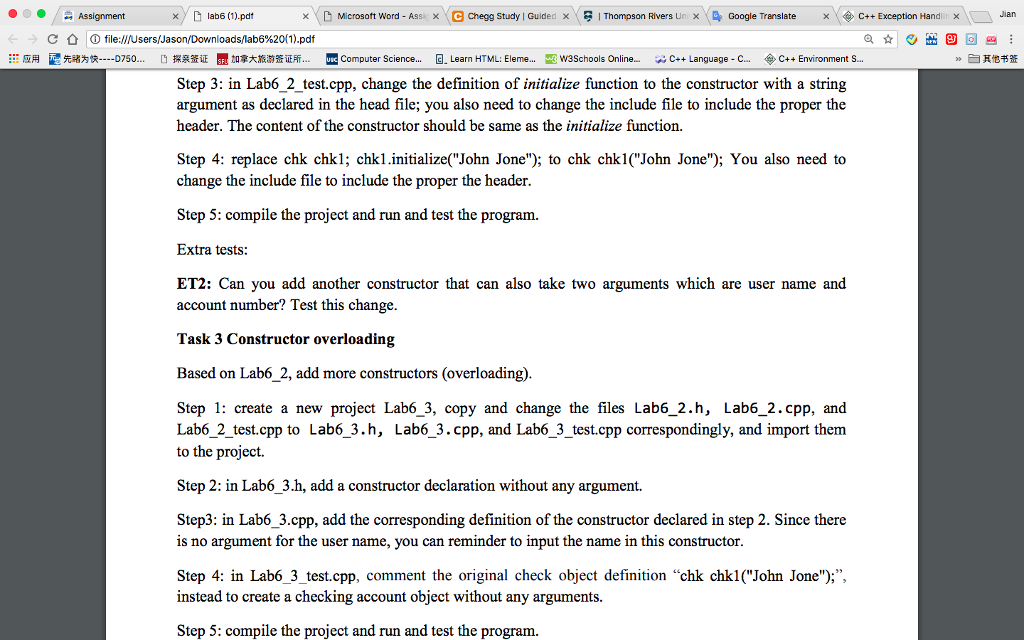
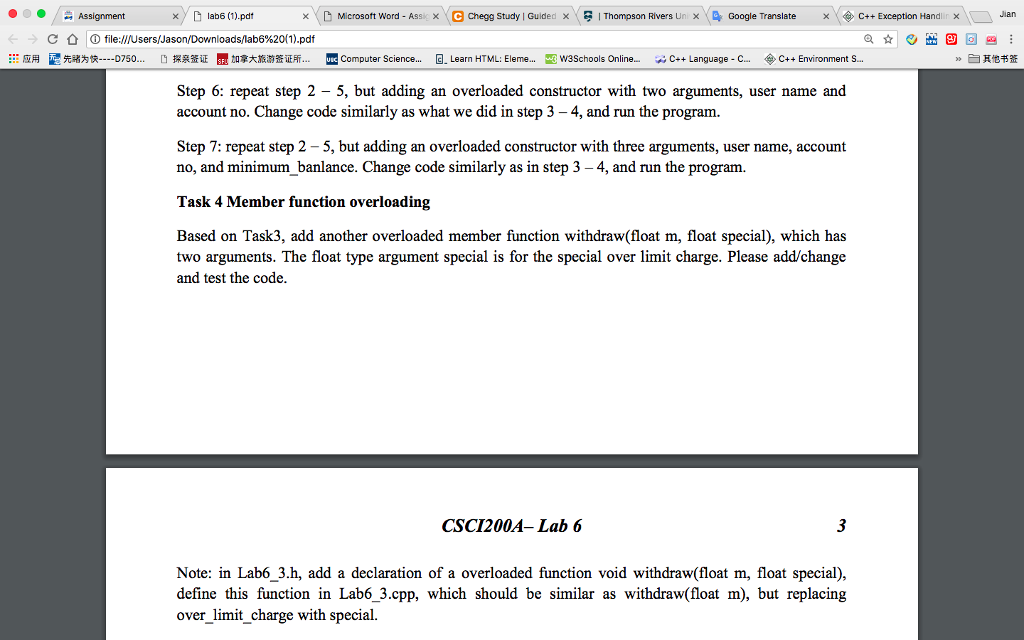
we have 3 tasks.
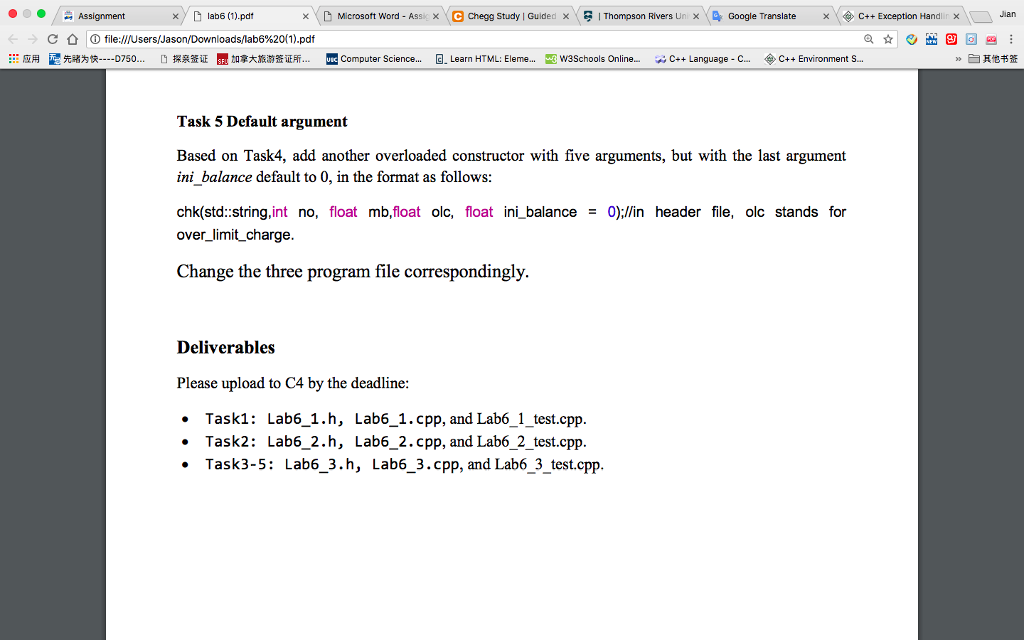
xlab6 (1).pdt D Microsoft Word-Ass) \ D lab6.pdt ? Thompson Rivers Lin X., Google Translate x\ ? C++ Exception Hand x/L) Jian x ? (D file:///Users/Jason/Downloads/lab6%20(1).pdf ::?? ???? -- 0750 ????? ?????????.. Computer Science G Learn HTML: Eleme...-3 waschools Online.. w C++ Language-C- C++ Environment S . ]???? >> CSCI200A-Lab 6 Access control, constructor and destructor, and overloading Description Write and execute C++ programs for the following purposes Access control for member variables and functions Utilize constructor and destructor . Explore constructor overloading Utilize default argument Task 1 Access control Based on Lab5, change the structure to class and add control access to class Step 1: create a new project Lab6 1, copy and change the files Lab5_2.h, Lab5_2.cpp, and Lab5 2 test.cpp to Lab6_1.h, Lab6_1.cpp, and Lab6 1 test.cpp and import them to the project. Step 2: in Lab6_1.h, change the structure to class, add key word public to the four member functions and keep these member variables as default private. Change the corresponding directives in this head file. Step3: in Lab6 1.cpp, you only need to change the include file to include the proper the header. Step 4: in Lab6_1 test.cpp, you only need to change the include file to include the proper the header Step 5: compile the project and run and test the program
Step by Step Solution
There are 3 Steps involved in it
To correctly handle Task 1 access control for your C program follow these detailed steps Task 1 Acce... View full answer

Get step-by-step solutions from verified subject matter experts
 Study Help