







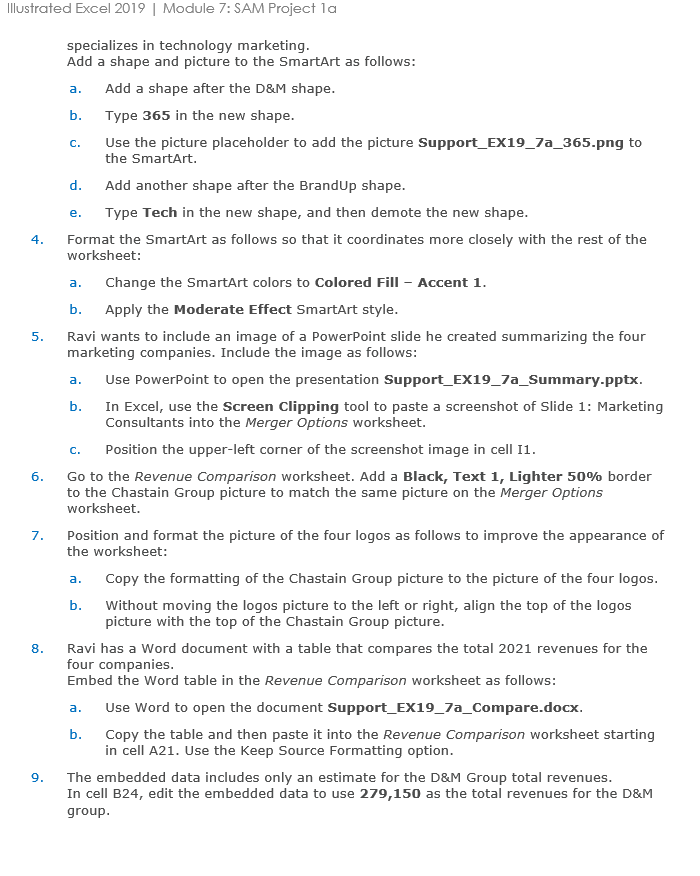
Question: Illustrated Excel 2 0 1 9 | Module 7 : SAM Project 1 a specializes in technology marketing. Add a shape and picture to the
Illustrated Excel Module : SAM Project a
specializes in technology marketing.
Add a shape and picture to the SmartArt as follows:
a Add a shape after the D&M shape.
b Type in the new shape.
c Use the picture placeholder to add the picture SupportEXapng to the SmartArt.
d Add another shape after the BrandUp shape.
e Type Tech in the new shape, and then demote the new shape.
Format the SmartArt as follows so that it coordinates more closely with the rest of the worksheet:
a Change the SmartArt colors to Colored Fill Accent
b Apply the Moderate Effect SmartArt style.
Ravi wants to include an image of a PowerPoint slide he created summarizing the four marketing companies. Include the image as follows:
a Use PowerPoint to open the presentation SupportEXaSummary.pptx
b In Excel, use the Screen Clipping tool to paste a screenshot of Slide : Marketing Consultants into the Merger Options worksheet.
c Position the upperleft corner of the screenshot image in cell I
Go to the Revenue Comparison worksheet. Add a Black, Text Lighter border to the Chastain Group picture to match the same picture on the Merger Options worksheet.
Position and format the picture of the four logos as follows to improve the appearance of the worksheet:
a Copy the formatting of the Chastain Group picture to the picture of the four logos
b Without moving the logos picture to the left or right, align the top of the logos picture with the top of the Chastain Group picture.
Ravi has a Word document with a table that compares the total revenues for the four companies.
Embed the Word table in the Revenue Comparison worksheet as follows:
a Use Word to open the document SupportEXaCompare.docx.
b Copy the table and then paste it into the Revenue Comparison worksheet starting in cell A Use the Keep Source Formatting option.
The embedded data includes only an estimate for the D&M Group total revenues. In cell B edit the embedded data to use as the total revenues for the D&M group.
Step by Step Solution
There are 3 Steps involved in it
1 Expert Approved Answer
Step: 1 Unlock

Question Has Been Solved by an Expert!
Get step-by-step solutions from verified subject matter experts
Step: 2 Unlock
Step: 3 Unlock
 Study Help