







Question: Im fairly new to java and I feel that has a lot to do with my issue but how do I get correctly input a
Im fairly new to java and I feel that has a lot to do with my issue but how do I get correctly input a file for the scanner to parse. I keep getting an index out of bounds error.
Source Code:
/** * Drives code. * @param args [0] Path to input file * [1] Path to output file */ public static void main(String[] args) { try { if (args.length > 0) { File f = new File("C:\\Users\\14049\\Documents\\Concept of Programming\\lex\\src\\welcome.scl" + args[0]); Scanner s = new Scanner(f); String source = " "; while (s.hasNext()) { source += s.nextLine() + " "; } Lexer l = new Lexer(source); l.printTokens(args[1]); s.close(); } } catch(FileNotFoundException e) { error(-1, -1, "Exception: " + e.getMessage()); } catch (IOException e) { e.printStackTrace(); } } }
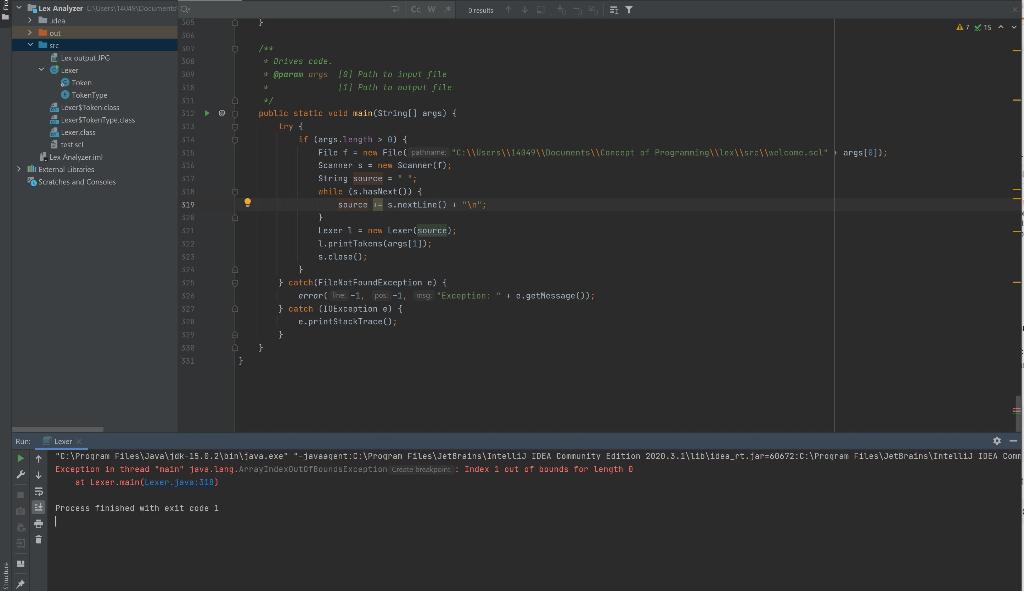
Lex Analyzer users can > Badea a com Dresults } 15 A Oui 101 ST EI ** LEKOULUUPC ker Token Toker Tyue cers taken clos meSTokalypeus eker class Boss Les reyer > Extemal ibraries Scrutches and Consores STA 51 1 31" 33 1 Sparan wystal Path to input le 117 Path to put file wy publice statie vuld main(String args) { Lry if Carys.ungth > 0) File f = new Filci patane, X14449x40acunentement of Programming (Loxwelcan args[]): SC S = new Scannerin: String source = ** while (shas ext3 sourco - s.nextLincoln } } exer1 Lexer (source); LorintakonsCargs[1]); s.class); } } catch (FilekotFoundException e) crror re-1, -1, my 'Exception: 0.gstMessage(): } catch (IOExcation e) { e.printStackTrace(); } } 523 521 52: E A } 332 Ruc: Leer + "C:\Program Filesijavaltak 25.6.2\oin tava.exe -javeegent:C:Progran Filesijeterains IntelliJ IDEA Connunity Edition 2020.3.11bidea_rt. Tar=60672:C:\Program Files\JetBrains Intellij IDEA Con Exception in thread nain Teve. Lang. ArrayIndexOutorgoundException create broke : Index 1 out of bounds for Length D et Lexertainlexel:18) Process finished with exit code 1
Step by Step Solution
There are 3 Steps involved in it

Get step-by-step solutions from verified subject matter experts
 Study Help