







Question: I'm having an error with the following program.. the error is shown at the bottom Write a Python program that will read in a filename
I'm having an error with the following program.. the error is shown at the bottom
Write a Python program that will read in a filename from the user. The file will contain one number on each line. Your program will compute the frequency (as a percentage of the whole) of the first digit of each number. Then it will use the turtle module to draw a horizontal bar chart. You must show the digit, and the frequency as text on the right-hand side of the bar.
This is the code:
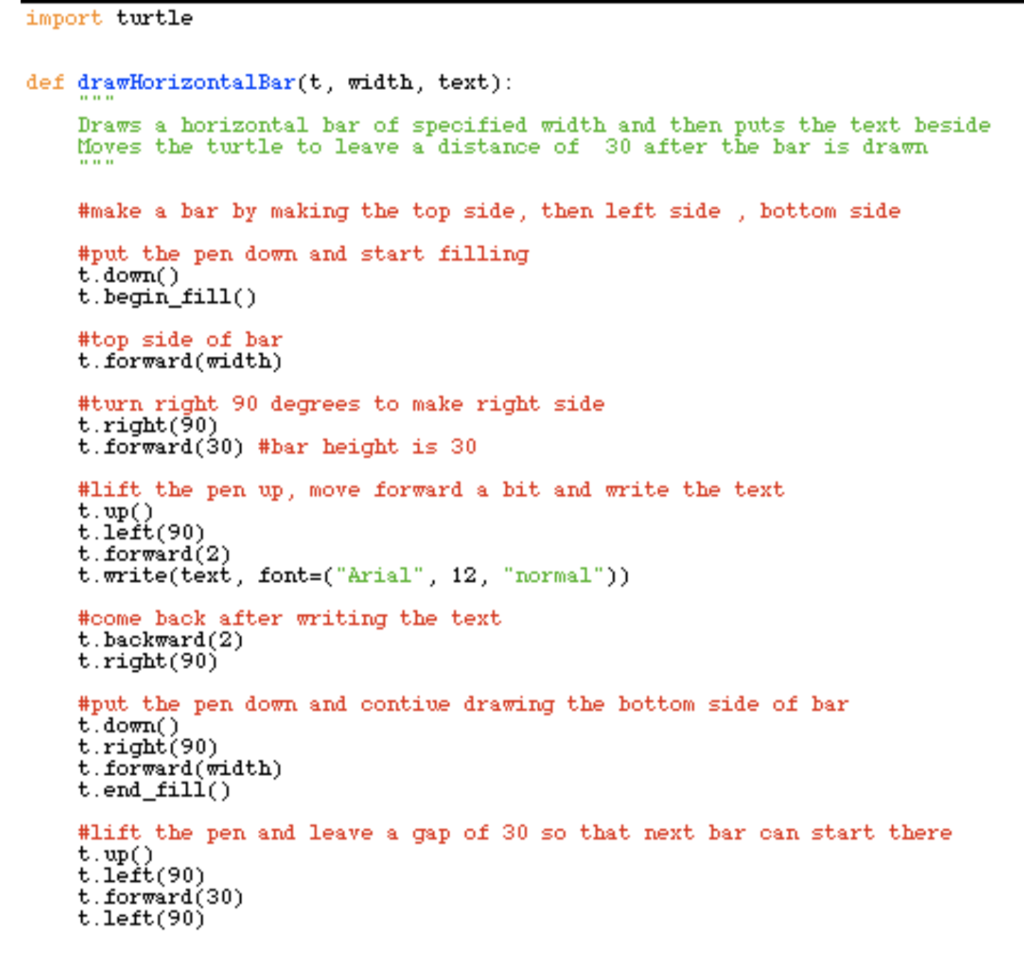
def drawHorizontalBar(t, width, text): """ Draws a horizontal bar of specified width and then puts the text beside Moves the turtle to leave a distance of 30 after the bar is drawn """
#make a bar by making the top side, then left side , bottom side
#put the pen down and start filling t.down() t.begin_fill()
#top side of bar t.forward(width)
#turn right 90 degrees to make right side t.right(90) t.forward(30) #bar height is 30
#lift the pen up, move forward a bit and write the text t.up() t.left(90) t.forward(2) t.write(text, font=("Arial", 12, "normal"))
#come back after writing the text t.backward(2) t.right(90)
#put the pen down and contiue drawing the bottom side of bar t.down() t.right(90) t.forward(width) t.end_fill()
#lift the pen and leave a gap of 30 so that next bar can start there t.up() t.left(90) t.forward(30) t.left(90)
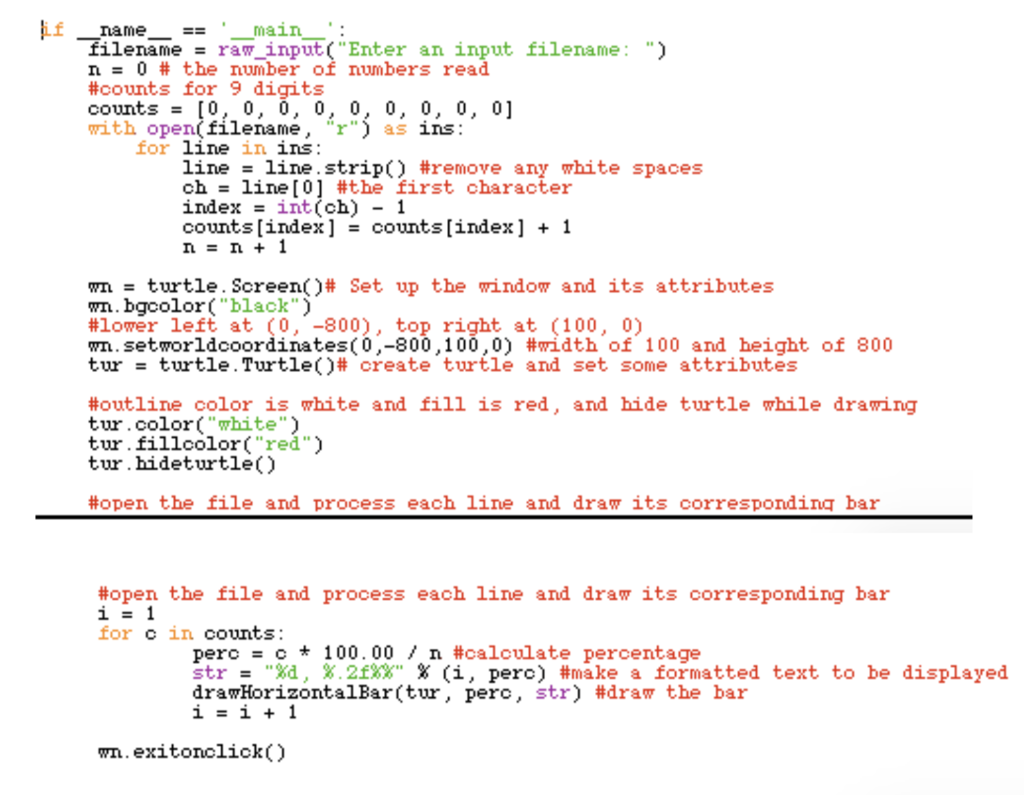
if __name__ == '__main__': filename = raw_input("Enter an input filename: ") n = 0 # the number of numbers read #counts for 9 digits counts = [0, 0, 0, 0, 0, 0, 0, 0, 0] with open(filename, "r") as ins: for line in ins: line = line.strip() #remove any white spaces ch = line[0] #the first character index = int(ch) - 1 counts[index] = counts[index] + 1 n = n + 1 wn = turtle.Screen()# Set up the window and its attributes wn.bgcolor("black") #lower left at (0, -800), top right at (100, 0) wn.setworldcoordinates(0,-800,100,0) #width of 100 and height of 800 tur = turtle.Turtle()# create turtle and set some attributes
#outline color is white and fill is red, and hide turtle while drawing tur.color("white") tur.fillcolor("red") tur.hideturtle()
#open the file and process each line and draw its corresponding bar i = 1 for c in counts: perc = c * 100.00 / n #calculate percentage str = "%d, %.2f%%" % (i, perc) #make a formatted text to be displayed drawHorizontalBar(tur, perc, str) #draw the bar i = i + 1
wn.exitonclick()
However for the text file that I have, I get an error saying:
index = int(num) - 1
ValueError: invalid literal for int() with base 10: ''
import turtle def drawHorizontalBar(t, width, text: Draws a horizontal bar of specified width and then puts the text beside Moves the turtle to leave a distance of 30 after the bar is drawn #make a bar by making the top side, then left side , bottom side #put the pen down and start filling t.down) t .begin fill() #top side of bar t.forward(width) #turn right 90 degrees to make right side t.right(90) t, forward(30) #bar height is 30 #lift the pen up, move forward a bit and write the text t.up) t.left(90) t.forward(2) t.write(text, font=("Aria1", 12, .. normal..)) #come back after writing the text t.backward(2) t.right(90) #put the pen down and contiue drawing the bottom side of bar t.down) t.right90) t.forward(width) t.end_fill() #lift the pen and leave a gap of 30 so that next bar can start there t.up) t.left(90) t.forward (30) t.left(90)
Step by Step Solution
There are 3 Steps involved in it

Get step-by-step solutions from verified subject matter experts
 Study Help