







Question: I'm having difficulty adjusting this debugging program to output EXACTLY to the screenshot. Any help would be appreciated. using System; using static System.Console; using System.IO;
I'm having difficulty adjusting this debugging program to output EXACTLY to the screenshot. Any help would be appreciated.
using System; using static System.Console; using System.IO;
namespace Program { class Program { static void Main() { string directory = ""; string path; string[] files; const string END = "end";
Write("Enter a directory >> "); directory = ReadLine(); while (directory != END) { if (Directory.Exists(directory)) { files = Directory.GetFiles(directory); if (files.Length == 0) WriteLine("{0} directory is empty.", directory); else { for (int x = 0; x > "); directory = ReadLine(); path = directory; } } else { WriteLine("Directory " + directory + " does not exist"); } } } } }
The results should look EXACTLY like the screenshot:
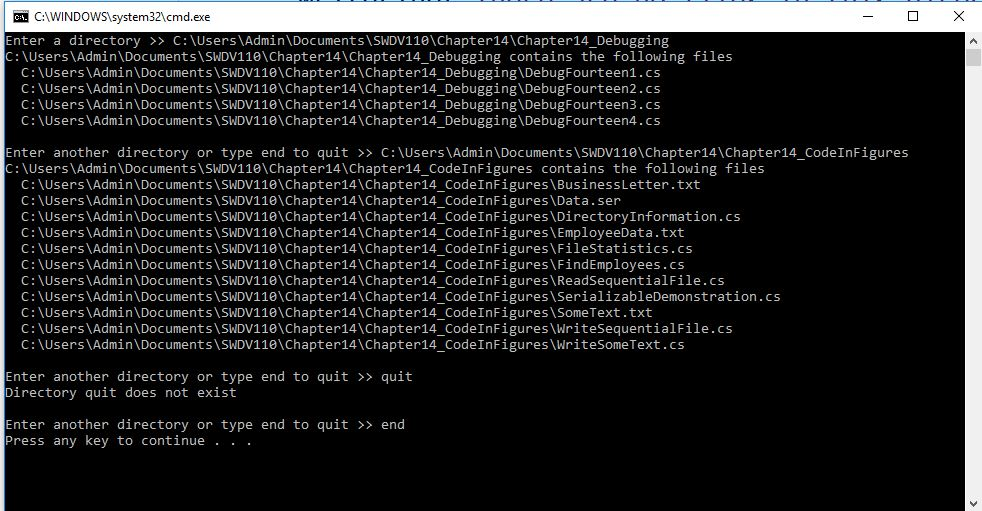
C:AWINDOWS system32\cmd.exe Enter a directory CUsers\Admin\Documents SWDV110\Chapter14\Chapter14_Debugging C: \Users Admin\Documents \SWDV11e\Chapter14\Chapter14_Debugging contains the following files C:\Users\Admin\Documents\SWDV110\Chapter14\Chapter14_Debugging\DebugFourteen1.cs C:\Users\Admin\Documents\SWDV110\Chapter14\Chapter14_Debugging\DebugFourteen2.cs C: \Users\Admin\Documents\SWDV110\Chapter14\Chapter14. Debugging\DebugFourteen3cs C:\Users\Admin\Documents\SWDV110\Chapter14\Chapter14_Debugging\DebugFourteen4.cs Enter another directory or type end to quit >> C:\Users\Admin\Documents\SWDV110\Chapter14\Chapter14. Code1nFigures C: \Users Admin\Documents \SWDV11e\Chapter14\Chapter14_CodeInFigures contains the following files C:\Users\Admin\Documents\SWDV110\Chapter14\Chapter14_CodeInFigures\BusinessLetter.txt C: \Users Admin\Documents\SWDV110\Chapter14\Chapter14_CodeInFigures \Data.ser C: \Users\Admin\Documents\SWDV110\Chapter14\Chapter14-Code1nFigures\DirectoryInformation. cs C:\Users\Admin\Documents\SWDV110\Chapter14\Chapter14_CodeInFigures\EmployeeData.txt C:\Users\Admin\Documents\SWDV110\Chapter14\Chapter14_CodeInFigures\FileStatistics.cs C:\Users\Admin\Documents\SWDV110\Chapter14\Chapter14_CodeInFigures\FindEmployees.cs C: \Users\Admin\Documents\SWDV110\Chapter14\Chapter14-CodelnFigures\ReadSequent ial File. cs C:\Users\Admin\Documents\SWDV110\Chapter14\Chapter14_CodeInFigures\SerializableDemonstration.cs C: \Users\Admin\Documents\SWDV110\Chapter14\Chapter14-Code1nFigures\SomeText . txt C: \Users\Admin\Documents\SWDV110\Chapter14\Chapter14-CodelnFiguresWriteSequentialFile.cs C:\Users\Admin\Documents\SWDV110\Chapter14\Chapter14_CodeInFigures\WriteSomeText.cs Enter another directory or type end to quit > quit Directory quit does not exist end Enter another directory or type end to quit Press any key to continue
Step by Step Solution
There are 3 Steps involved in it

Get step-by-step solutions from verified subject matter experts
 Study Help