







Question: I'm having some difficulties trying to this project for c++. need help please Project 2 The purpose of this project is to comprehensively bring together
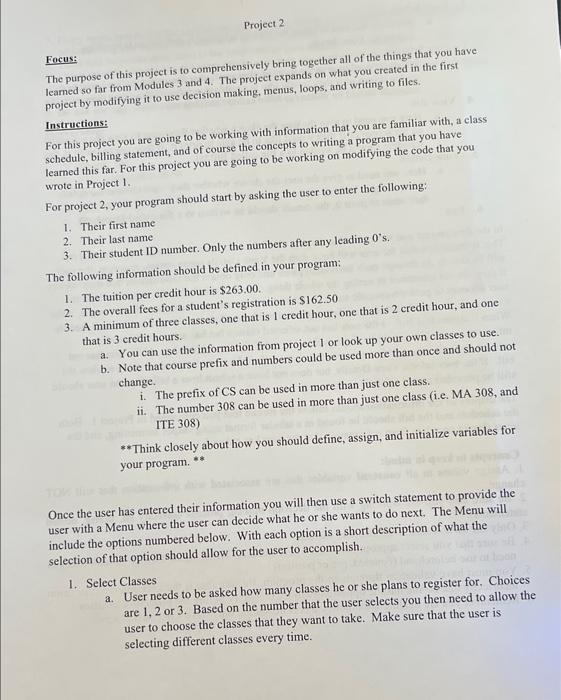
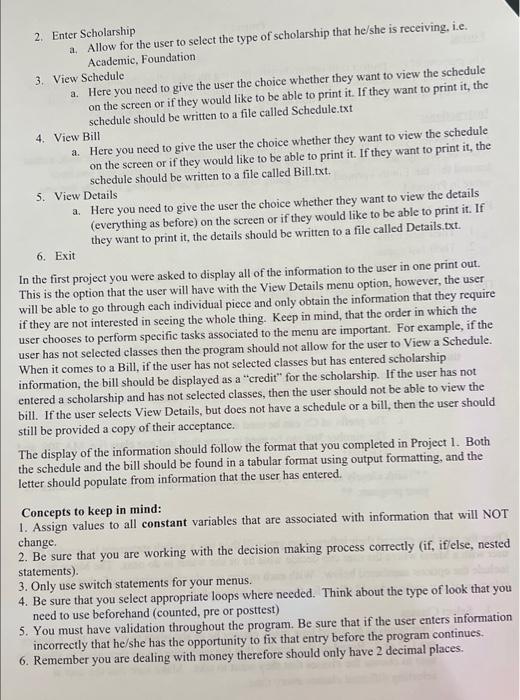
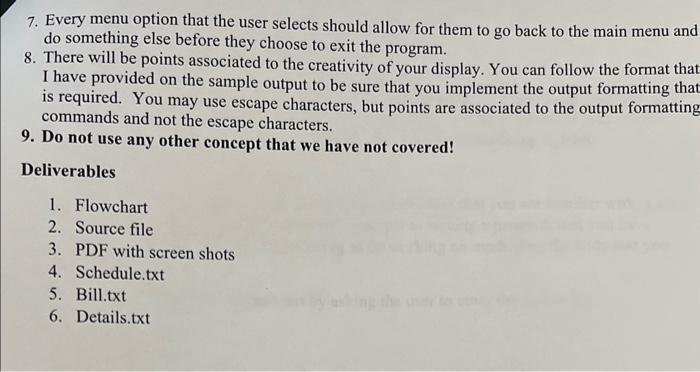
Project 2 The purpose of this project is to comprehensively bring together all of the things that you have Facus: leamed so far from Modules 3 and 4 . The project expands on what you created in the first project by modifying it to use decision making, menus, loops, and writing to files. For this project you are going to be working with information that you are familiar with, a class Instructions: Fchedule, billing statement, and of course the concepts to writing a program that you have learned this far. For this project you are going to be working on modifying the code that you wrote in Project 1. For project 2, your program should start by asking the user to enter the following: 1. Their first name 3. Their student ID number. Only the numbers after any leading 0 's. 2. Their last name The following information should be defined in your program: 1. The tuition per credit hour is $263.00. 2. The overall fees for a student's registration is $162.50 3. A minimum of three classes, one that is 1 credit hour, one that is 2 credit hour, and one a. You can use the information from project 1 or look up your own classes to use. that is 3 credit hours. b. Note that course prefix and numbers could be used more than once and should not i. The prefix of CS can be used in more than just one class. change. ii. The number 308 ean be used in more than just one class (i.e. MA 308 , and ITE 308) * Think closely about how you should define, assign, and initialize variables for your program. Once the user has entered their information you will then use a switch statement to provide the user with a Menu where the user can decide what he or she wants to do next. The Menu will include the options numbered below. With each option is a short description of what the selection of that option should allow for the user to accomplish. a. User needs to be asked how many classes he or she plans to register for. Choices 1. Select Classes are 1, 2 or 3 . Based on the number that the user selects you then need to allow the user to choose the classes that they want to take. Make sure that the user is selecting different classes every time. a. Allow for the user to select the type of scholarship that he/she is receiving, i.e. 2. Enter Scholarship Academic, Foundation a. Here you need to give the user the choice whether they want to view the schedule 3. View Schedule on the screen or if they would like to be able to print it. If they want to print it, the schedule should be written to a file called Schedule.txt a. Here you need to give the user the choice whether they want to view the schedule 4. View Bill on the screen or if they would like to be able to print it. If they want to print it, the schedule should be written to a file called Bill.txt. a. Here you need to give the user the choice whether they want to view the details 5. View Details (everything as before) on the screen or if they would like to be able to print it. If they want to print it, the details should be written to a file called Details, txt. 6. Exit In the first project you were asked to display all of the information to the user in one print out. This is the option that the user will have with the View Details menu option, however, the user will be able to go through each individual piece and only obtain the information that they require if they are not interested in seeing the whole thing. Keep in mind, that the order in which the user chooses to perform specific tasks associated to the menu are important. For example, if the user has not selected classes then the program should not allow for the user to View a Schedule. When it comes to a Bill, if the user has not selected classes but has entered scholarship information, the bill should be displayed as a "eredit" for the scholarship. If the user has not entered a scholarship and has not selected classes, then the user should not be able to view the bill. If the user selects View Details, but does not have a schedule or a bill, then the user should still be provided a copy of their acceptance. The display of the information should follow the format that you completed in Project 1. Both the schedule and the bill should be found in a tabular format using output formatting, and the letter should populate from information that the user has entered. Concepts to keep in mind: 1. Assign values to all constant variables that are associated with information that will NOT 2. Be sure that you are working with the decision making process correctly (if, if/else, nested change. statements). 3. Only use switch statements for your menus. 4. Be sure that you select appropriate loops where needed. Think about the type of look that you need to use beforehand (counted, pre or posttest) 5. You must have validation throughout the program. Be sure that if the user enters information incorrectly that he/she has the opportunity to fix that entry before the program continues. 6. Remember you are dealing with money therefore should only have 2 decimal places. 7. Every menu option that the user selects should allow for them to go back to the main menu and do something else before they choose to exit the program. 8. There will be points associated to the creativity of your display. You can follow the format that I have provided on the sample output to be sure that you implement the output formatting tha is required. You may use escape characters, but points are associated to the output formatting commands and not the escape characters. 9. Do not use any other concept that we have not covered! Deliverables 1. Flowchart 2. Source file 3. PDF with screen shots 4. Schedule.txt 5. Bill.txt 6. Details.txt
Step by Step Solution
There are 3 Steps involved in it

Get step-by-step solutions from verified subject matter experts
 Study Help