







Question: I'm having some trouble setting this up can someone help? 1 / 2 65% + IST 190 BASH Scripting Lab Assignment Step 1 - Securea
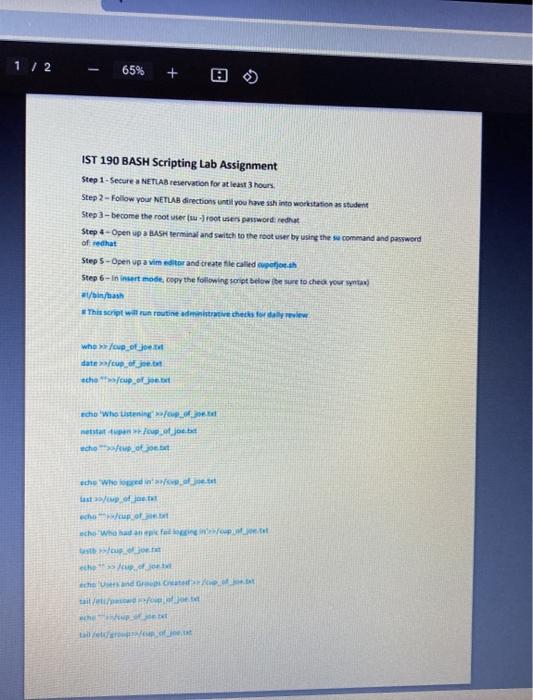
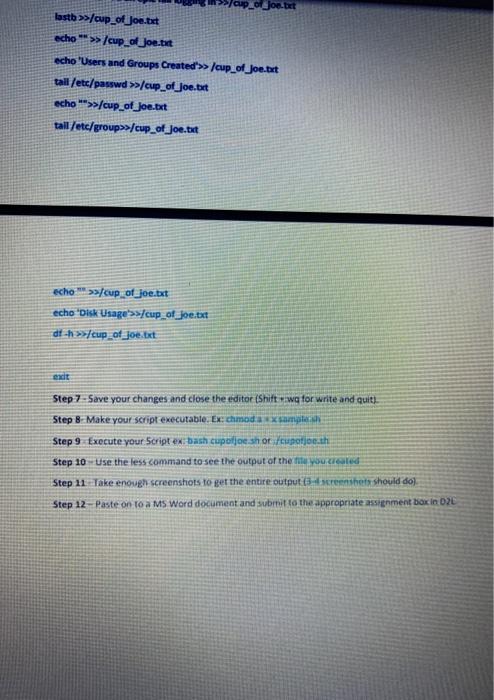
1 / 2 65% + IST 190 BASH Scripting Lab Assignment Step 1 - Securea NETLAB reservation for at least 3 hours Step 2 - Follow your NETLAB directions until you have ssh into workstation student Step 3 - become the root ser su - root users password redhat Step - Open up a la terminal and switch to the root use by using these command and password of that Step 5 - Open up a vim editor and create file called potjosh Step 6- in insert modt, copy the following soript below the sure to check your stay #t/bin/bash This script will run routine aderative check for whole date cup of jou. echo soup cho 'who used mestaj echo echo 'Where in apo jo och up or sche Who anco ht he . che sand taito hep talot Podjoe bet lastb >>/cup_of_jon.tet echo ** >/cup_of_Joe.txt echo 'Users and Groups Created >> cup_of_joe.but tall/etc/passwd >>/cup_of_joe.but echo **>>/cup_of_Joe.but tall/etc/group/cup_of_Joe.txt echos/cup of_joe.txt echo 'Disk Usage'>>]cup of Joe.txt df.h>/up_of_joe.txt Step 7-Save your changes and close the editor (Shift wg for write and quit) Step 8 Make your script executable. Ex: chmodaxx sunglas Step 9 Execute your Script ex bash cupoloe shor/upotosh Step 10 Use the less command to see the output of the mounted Step 11 Take enough screenshots to get the entire output screenshe should do Step 12 Paste on to a MS Word document and submit to the appropriate assignment box in DL 1 / 2 65% + IST 190 BASH Scripting Lab Assignment Step 1 - Securea NETLAB reservation for at least 3 hours Step 2 - Follow your NETLAB directions until you have ssh into workstation student Step 3 - become the root ser su - root users password redhat Step - Open up a la terminal and switch to the root use by using these command and password of that Step 5 - Open up a vim editor and create file called potjosh Step 6- in insert modt, copy the following soript below the sure to check your stay #t/bin/bash This script will run routine aderative check for whole date cup of jou. echo soup cho 'who used mestaj echo echo 'Where in apo jo och up or sche Who anco ht he . che sand taito hep talot Podjoe bet lastb >>/cup_of_jon.tet echo ** >/cup_of_Joe.txt echo 'Users and Groups Created >> cup_of_joe.but tall/etc/passwd >>/cup_of_joe.but echo **>>/cup_of_Joe.but tall/etc/group/cup_of_Joe.txt echos/cup of_joe.txt echo 'Disk Usage'>>]cup of Joe.txt df.h>/up_of_joe.txt Step 7-Save your changes and close the editor (Shift wg for write and quit) Step 8 Make your script executable. Ex: chmodaxx sunglas Step 9 Execute your Script ex bash cupoloe shor/upotosh Step 10 Use the less command to see the output of the mounted Step 11 Take enough screenshots to get the entire output screenshe should do Step 12 Paste on to a MS Word document and submit to the appropriate assignment box in DL
Step by Step Solution
There are 3 Steps involved in it

Get step-by-step solutions from verified subject matter experts
 Study Help