



Question: I'm having trouble figuring out how to add an adjacency matrix file to a graph. I'm using the scanner and hasNextLine to go through the
I'm having trouble figuring out how to add an adjacency matrix file to a graph. I'm using the scanner and hasNextLine to go through the file, but cant figure out how to add the nodes and edges to my graph. Any help would be huge.
Here is an example of a file that I'm taking input from:
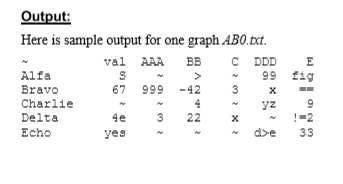
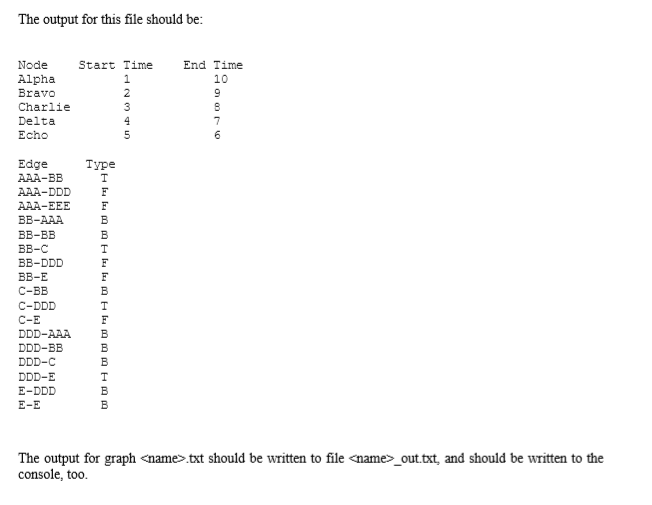
Graph class:
public class Graph { ArrayList nodeList; ArrayList edgeList; public Graph() { nodeList = new ArrayList(); edgeList = new ArrayList(); } public ArrayList getNodeList() { return nodeList; } public ArrayList getEdgeList() { return edgeList; } public void addNode(Node n) { nodeList.add(n); } public void addEdge(Edge e) { edgeList.add(e); } public String toString() { String s = "Graph g. "; if (nodeList.size() > 0) { for (Node n : nodeList) { // Print node info String t = " Node " + n.getName() + ", abbrev " + n.getAbbrev() + ", value " + n.getVal() + " "; s = s.concat(t); } s = s.concat(" "); } return s; } } Here is the class that I want to add the matrix from.
public class DelivB { File inputFile; File outputFile; PrintWriter output; Graph g; public DelivB(File in, Graph gr) { inputFile = in; g = gr; // Get output file name. String inputFileName = inputFile.toString(); String baseFileName = inputFileName.substring(0, inputFileName.length() - 4); // Strip off ".txt" String outputFileName = baseFileName.concat("_out.txt"); outputFile = new File(outputFileName); if (outputFile.exists()) { // For retests outputFile.delete(); } try { output = new PrintWriter(outputFile); } catch (Exception x) { System.err.format("Exception: %s%n", x); System.exit(0); } System.out.println("DelivB: To be implemented"); // --------------------------------Deliverable B // -------------------------------------------// try { Scanner scanner = new Scanner(new File(inputFileName)); while (scanner.hasNextLine()) { System.out.println(scanner.nextLine()); } scanner.close(); } catch (FileNotFoundException e) { e.printStackTrace(); } } } Output: Here is sample output for one graph ABO.tct. val AAA BB CDDD E Alfa s S 99 fig Bravo 67 999 -42 3 x Charlie 4 yz 9 Delta 4e 3 22 Echo yes 33 U? ? x 2 2 3 The output for this file should be: Node Start Time Alpha 1 Bravo 2 Charlie 3 Delta Echo 5 End Time 10 9 8 7 6 Type Edge AAA-BB AAA-DDD AAA-EEE BB-AAA BB-BB BB-C BB-DDD BB-E C-BB C-DDD C-E DDD-AAA DDD-BB DDD-C DDD-E E-DDD E-E F B B F F B F B B B B B The output for graph
Step by Step Solution
There are 3 Steps involved in it

Get step-by-step solutions from verified subject matter experts