







Question: I'm having trouble getting my arduino code to work. I know there are probably a few mistakes, but the requirements are: pushbutton 1 has to
I'm having trouble getting my arduino code to work. I know there are probably a few mistakes, but the requirements are: pushbutton 1 has to have the LED turn on and blink 8 times then turn off. Push button 2, when pushed and held, turns the LED on and keeps it on until the button is released.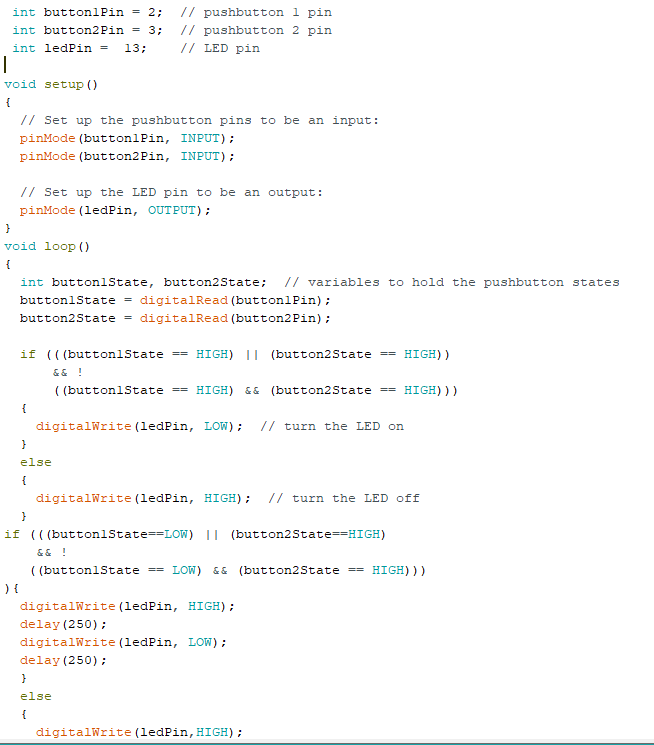
Please help me get the code to work.
int buttonlPin-2: // pushbutton 1 pin int button2Pin-3; // pushbutton 2 pin int ledPin= 13; // LED pn void setup () // Set up the pushbutton pins to be an input: pinMode (buttonlPin, INPUT): pinMode (button2Pin, INPUT): // Set up the LED pin to be an output: pinMode (ledPin, OUTPUT) void loop () int buttonlState, button2State: I/ variables to hold the pushbutton states buttonlStatedigitalRead (buttonlPin) button2StatedigitalRead (button2Pin) if (((buttonlStateHIGH) I (button2State HIGH)) (buttonlState -HIGH) &&(button2State HIGH)) digitalWrite (ledPin, LOW): // turn the LED on else digitalWrite (ledPin, HIGH) // turn the LED off if (((buttonlState LOW) I (button2State HIGH) (buttonlState LOW)&& (button2StateHIGH))) digitalNrite (ledPin, delay (250); digitalNrite (ledPin, delay (250); HIGH): LOW): else digitalNrite (ledPin, HIGH)
Step by Step Solution
There are 3 Steps involved in it

Get step-by-step solutions from verified subject matter experts
 Study Help