





Question: I'm lost on this XML problem. Please help. Code and picture below. XML problem ////////////////////////////////////////////////////////////////////////////////// //Election.xsl/// Minnesota Congressional Election Results Minnesota Congressional Election Results District

I'm lost on this XML problem. Please help. Code and picture below. XML problem
I'm lost on this XML problem. Please help. Code

//////////////////////////////////////////////////////////////////////////////////

//Election.xsl///

Minnesota Congressional Election Results

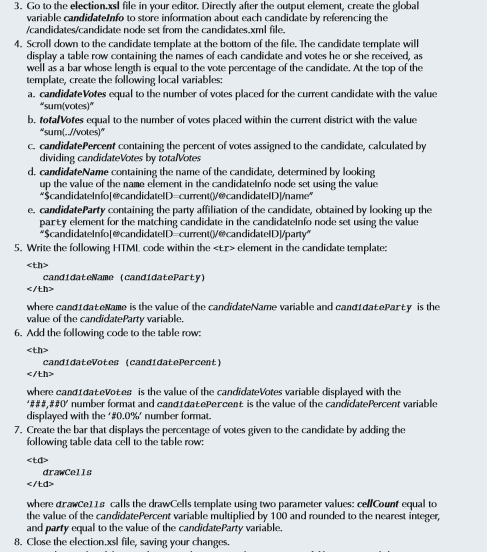
3. Go to the election.xsl file in your editor. Directly after the output element, create the global variable candidatelnfo to store ation about each candidate by referencing the /candidates candidate node set from the candidates.xml file. 4. Scroll down to the candidate template at the bottom of the file. The candidate template will display a table row containing the names of each candidate and votes he or she received, as well as a bar whose length is equal to the vote percentage of the candidate. AL the top of the template, create the following local variables: a. candidate Votes equal to the number of votes placed for the current candidate with the value Sum(votes) b. totalVotes equal to the number of votes placed within the current district with the value "sum(- Notes)" candidatePercent containing the percent of votes assigned to the candidate, calculated by dividing candidate Votes by totalVotes d. candidateName containing the name of the candidate, determined by looking up the value of the name element in the candidatelnio node set using the value ScandidatelnfolecandidatelD-ourrent0VescandidatelDlame" e. candidate Party containing the party affiliation of the candidate, obtained by looking up the party element for the matching candidate in the candidatelnfo node set using the value wscandidatelnfolescandidatelD current0ecandidatelDVparty" 5. Write the following HTML code within the tr element in the candidate template: candidateName (candidate Party) where candidateName is the value of the candidateName variable and candidateparty is the value of the candidateParty variable. 6. Add the following code to the table row: candidate votes (candidatePercent) where candidatevotes is the value of the candidateVotes variable displayed with the 'ia 20' number format and candidate Percent is the value of the candidate Percent variable displayed with the 'a0.0%' number format. 7. Create the bar that displays the percentage of votes given to the candidate by adding the following table data cell to the table row: drawCells where drawcells calls the drawCells template using two parameter values: cellCount equal to the value of the candidatePercent variable multiplied by 100 and rounded to the nearest integer, and party equal to the value of the candidateParty variable. 8. Close the election.xsl file, saving your changes

Step by Step Solution

There are 3 Steps involved in it

1 Expert Approved Answer
Step: 1 Unlock blur-text-image

Question Has Been Solved by an Expert!

Get step-by-step solutions from verified subject matter experts

Step: 2 Unlock
Step: 3 Unlock

Students Have Also Explored These Related Databases Questions!