







Question: I'm trying to read a text file in Python and I receive this error, the file is saved in the same directory as the current
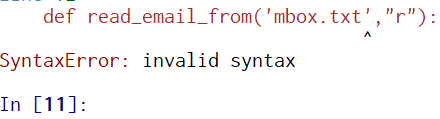
I'm trying to read a text file in Python and I receive this error, the file is saved in the same directory as the current python file. How can I resolve this error?
import smtplib
import time
import imaplib
import email
# -------------------------------------------------
#
# Utility to read email from Using Python
#
# ------------------------------------------------
def read_email_from('mbox.txt',"r"):
try:
mail = imaplib.IMAP4_SSL(SMTP_SERVER)
mail.login(FROM_EMAIL,FROM_PWD)
mail.select('inbox')
type, data = mail.search(None, 'ALL')
mail_ids = data[0]
id_list = mail_ids.split()
first_email_id = int(id_list[0])
latest_email_id = int(id_list[-1])
for i in range(latest_email_id,first_email_id, -1):
typ, data = mail.fetch(i, '(RFC822)' )
for response_part in data:
if isinstance(response_part, tuple):
msg = email.message_from_string(response_part[1])
email_subject = msg['subject']
email_from = msg['from']
print 'From : ' + email_from + ' '
print 'Subject : ' + email_subject + ' '
except Exception, e:
print str(e)
def read_email_from( mbox.txt',"r"): SyntaxError: invalid syntax In [11]
Step by Step Solution
There are 3 Steps involved in it

Get step-by-step solutions from verified subject matter experts
 Study Help