







Question: Im using C# to create a basic note taking app but It has some errors. My code: using System; using System.Collections.Generic; using System.ComponentModel; using System.Data;
Im using C# to create a basic note taking app but It has some errors.
My code:
using System; using System.Collections.Generic; using System.ComponentModel; using System.Data; using System.Drawing; using System.Linq; using System.Text; using System.Threading.Tasks; using System.Windows.Forms;
namespace NoteApp1 { public partial class Form1 : Form { DataTable table = new DataTable(); public Form1() { InitializeComponent(); } private void dataGridView1_CellContentClick(object sender, DataGridViewCellEventArgs e) { table.Columns.Add("Title", typeof(String)); table.Columns.Add("Message", typeof(String)); dataGridView1.DataSource = table; } private void bttNew_Click(object sender, EventArgs e) { txtTitle.Clear(); txtMessage.Clear(); }
private void bbtSave_Click(object sender, EventArgs e) { table.Rows.Add(txtTitle.Text,txtMessage.Text); txtTitle.Clear(); txtMessage.Clear(); }
private void bttRead_Click(object sender, EventArgs e) { int Index = dataGridView1.CurrentCell.RowIndex; if (Index > -1) { txtTitle.Text = table.Rows[Index].ItemArray[0].ToString(); txtTitle.Text = table.Rows[Index].ItemArray[1].ToString(); } }
private void bttDelete_Click(object sender, EventArgs e) { int Index = dataGridView1.CurrentCell.RowIndex; table.Rows[Index].Delete(); }
} }
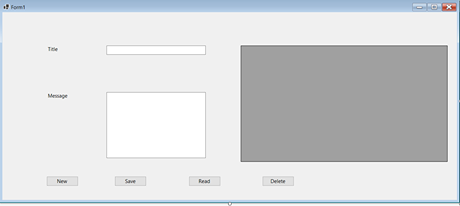
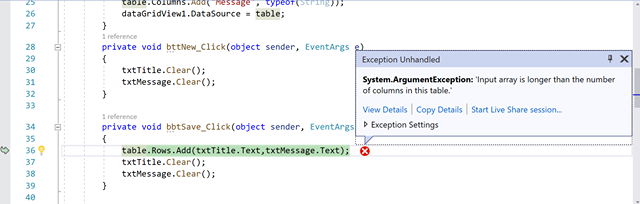
Error:
How can I solve this? Thank you very much!!!
Tole 26 27 28 29 30 31 32 33 table.Columns.Add( Message typeof dataGridView1.Datasource = table; } 1 reference private void bttNew_Click(object sender, EventArgs e) { Exception Unhandled txtTitle.clear(); txtMessage.Clear(); System.ArgumentException: 'Input array is longer than the number of columns in this table. View Details Copy Details Start Live Share session... 1 reference private void bbtSave_Click(object sender, EventArgs Exception Settings { table.Rows.Add(txtTitle.Text, txt Message.Text); % txtTitle.Clear(); txtMessage.Clear(); } 34 35 36 37 38 39 40
Step by Step Solution
There are 3 Steps involved in it

Get step-by-step solutions from verified subject matter experts
 Study Help