







Question: I'm using LADsim to programme the elevator, so please summit answer in ladder format kind regards FIGURE 3 shows the graphic simulation of the Elevator
I'm using LADsim to programme the elevator, so please summit answer in ladder format
kind regards
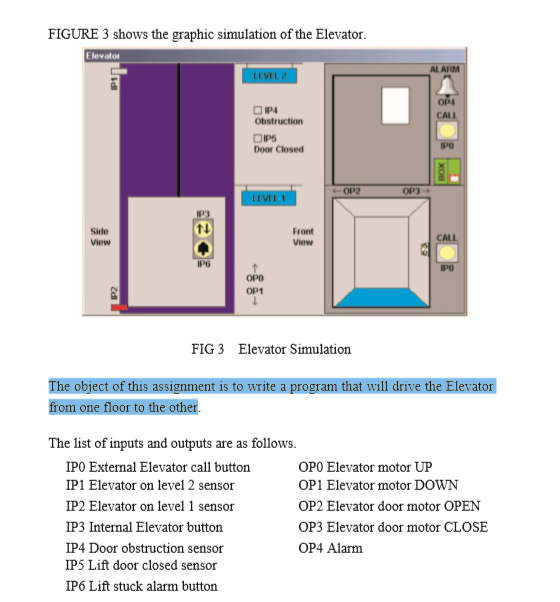
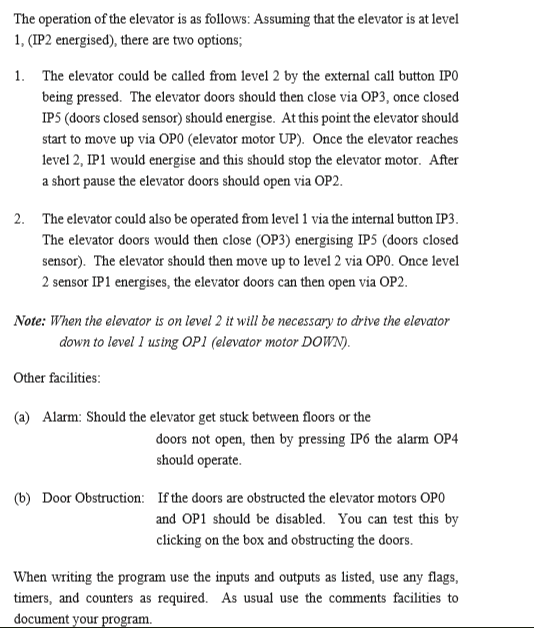
FIGURE 3 shows the graphic simulation of the Elevator ARM obstruction Door Closed Side View Front View IP6 OPD OP1 FIG 3 Elevator Simulation from one floor to the other. The list of inputs and outputs are as follows IPO External Elevator cal1 button IP1 Elevator on level 2 sensor IP2 Elevator on level 1 sensor IP3 Internal Elevator button IP4 Door obstruction sensor IP5 Lift door closed sensor IP6 Lift stuck alarm button OPO Elevator motor UP OP1 Elevator motor DOWN OP2 Elevator door motor OPEN OP3 Elevator door motor CLOSE OP4 Alarm The operation of the elevator is as follows: Assuming that the elevator is at level 1 IP2 energised), there are two options 1. The elevator could be called from level 2 by the external call button IPO being pressed. The elevator doors should then close via OP3, once closed IP5 (doors closed sensor) should energise. At this point the elevator should start to move up via OPO (elevator motor UP). Once the elevator reaches level 2, IP1 would energise and this should stop the elevator motor. After a short pause the elevator doors should open via 2. The elevator could also be operated from level 1 via the internal button IP3 The elevator doors would then close (OP3) energising IP5 (doors closed sensor). The elevator should then move up to level 2 via OPO. Once level 2 sensor IP1 energises, the elevator doors can then open via OP2 Note: When the elevator is on level 2 tl be necessary to drive the elevator down to level 1 using OPl (elevator motor DOWv). Other facilities: (a) Alarm: Should the elevator get stuck between floors or the doors not open, then by pressing IP6 the alarm OP4 should operate. b) Door Obstruction: If the doors are obstructed the elevator motors OPO and OP1 should be disabled. You can test this by clicking on the box and obstructing the doors When writing the program use the inputs and outputs as listed, use any flags, timers, and counters as required. As usual use the comments facilities to document your program
Step by Step Solution
There are 3 Steps involved in it

Get step-by-step solutions from verified subject matter experts
 Study Help