







Question: I'm using visual studio community edition to run this code, I'm receving 6 errors that I cannot figure out how to fix. What changes do
I'm using visual studio community edition to run this code, I'm receving 6 errors that I cannot figure out how to fix.
What changes do I need to make to fix it?
Here is the code I'm using:
main.cpp
#include "InventoryItem.h" #include "CashRegister.h" #include
using namespace std;
const double SALES_TAX = .06, //current sales tax PROFIT_MARGIN = .3; //to hold the markup percentage
InventoryItem menuCase(InventoryItem, CashRegister&); void menu(); void greet(); //end prototypes
int main() { greet();
menu();
cout
void greet() { cout
void menu() { int menuOption; char moreItems='Y'; const int SIZE=8; InventoryItem items[SIZE]={ InventoryItem("Loki Earrings", 8.95, 2), InventoryItem("Cpt. America Pendant", 4.95, 8), InventoryItem("Iron Man Gloves", 8.95, 6), InventoryItem("Black Widow Earrings", 12.95, 5), InventoryItem("Thor Earrings - Mjolnir", 12.95, 9), InventoryItem("Hulk/Banner Earrings", 16.95, 7), InventoryItem("Hawkeye Pendant", 7.95, 20), InventoryItem("Loki Helmet Charm", 6.95, 12) }; CashRegister reg1;
while (moreItems='Y') { cout
for (int count=1; count
cout
cout > menuOption;
while (menuOption > menuOption; } while (menuOption > SIZE) { cout > menuOption; }
switch (menuOption) { case 1: items[menuOption-1]=menuCase(items[menuOption-1], reg1); break; case 2: items[menuOption-1]=menuCase(items[menuOption-1], reg1); break; case 3: items[menuOption-1]=menuCase(items[menuOption-1], reg1); break; case 4: items[menuOption-1]=menuCase(items[menuOption-1], reg1); break; case 5: items[menuOption-1]=menuCase(items[menuOption-1], reg1); break; case 6: items[menuOption-1]=menuCase(items[menuOption-1], reg1); break; case 7: items[menuOption-1]=menuCase(items[menuOption-1], reg1); break; case 8: items[menuOption-1]=menuCase(items[menuOption-1], reg1); break; default: break; } //end switch
if (menuOption == 0) { cout > moreItems; moreItems = toupper(moreItems); } } //end moreItems while }; //end menu function
InventoryItem menuCase(InventoryItem inventitem, CashRegister ®a) { int quantity;
cout >quantity;
while (quantity >quantity; } while (quantity > inventitem.getUnits()) { cout >quantity; }
if (quantity > 0) { if (quantity 0 else { //for if the quantity is 0 cout
return inventitem; };
InventoryItem.h
#ifndef INVENTORYITEM_H #define INVENTORYITEM_H #include
using namespace std;
class InventoryItem { private: string description; //item description double cost; //to hold the item's cost int units; //to hold the number of units public: //Constructor 1 InventoryItem(); //Constructor 2 InventoryItem(string); //Constructor 3 InventoryItem(string, double, int); //mutators void setDescription(string); void setCost(double); void setUnits(int); //accessors string getDescription() const; double getCost() const; int getUnits() const;
void unitChange(int); };
#endif //INVENTORYITEM_H
CashRegister.cpp
#include "InventoryItem.h" #include "CashRegister.h" #include
using namespace std; //global constants
//default constructor CashRegister::CashRegister() { quantity=0; retailCost=0.0; subtotal=0.0; total=0.0; };
//mutators
//accepts user input to set quantity void CashRegister::setQuantity(int q) { quantity=q; };
//accepts inventoryitem cost and user input quantity to set the subtotal void CashRegister::setsubtotal(double rcost, int q) { subtotal = subtotal + (rcost*q); };
void CashRegister::setCost(double rcost, double PROFIT_MARGIN) { retailCost = rcost + (rcost*PROFIT_MARGIN); };
void CashRegister::resetCostquant() { retailCost = 0.0; quantity = 0; };
void CashRegister::setTotal(double subT, double SALES_TAX) { total =((subT*SALES_TAX)+subT); };
//accessors
int CashRegister::getQuantity() const { return quantity; };
double CashRegister::getsubtotal() const { return subtotal; };
double CashRegister::getCost() const { return retailCost;
};
double CashRegister::getTotal() const { return total; };
CashRegister.h
#ifndef CASHREGISTER_H #define CASHREGISTER_H
using namespace std;
class CashRegister { private: int quantity; //the number of items to be purchased double retailCost, subtotal, total; //i think this is all i need. the rest is in the inventoryitem class.
public: //constructor 1 CashRegister();
//mutators void setQuantity(int); void setsubtotal(double, int); void setCost(double, double); void resetCostquant(); void setTotal(double, double);
//accessors int getQuantity() const; double getsubtotal() const; double getCost() const; double getTotal() const;
};
#endif //CASHREGISTER_H
InventoryItem.cpp
#include "InventoryItem.h" #include
using namespace std;
//constructor 1 InventoryItem::InventoryItem() { //initialize everything at nothing description=" "; cost = 0.0; units = 0; };
//Constructor 2 InventoryItem::InventoryItem(string desc) { //assign a value to description description = desc;
//initialize cost and units at 0 cost = 0.0; units = 0; };
//Constructor 3 InventoryItem::InventoryItem(string desc, double c, int u) { //assign a value to everything description = desc; cost = c; units = u; };
//mutators
//class member function accepts a string value and assigns it to //class member data description void InventoryItem::setDescription(string desc) { //assign a value to description description = desc; };
//class member function accepts a double value and assigns it to //class member data cost void InventoryItem::setCost(double c) { //assign a value to cost cost = c; };
//class member function accepts a int value and assigns it to //class member data units void InventoryItem::setUnits(int u) { //assign a value to units units = u; };
//accessors
//class member function accepts no arguments nad returns the value //currently stored in the class member data description string InventoryItem::getDescription() const { //returns the description string return description; };
//class member function accepts no arguments and returns the value //currently stored in the class member data cost double InventoryItem::getCost() const { //returns the cost value return cost; };
//class member function accepts no arguments and returns the value //currently stored in the class member data units int InventoryItem::getUnits() const { //returns the number of units return units; };
//accepts the int quantity from CashRegister class to alter the supply on hand void InventoryItem::unitChange(int purchased) { units = units-purchased; }; InventoryItem.h
#ifndef INVENTORYITEM_H #define INVENTORYITEM_H #include
// Constant for the description's default size const int DEFAULT_SIZE = 51;
class InventoryItem { private: char *description; // The item description double cost; // The item cost int units; // Number of units on hand int unitsSold;
// Private member function. void createDescription(int size, char *value);
public: // Constructor #1 InventoryItem();
// Constructor #2 InventoryItem(char *desc);
// Constructor #3 InventoryItem(char *desc, double c, int u);
// Destructor ~InventoryItem();
// Mutator functions void setDescription(char *d);
void setCost(double c);
void setUnits(int u);
void setUnitsSold(int s);
// Accessor functions const char *getDescription() const;
double getCost() const;
int getUnits() const;
int getUnitsSold() const;
};
#endif
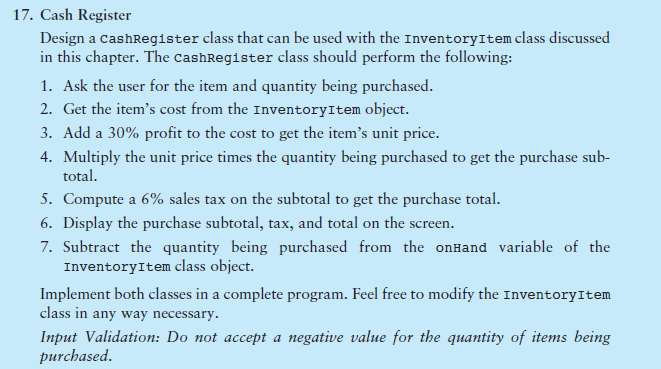
17. Cash Register Design a cashRegister class that can be used with the Inventoryitem class discussed in this chapter. The cashRegister class should perform the following: 1. Ask the user for the item and quantity being purchased. 2. Get the item's cost from the InventoryItem object. 3. Add a 30% profit to the cost to get the item's unit price. 4. Multiply the unit price times the quantity being purchased to get the purchase sub- total. 5. Compute a 6% sales tax on the subtotal to get the purchase total. 6. Display the purchase subtotal, tax, and total on the screen. 7. Subtract the quantity being purchased from the onHand variable of the InventoryItem class object. Implement both classes in a complete program. Feel free to modify the InventoryItem class in any way nec Input Validation: Do not accept a negative value for the quantity of items being purchased. essary
Step by Step Solution
There are 3 Steps involved in it

Get step-by-step solutions from verified subject matter experts
 Study Help