







Question: I'm working on Hands-On Project 7-4 for the JavaScript Web Warrior Series (6th Edition). When you click the preview button, a box displaying the submitted
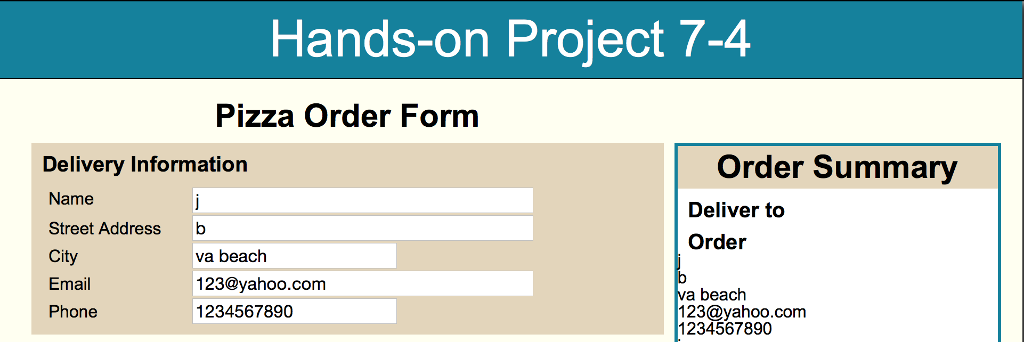
I'm working on Hands-On Project 7-4 for the JavaScript Web Warrior Series (6th Edition). When you click the preview button, a box displaying the submitted delivery information should appear on the right side of the screen (see above). I cannot get the box to display and I can't figure out what might be wrong with my JavaScript (script.js). If someone can look at my code, and give me some pointers, I'd really appreciate it.
I've pasted all the relevant files into this question(HTML first, then css, then js, then the Modernizr text).
Hands-on Project 7-4
/* JavaScript 6th Edition Chapter 7 Hands-on Project 7-4
Filename: styles.css */
/* apply a natural box layout model to all elements */ * { -moz-box-sizing: border-box; -webkit-box-sizing: border-box; box-sizing: border-box; }
/* reset rules */ html, body, div, span, applet, object, iframe, h1, h2, h3, h4, h5, h6, p, blockquote, pre, a, abbr, acronym, address, big, cite, code, del, dfn, em, img, ins, kbd, q, s, samp, small, strike, strong, sub, sup, tt, var, b, u, i, center, dl, dt, dd, ol, ul, li, fieldset, form, label, legend, table, caption, tbody, tfoot, thead, tr, th, td, article, aside, canvas, details, embed, figure, figcaption, footer, header, hgroup, menu, nav, output, ruby, section, summary, time, mark, audio, video { margin: 0; padding: 0; border: 0; font-size: 100%; font: inherit; vertical-align: baseline; }
/* HTML5 display-role reset for older browsers */ article, aside, details, figcaption, figure, footer, header, hgroup, menu, nav, section { display: block; }
body { line-height: 1; max-width: 960px; background: white; margin: 0 auto; font-family: Arial, Helvetica, sans-serif; -webkit-box-shadow: 10px 0px 10px rgba(50, 50, 50, 1), 0px 10px 10px rgba(50, 50, 50, 1), -10px 0px 10px rgba(50, 50, 50, 1); -moz-box-shadow: 10px 0px 10px rgba(50, 50, 50, 1), 0px 10px 10px rgba(50, 50, 50, 1), -10px 0px 10px rgba(50, 50, 50, 1); box-shadow: 10px 0px 10px rgba(50, 50, 50, 1), 0px 10px 10px rgba(50, 50, 50, 1), -10px 0px 10px rgba(50, 50, 50, 1); }
ol, ul { list-style: none; }
/* page header */ header { background: #04819E; width: 100%; color: #FFFFFF; font-size: 48px; text-align: center; line-height: 1.5em; border-bottom: 1px solid black; }
/* main content */ article { width: 960px; text-align: left; background: ivory; padding: 20px; overflow: auto; }
h2 { font-weight: bold; font-size: 30px; text-align: center; width: 66.6667%; }
#errorMessage { display: none; width: 80%; text-align: center; padding: 10px; margin: 15px auto 5px; background: #e3d5ba; color: black; border: 5px solid rgb(190,50,38); font-weight: bold; }
/* form */ form { padding: 10px; width: 66.6667%; float: left; }
fieldset { margin-bottom: 10px; position: relative; padding: 2.5em 1em 0.5em 1em; background: #e3d5ba; }
fieldset fieldset { padding-top: 15px; }
legend, #submit, #instrlabel { font-family: arial, helvetica, sans-serif; font-weight: bold; }
legend { position: absolute; top: 0; left: 0; font-size: 1.25em; margin-top: 0.5em; margin-left: 0.5em; }
fieldset fieldset legend { font-size: 1em; margin-top: 25px; top: -30px; left: 8px; }
input, textarea { font-size: 1em; }
#instructions { display: block; }
#deliveryinfo, #orderinfo, #additionalinfo, #submitbutton { border: none; }
#deliveryinfo label { display: block; float: left; clear: left; margin-top: 5px; }
#deliveryinfo input { display: block; margin-left: 135px; }
#nameinput, #emailinput, #addrinput { width: 20em; }
#cityinput, #phoneinput { width: 12em; }
#crustbox label, #toppingbox label { margin-right: 25px; }
#instrlabel { display: block; margin: 1em 0 0.5em 0; }
textarea { margin-bottom: 1em; }
#previewBtn { font-size: 1.25em; }
#previewbutton { background: inherit; border: none; padding: 0.5em 0 0 0; text-align: center; }
section { float: right; width: 33.3333%; background: white; border: 3px solid #04819E; margin-top: 10px; display: none; }
section h2 { width: 100%; background: #e3d5ba; padding: 5px; }
section div { margin-left: 20px; display: none; padding: 10px; }
section div p { margin-bottom: 5px; }
section div p span { font-weight: bold; }
section li { list-style-type: none; margin-left: 20px; }
h3 { font-family: arial, helvetica, sans-serif; font-weight: bold; font-size: 1.25em; margin-top: 0.5em; margin-left: 0.5em; }
/* JavaScript 6th Edition Chapter 7 Hands-on Project 7-4
Author: Jenn B Date: Sept. 19, 2017
Filename: index.htm */ "use strict"; //interpret content in JavaScript strict mode
//global variable var delivInfo = {}; var delivSummary = document.getElementById("deliverTo");
//add input values into the object function processDeliveryInfo() { delivInfo.name = document.getElementById("nameinput").value; delivInfo.addr = document.getElementById("addrinput").value; delivInfo.city = document.getElementById("cityinput").value; delivInfo.email = document.getElementById("emailinput").value; delivInfo.phone = document.getElementById("phoneinput").value; for(var prop in delivInfo) { delivSummary.innerHTML += "
" + delivInfo[prop] + "
"; } }
//function will call and display the data entered by the user function previewOrder() { processDeliveryInfo(); document.getElementById("deliverTo").style.display = "block"; }
//create an event listener for the submit button function createEventListener() { var previewButton = document.getElementById("previewBtn"); if (previewButton.addEventListener) { previewButton.addEventListener("click", previewOrder, false); } else if (previewButton.attachEvent) { previewButton.attachEvent("onclick", previewOrder); } }
//create listener event on page load if(window.addEventListener) { window.addEventListener("load", createEventListener, false); } else if (window.attachEvent) { window.attachEvent("onload", createEventListener); }
/* Modernizr 2.6.2 (Custom Build) | MIT & BSD * Build: http://modernizr.com/download/#-input-inputtypes-shiv-cssclasses-load */ ;window.Modernizr=function(a,b,c){function v(a){j.cssText=a}function w(a,b){return v(prefixes.join(a+";")+(b||""))}function x(a,b){return typeof a===b}function y(a,b){return!!~(""+a).indexOf(b)}function z(a,b,d){for(var e in a){var f=b[a[e]];if(f!==c)return d===!1?a[e]:x(f,"function")?f.bind(d||b):f}return!1}function A(){e.input=function(c){for(var d=0,e=c.length;d
Step by Step Solution
There are 3 Steps involved in it
1 Expert Approved Answer
Step: 1 Unlock

Question Has Been Solved by an Expert!
Get step-by-step solutions from verified subject matter experts
Step: 2 Unlock
Step: 3 Unlock
 Study Help