







Question: Image Processing Applications of Probability Theory In this project, groups of four students will collaborate to experiment with probabilistic meth - ods of generating and
Image Processing Applications of Probability Theory
In this project, groups of four students will collaborate to experiment with probabilistic meth
ods of generating and analyzing images in the MATLAB clone Octaveonline. You will be working
with grayscale images that use one real number per picture element pixel to represent
shades of gray: the range of these pixel values is where represents black and represents
white. To display an image that is stored in matrix A simply type: imshowA
You are given the following functions in an Octaveonline bucket found here:
Entropy
Calculates entropy in bits, when given quantizer output level probabilities in vector
Note: This function normalizes so that all of its coefficients sum up to
outputlevels MMSElevelsdata outputlevels
Performs one iteration of the LloydMax algorithm to move quantizer levels, in array
outputlevels, toward their optimal values optimal those that minimize the mean
squared error between samples in array "data" and their roundedtonearest level quantized
versions
qdata Quantizedataoutputlevels
Quantizes each coefficient in data by rounding it to the nearest one of the values specified by
array outputlevels. Output matrix qdata matches the dimensions of input matrix data.
qdata Quantizecountdataoutputlevels
After quantizing each coefficient in matrix data to the nearest value in outputlevels,
function Quantizecount returns a count of samples at each output level. Output array
count matches the dimensions of input array outputlevels. This function is used to
estimate the probabilities of quantizer output levels.
Randomsamples dummy
Generates samples of a discrete random variable whose PMF is specified by equallength
vectors and : the probability that is These samples are returned in array
data, which is of the same size as input array dummy.
HistogramA
Display the histogram of a graylevel image range that is stored in matrix A
Huffman
Array b returns the number of bits per variablelength codeword corresponding to probability
values in array as found via Huffman coding. Probability values in may be scaled by
a positive real constant. For example, four equallylikely outcomes may be represented by
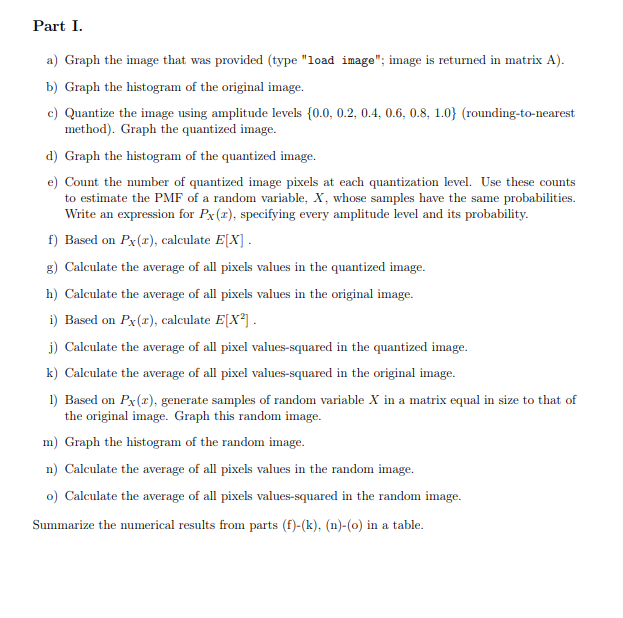
either or by Part I.
a Graph the image that was provided type "load image"; image is returned in matrix A
b Graph the histogram of the original image.
c Quantize the image using amplitude levels roundingtonearest
method Graph the quantized image.
d Graph the histogram of the quantized image.
e Count the number of quantized image pixels at each quantization level. Use these counts
to estimate the PMF of a random variable, whose samples have the same probabilities.
Write an expression for specifying every amplitude level and its probability.
f Based on calculate
g Calculate the average of all pixels values in the quantized image.
h Calculate the average of all pixels values in the original image.
i Based on calculate
j Calculate the average of all pixel valuessquared in the quantized image.
k Calculate the average of all pixel valuessquared in the original image.
Based on generate samples of random variable in a matrix equal in size to that of
the original image. Graph this random image.
m Graph the histogram of the random image.
n Calculate the average of all pixels values in the random image.
o Calculate the average of all pixels valuessquared in the random image.
Summarize the numerical results from parts fkno in a table. Please Write full answers to all question
Step by Step Solution
There are 3 Steps involved in it
1 Expert Approved Answer
Step: 1 Unlock

Question Has Been Solved by an Expert!
Get step-by-step solutions from verified subject matter experts
Step: 2 Unlock
Step: 3 Unlock
 Study Help