







Question: Implement a basic color-to-greyscale image converter. A popular approach is to use the luminosity method, where each greyscale pixel is computed as a weighted average
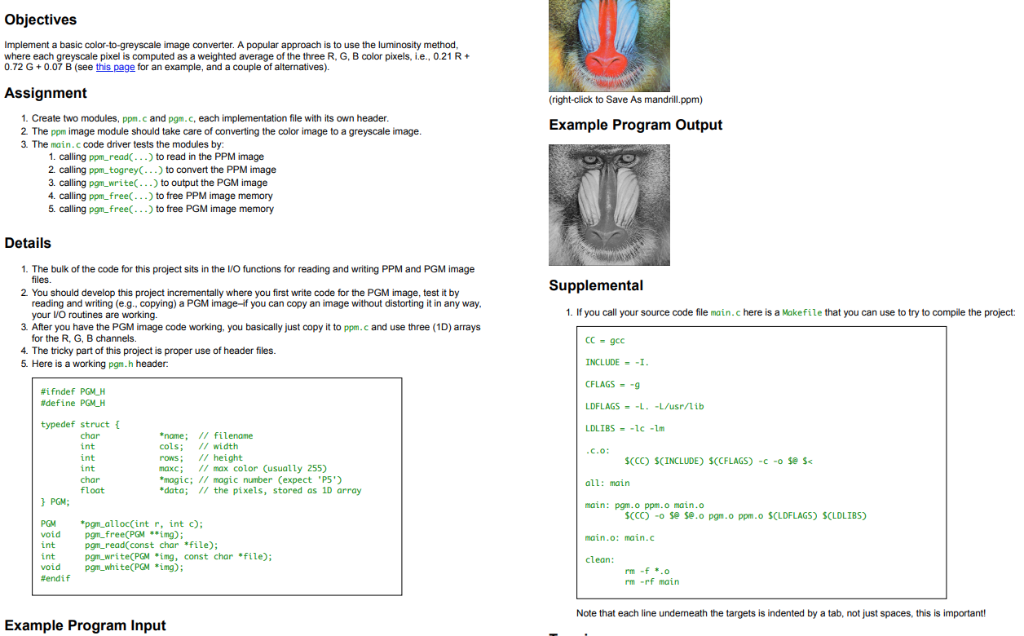
Implement a basic color-to-greyscale image converter. A popular approach is to use the luminosity method, where each greyscale pixel is computed as a weighted average of the three R, G, B color pixels, i.e., 0.21 R + 0.72 G + 0.07 B (see this page for an example, and a couple of alternatives).
Suggestions (e.g., for C implementation)
- Create two modules, ppm.c and pgm.c, each implementation file with its own header.
- The ppm image module should take care of converting the color image to a greyscale image.
- The main.c code driver tests the modules by:
- calling ppm_read(...) to read in the PPM image
- calling ppm_togrey(...) to convert the PPM image
- calling pgm_write(...) to output the PGM image
- calling ppm_free(...) to free PPM image memory
- calling pgm_free(...) to free PGM image memory
Further Suggestions
- The bulk of the code for this project sits in the I/O functions for reading and writing PPM and PGM image files.
- You should develop this project incrementally where you first write code for the PGM image, test it by reading and writing (e.g., copying) a PGM imageif you can copy an image without distorting it in any way, your I/O routines are working.
- After you have the PGM image code working, you basically just copy it to ppm.c and use three (1D) arrays for the R, G, B channels.
- The tricky part of this project is proper use of header files.
(right-click to Save As mandrill. ppm) Objectives Implement a basic color-to-greyscale image converter. A popular approach is to use the luminosity method, where each greyscale pixel is computed as a weighted average of the three R, G, B color pixels, i.e., 0.21 R + 0.72 G +0.07 B (see this page for an example, and a couple of alternatives). Assignment 1. Create two modules, ppn.c and pgn.c, each implementation file with its own header. 2 The ppm image module should take care of converting the color image to a greyscale image 3. The main.c code driver tests the modules s by: 1. calling ppm_read(...) to read in the PPM image 2. calling ppm_togrey...) to convert the PPM image 3. calling pgm_write(...) to output the PGM image 4. calling ppm_free(...) to free PPM image memory 5. calling pgm_free(...) to free PGM image memory Example Program Output Details Supplemental 1. The bulk of the code for this project sits in the I/O functions for reading and writing PPM and PGM image files. 2 You should develop this project incrementally where you first write code for the PGM image, test it by reading and writing (e.g..copying) a PGM image-if you can copy an image without distorting it in any way. your VO routines are working 3. After you have the PGM image code working, you basically just copy it to ppm.c and use three (10) arrays for the RGB channels 4. The tricky part of this project is proper use of header files. . 5. Here is a working pgn.h header 1. If you call your source code file main.c here is a Makefile that you can use to try to compile the project: CC - gcc INCLUDE = -1 CFLAGS = -9 #ifndef PGMUH #define PGMLM LDFLAGS - -L. -L/usr/lib LDLIBS --lcm .C.0: typedef struct char int int int char float } PGN: * nome; // filename cols; // width rows: // height maxc; // max color (usually 255) *magic; // magic number (expect 'P5') *data; // the pixels, stored as 10 array $(CC) SCINCLUDE) SCCFLAGS) -C-o se s all: main main: pgm.o ppm.o main.o SCCC) - Seseo pono ppm.o SCLDFLAGS) SCLDLIBS) main.o: main.c PGM void int int void Ferdif *pgn_alloc(int r, int ); pgnfree(PGM **ing); pon_read(const char *file); pgn_write(PGM img, const char *file); pon_whiteCPM *ing); clean: rm-f *.0 rm -rf main Note that each line underneath the targets is indented by a tab, not just spaces, this is important! Example Program Input
Step by Step Solution
There are 3 Steps involved in it

Get step-by-step solutions from verified subject matter experts
 Study Help