







Question: Implement a checkoutpage here is link to the example in the book https://www.dropbox.com/sh/otlc1g9j35x03rh/AAANs6dSWKXZ6qYKw1W-UWfda?dl=0 CSET4100 Assignment 3 Overview This assignment focus on creating java servlet/JSP that
Implement a checkoutpage
here is link to the example in the book
https://www.dropbox.com/sh/otlc1g9j35x03rh/AAANs6dSWKXZ6qYKw1W-UWfda?dl=0
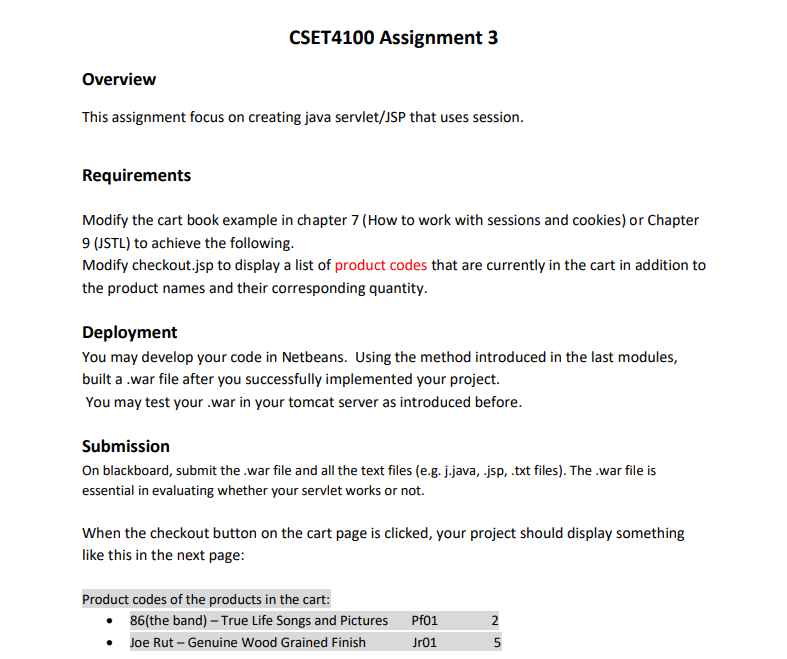
CSET4100 Assignment 3 Overview This assignment focus on creating java servlet/JSP that uses session. Requirements Modify the cart book example in chapter 7 (How to work with sessions and cookies) or Chapter 9 (JSTL) to achieve the following. Modify checkout.jsp to display a list of product codes that are currently in the cart in addition to the product names and their corresponding quantity. Deployment You may develop your code in Netbeans. Using the method introduced in the last modules, built a war file after you successfully implemented your project. You may test your war in your tomcat server as introduced before. Submission On blackboard, submit the.war file and all the text files (e.g. j.java, .jsp, txt files). The war file is essential in evaluating whether your servlet works or not. When the checkout button on the cart page is clicked, your project should display something like this in the next page: Product codes of the products in the cart: 86(the band) True Life Songs and Pictures Pfo1 CSET4100 Assignment 3 Overview This assignment focus on creating java servlet/JSP that uses session. Requirements Modify the cart book example in chapter 7 (How to work with sessions and cookies) or Chapter 9 (JSTL) to achieve the following. Modify checkout.jsp to display a list of product codes that are currently in the cart in addition to the product names and their corresponding quantity. Deployment You may develop your code in Netbeans. Using the method introduced in the last modules, built a war file after you successfully implemented your project. You may test your war in your tomcat server as introduced before. Submission On blackboard, submit the.war file and all the text files (e.g. j.java, .jsp, txt files). The war file is essential in evaluating whether your servlet works or not. When the checkout button on the cart page is clicked, your project should display something like this in the next page: Product codes of the products in the cart: 86(the band) True Life Songs and Pictures Pfo1
Step by Step Solution
There are 3 Steps involved in it

Get step-by-step solutions from verified subject matter experts
 Study Help