







Question: Implement a class Sheer that will manage a simple spread sheet. The class will provide the following features: Sheet(name, numberofRows. numberofColumns) Maximum size is 24
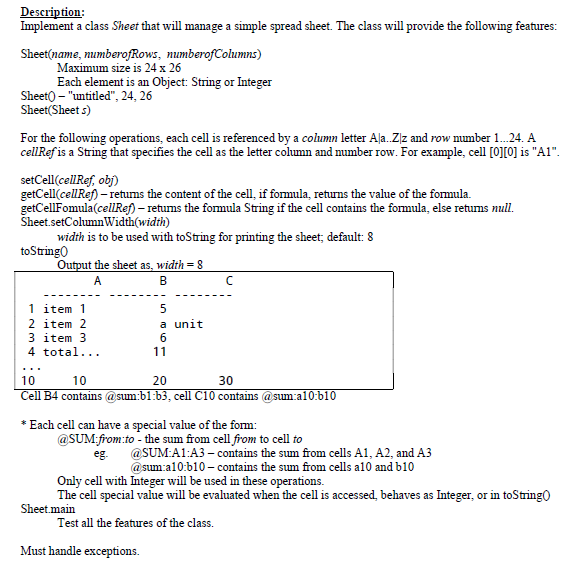
Implement a class Sheer that will manage a simple spread sheet. The class will provide the following features: Sheet(name, numberofRows. numberofColumns) Maximum size is 24 times 26 Each element is an Object: String or Integer Sheet() - "untitled", 24, 26 Sheet(Sheet s) For the following operations, each cell is referenced by a column letter A|a..Z|z and row number 1...24. A cellRef is a String that specifies the cell as the letter column and number row. For example, cell [0][0] is "A1". setCell(cellRef, obj) getCell(cellRef) - returns the content of the cell, if formula, returns the value of the formula. getCellFomula(cellRef) - returns the formula String if the cell contains the formula, else returns null. Sheet.setColumnWidth(width) width is to be used with toString for printing the sheet; default: 8 toString() Output the sheet as, width = 8 Cell B4 contains @sum:b1:b3, cell CIO contains @sum:a10:b10 *Each cell can have a special value of the form: @SUM:from:to - the sum from cell from to cell to eg. @SUM:A1:A3 - contains the sum from cells Al, A2, and A3 @sum:a10:b10- contains the stun from cells a10 and b10 Only cell with Integer will be used in these operations. The cell special value will be evaluated when the cell is accessed, behaves as Integer, or in toString() Sheet.main Test all the features of the class. Must handle exceptions
Step by Step Solution
There are 3 Steps involved in it

Get step-by-step solutions from verified subject matter experts
 Study Help