Implement a complete version of an Array-Based List. Use 50 as the maximum number of elements. To create arrays use the method build_array from referential_array.py as discussed in the Lectures. Your List should include implementations for the following 10 functions:
__str__(self): Returns a string representation of the list. Structure the string so that there is one item per line. Called by str(self)
__len__(self): Returns the length of the list. Called by len(self)
__contains__(self, item): Returns True if item is in the list, False otherwise. Called by item in self
__getitem__(self, index): Returns the item at index in the list, if index is non-negative. If it is negative, it will return the last item if index is 1, the second-to last if index is 2, and so on up to minus the length of the list, which returns the first item. The function raises an IndexError if index is out of the range from -len(self) to len(self). Called by self[index]
__setitem__(self, index, item): Sets the value at index in the list to be item. The index can be negative, behaving as described above. Raises an IndexError if index is out of the range from -len(self) to len(self). Called by self[index] = item
__eq__(self, other): Returns True if this list is equivalent to other. Called by self == other
append(self, item): Adds item to the end of the list. Remember the underlying array is and should remain of fixed size. The operation should raise an Exception if the list is full.
insert(self, index, item): Inserts item into self before position index. The index can be negative, behaving as described above. Raises an IndexError if index is out of the range from -len(self) to len(self).
remove(self, item): Deletes the first instance of item from the list. Raises a ValueError if item does not exist in self
delete(self, index): Deletes the item at index from the list, moving all items after it towards the start of the list. The index can be negative, behaving as described above. Raises an IndexError if index is out of the range from -len(self) to len(self).
sort(self, reverse): Sorts the items in the list in ascending order if reverse is False or descending order if is reverse is True. Pick your favourite sorting algorithm from those covered in the Lectures.
Make your class iterable.
The above is reference as I need help with Tasks 3 and 4. Thank you :)
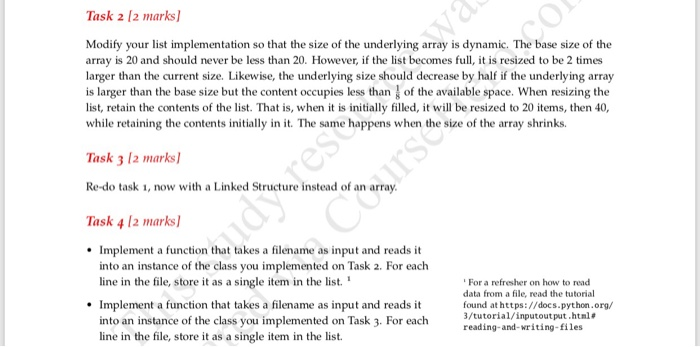
Task 2 12 marksl Modify your list implementation so that the size of the underlying array is dynamic. The base size of the array is 20 and should never be less than 20. However, if the list becomes full, it is resized to be 2 times larger than the current size. Likewise, the underlying size should decrease by half if the underlying array is larger than the base size but the content occupies less than of the available space. When resizing the list, retain the contents of the list. That is, when it is initially filled, it will be resized to 20 items, then 40, while retaining the contents initially in it. The same happens wh en the size of the array shrinks. Task 3 12 marks) Re-do task 1, now with a Linked Structure instead of an array Task 4 l2 marks] Implement a function that takes a filename as input and reads it into an instance of the class you implemented on Task 2. For each line in the file, store it as a single item in the list. Implement a function that takes a filename as input and reads it into an instance of the class you implemented on Task 3. For each line in the file, store it as a single item in the list. For a refresher on how to read data from a file, read the tutorial found at https://docs.python.org/ 3/tutorial/ inputout put .html@ reading-and-writing-files









 Study Help