







Question: Implement a java class method interacting with users based on the following criteria. Assuming the provided input files exist and can be read, the program
Implement a java class method interacting with users based on the following criteria.
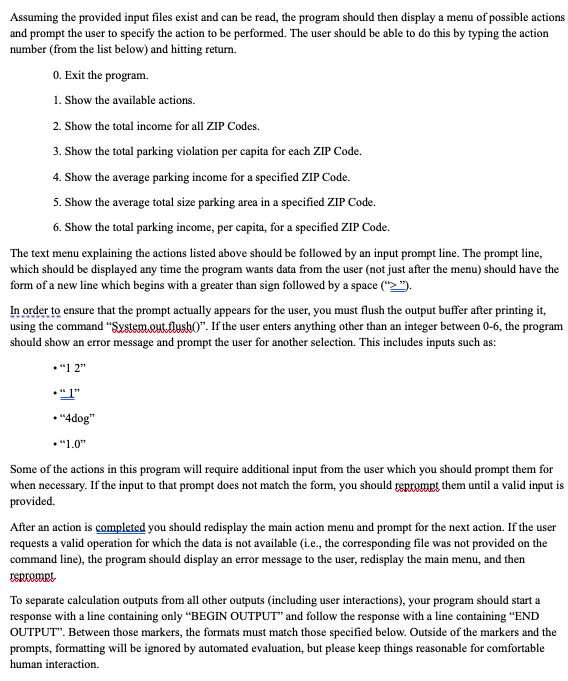
Assuming the provided input files exist and can be read, the program should then display a menu of possible actions and prompt the user to specify the action to be performed. The user should be able to do this by typing the action number from the list below and hitting return.
Exit the program.
Show the available actions.
Show the total income for all ZIP Codes.
Show the total parking violation per capita for each ZIP Code.
Show the average parking income for a specified ZIP Code.
Show the average total size parking area in a specified ZIP Code.
Show the total parking income, per capita, for a specified ZIP Code.
The text menu explaining the actions listed above should be followed by an input prompt line. The prompt line, which should be displayed any time the program wants data from the user not just after the menu should have the form of a new line which begins with a greater than sign followed by a space xrightarrowunderlinetext
In order to ensure that the prompt actually appears for the user, you must flush the output buffer after printing it using the command "Systemout.flush If the user enters anything other than an integer between the program should show an error message and prompt the user for another selection. This includes inputs such as:
beginarrayl
cdot
cdot mathrmdog
cdot
endarray
Some of the actions in this program will require additional input from the user which you should prompt them for when necessary. If the input to that prompt does not match the form, you should reprompt them until a valid input is provided.
After an action is completed you should redisplay the main action menu and prompt for the next action. If the user requests a valid operation for which the data is not available ie the corresponding file was not provided on the command line the program should display an error message to the user, redisplay the main menu, and then reprempt,
To separate calculation outputs from all other outputs including user interactions your program should start a response with a line containing only "BEGIN OUTPUT" and follow the response with a line containing "END OUTPUT'" Between those markers, the formats must match those specified below. Outside of the markers and the prompts, formatting will be ignored by automated evaluation, but please keep things reasonable for comfortable human interaction. Available Actions
If the user enters a when prompted for input at the main menu, the program should display to the console, using Systemout a sorted list of the currently available actions. That list should differ based on the data sets parking income file, population file, and parking size file proprovided to your application. For example if the command line arguments are:
incomexampleincomefile.csv
The output should be:
BEGIN OUTPUT
END OUTPUT
parkingexampleparkingfile.csv
The output should be:
BEGIN OUTPUT
END OUTPUT
parking, populationexampleparkingfile.csv population.csv
The output should be:
BEGIN OUTPUT
END OUTPUT
Step by Step Solution
There are 3 Steps involved in it
1 Expert Approved Answer
Step: 1 Unlock

Question Has Been Solved by an Expert!
Get step-by-step solutions from verified subject matter experts
Step: 2 Unlock
Step: 3 Unlock
 Study Help