







Question: Implement a .NET desktop application (i.e., Windows Form, WPF, UWP) by using C# to load the data from Medals.csv, choose appropriate data structure to organize
Implement a .NET desktop application (i.e., Windows Form, WPF, UWP) by using C# to load the data from Medals.csv, choose appropriate data structure to organize the data. After the data has been loaded, your app should be able to
1. Add new medalist information to the data structure
2. Delete a specific data from the data structure
3. Implement a generic Search method that implements the linear-search algorithm.
Search method should compare the search key with each element in the data source until all elements has been processed. The output of this method can be IEnumerable Then use the medalist to test your Search method.
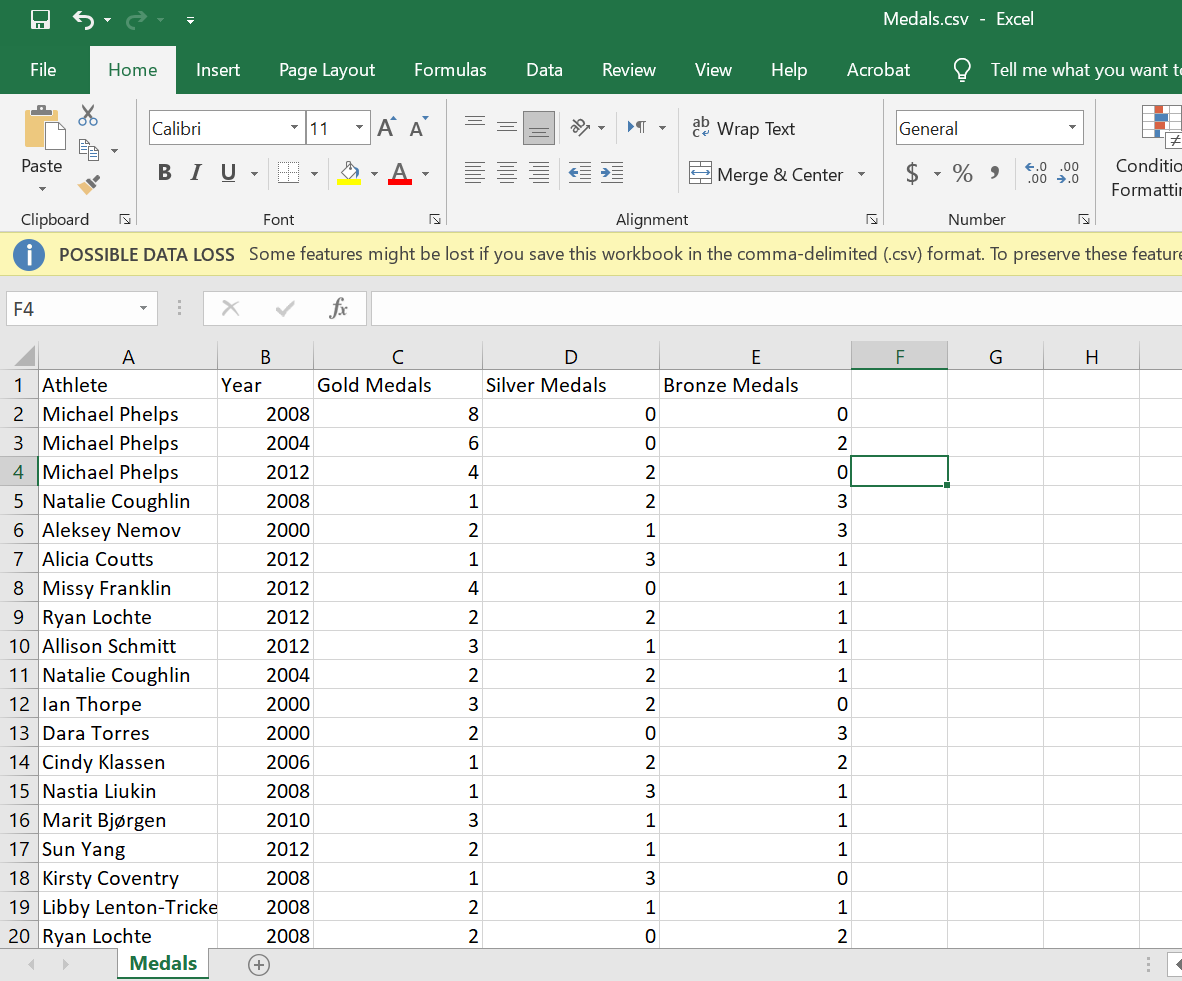
Medals.csv - Excel File Home Insert Page Layout Formulas Data Review View Help Acrobat Tell me what you want to Calibri 11 ce Wrap Text General + Paste BIU Merge & Center $ - % , .0 .00 .00 7.0 Conditia Formattir Clipboard Font Alignment Number POSSIBLE DATA LOSS Some features might be lost if you save this workbook in the comma-delimited (csv) format. To preserve these feature F4 . F G H D Silver Medals E Bronze Medals 8 0 0 6 0 2 4 2 0 1 2 3 2 1 3 1 3 1 4 0 1 2 2 1 3 1 1 A B C 1 Athlete Year Gold Medals 2 Michael Phelps 2008 3 Michael Phelps 2004 4 Michael Phelps 2012 5 Natalie Coughlin 2008 6 Aleksey Nemov 2000 7 Alicia Coutts 2012 8 Missy Franklin 2012 9 Ryan Lochte 2012 10 Allison Schmitt 2012 11 Natalie Coughlin 2004 12 Ian Thorpe 2000 13 Dara Torres 2000 14 Cindy Klassen 2006 15 Nastia Liukin 2008 16 Marit Bjrgen 2010 17 Sun Yang 2012 18 Kirsty Coventry 2008 19 Libby Lenton-Tricke 2008 20 Ryan Lochte 2008 Medals 2 2 1 3 2 0 2 3 1 2 2 1 - W NO 3 1 3 1 1 mn 2 1 1 1 3 0 2 mo 1 1 2 2
Step by Step Solution
There are 3 Steps involved in it

Get step-by-step solutions from verified subject matter experts
 Study Help