







Question: Implement ? a standalone application in using Java code and JavaFX GUI components ? . Look at a normal calculator to figure out the functionality
Implement
?
a standalone application in using Java code and JavaFX GUI components
?
.
Look
at
a
normal
calculator
to
figure
out
the
functionality
of
M+,
M-,
MR
and
MC
given
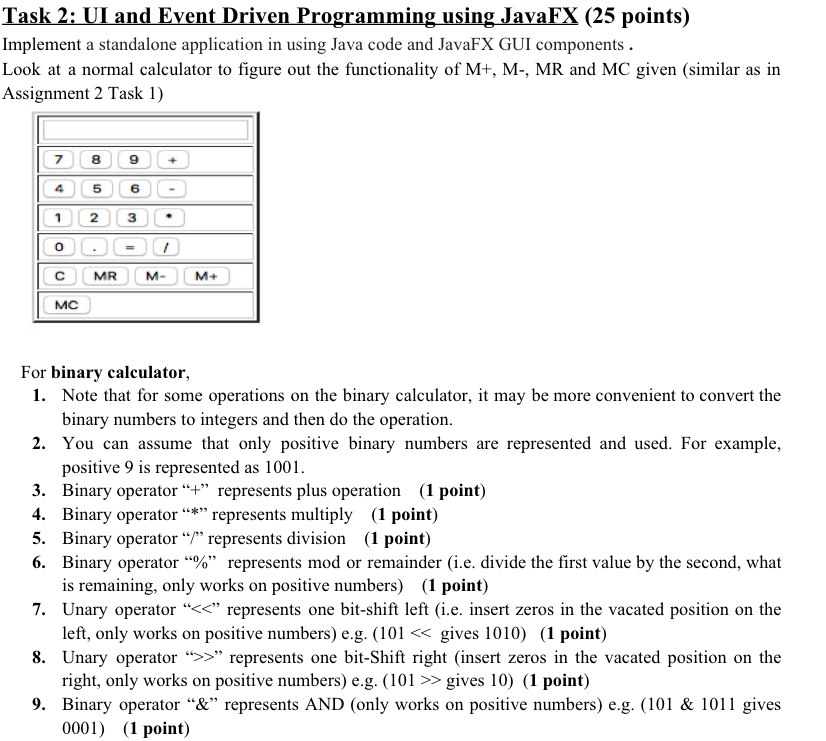
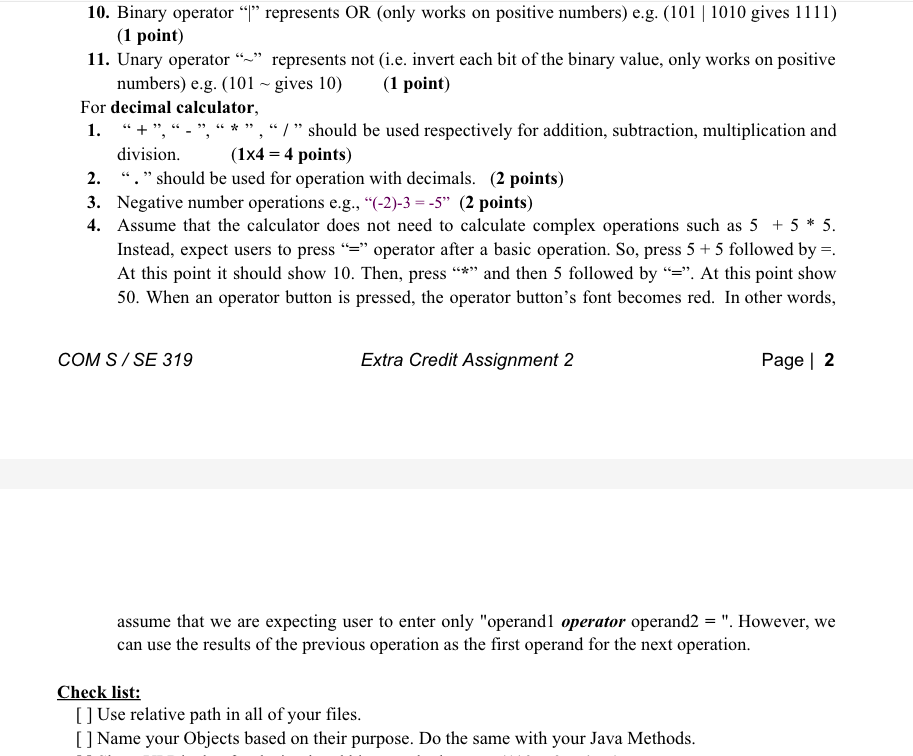
(25 points) Implement a standalone application in using Java code and JavaFX GUI components. Look at a normal calculator to figure out the functionality of M+, M-, MR and MC given (similar as in Assignment 2 Task 1) 7 89 5 6 C MR M- M+ MC For binary calculator, 1. Note that for some operations on the binary calculator, it may be more convenient to convert the binary numbers to integers and then do the operation. 2. You can assume that only positive binary numbers are represented and used. For example, positive 9 is represented as 1001 3. Binary operator"+"represents plus operation (1 point) 4. Binary operator "*" represents multiply (1 point) 5. Binary operator "" represents division (1 point) 6. Binary operator "%", represents mod or remainder (ie, divide the first value by the second, what 7. Unary operator >" represents one bit-Shift right (insert zeros in the vacated position on the 9. Binary operator "&" represents AND (only works on positive numbers) e.g. (101 & 1011 gives is remaining, only works on positive numbers) (1 point) left, only works on positive numbers) e.g. (101 > gives 10) (1 point) 0001) (1 point) (25 points) Implement a standalone application in using Java code and JavaFX GUI components. Look at a normal calculator to figure out the functionality of M+, M-, MR and MC given (similar as in Assignment 2 Task 1) 7 89 5 6 C MR M- M+ MC For binary calculator, 1. Note that for some operations on the binary calculator, it may be more convenient to convert the binary numbers to integers and then do the operation. 2. You can assume that only positive binary numbers are represented and used. For example, positive 9 is represented as 1001 3. Binary operator"+"represents plus operation (1 point) 4. Binary operator "*" represents multiply (1 point) 5. Binary operator "" represents division (1 point) 6. Binary operator "%", represents mod or remainder (ie, divide the first value by the second, what 7. Unary operator >" represents one bit-Shift right (insert zeros in the vacated position on the 9. Binary operator "&" represents AND (only works on positive numbers) e.g. (101 & 1011 gives is remaining, only works on positive numbers) (1 point) left, only works on positive numbers) e.g. (101 > gives 10) (1 point) 0001) (1 point)
Step by Step Solution
There are 3 Steps involved in it

Get step-by-step solutions from verified subject matter experts
 Study Help