







Question: Implement a very basic menu driven, console based Java application. Make use of the following limited features:(nothing else) --While loops --Switch statement or if/else --methods
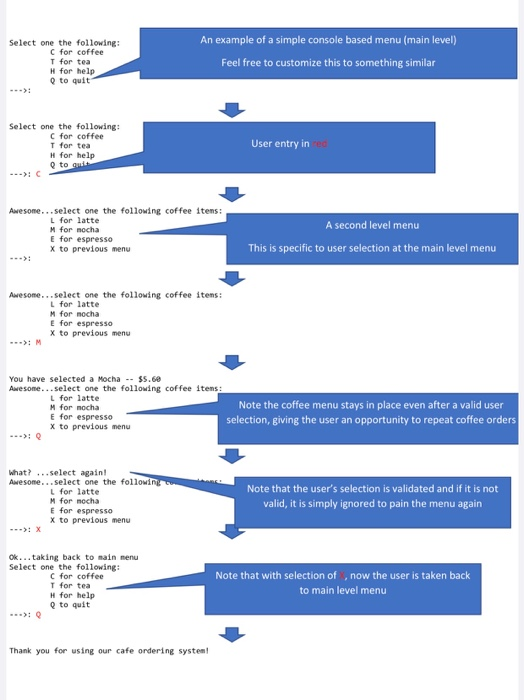
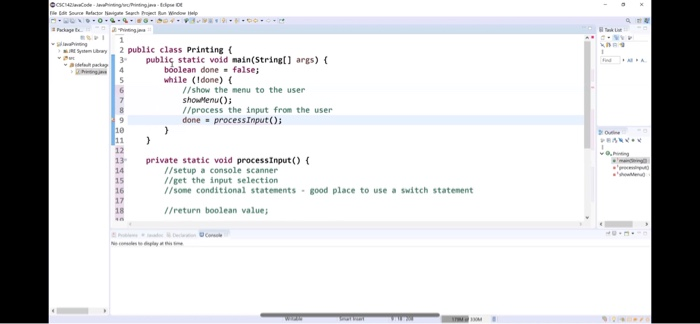
An example of a simple console based menu (main level) Select one the following: C for coffee I for tea H for help O to quit Feel free to customize this to something similar Select one the following: C for coffee T for tea H for help Q to it User entry ined Awesome...select one the following coffee items: L for latte M for mocha E for espresso X to previous menu A second level menu This is specific to user selection at the main level menu Awesome...select one the following coffee items: L for latte M for mocha E for espresso X to previous menu You have selected a Mocha - $5.60 Awesome... select one the following coffee items: L for latte M for nocha E for espresso X to previous menu Note the coffee menu stays in place even after a valid user selection, giving the user an opportunity to repeat coffee orders What? ... select again! Awesome... select one the followin L for latte M for nocha E for espresso X to previous menu Note that the user's selection is validated and if it is not valid, it is simply ignored to pain the menu again Ok... taking back to main menu Select one the following: C for coffee T for tea H for help Q to quit *): 0 Note that with selection of now the user is taken back to main level menu Thank you for using our cafe ordering system! C odeviging Source to each oth Window 2 public class Printing 3 public static void main(String[] args) { boolean done = false; while (Idone) { // show the menu to the user showenu(); //process the input from the user done process Input(); private static void processInput() { //setup a console scanner //get the input selection //sone conditional statements - good place to use a switch statement //return boolean values
Step by Step Solution
There are 3 Steps involved in it

Get step-by-step solutions from verified subject matter experts
 Study Help