







Question: Implement creatChild method in WordTree Class in Java public class WordTreeNode *Highest allowable character index is NUMCHILDREN-1 (assuming one-byte ASCII i.e. extended ASCII) NUMCHILDREN is
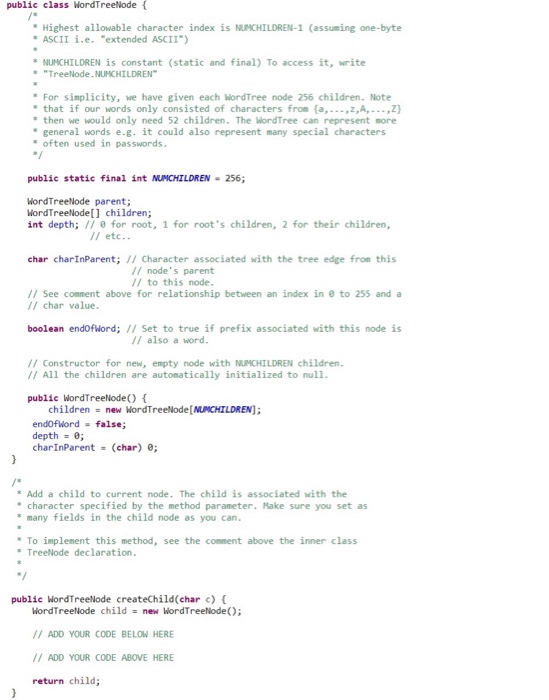
public class WordTreeNode *Highest allowable character index is NUMCHILDREN-1 (assuming one-byte ASCII i.e. "extended ASCII") NUMCHILDREN is constant (static and final) To access it, write *"TreeNode.NUMCHILDREN For simplicity, we have given each WordTree node 256 children. Note that if our words only consisted of characters from (a,z,A,) then we would only need 52 children. The WordTree can represent more " general words e.g. it could also represent many special characters often used in passwords. public static final int NUCHILDREN-256; WordTreeNode parent; WordTreeNode[] children; int depth; // for root, 1 for root's children, 2 for their children, // etc.. char charInParent; I/ Character associated with the tree edge from this // node's parent // to this node. // See comment above for relationship between an index in // char value. to 255 and a boolean endofWord; I/ Set to true if prefix associated with this node is // also a word. // Constructor for new, empty node with NUMCHILDREN children // All the children are automatically initialized to null public WordTreelode(O children = new ilordTreeNode[NUCHILDREN); endofword- false depth = 0; charInParent = (char) 0; *Add a child to current node. The child is associated with the " character specified by the method parameter. Hake sure you set as * many fields in the child node as you can To implement this method, see the comment above the inner class * TreeNode declaration public WordTreeNode createChild(char c) WordTreeNode child-new WordTreeNode) /ADD YOUR CODE BELOW HERE ADD YOUR CODE ABOVE HERE return child
Step by Step Solution
There are 3 Steps involved in it

Get step-by-step solutions from verified subject matter experts
 Study Help