







Question: Implement optimized C/C++ code using code optimization techniques We will consider an image to be represented as a two-dimensional matrix M, where My denotes the
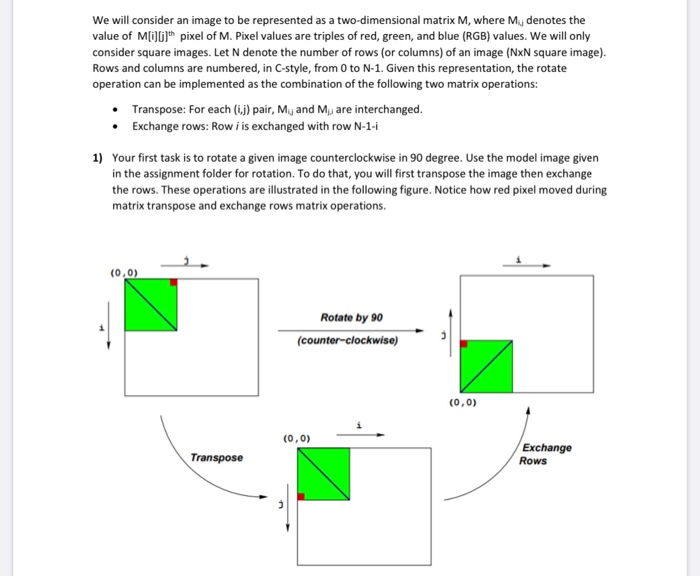
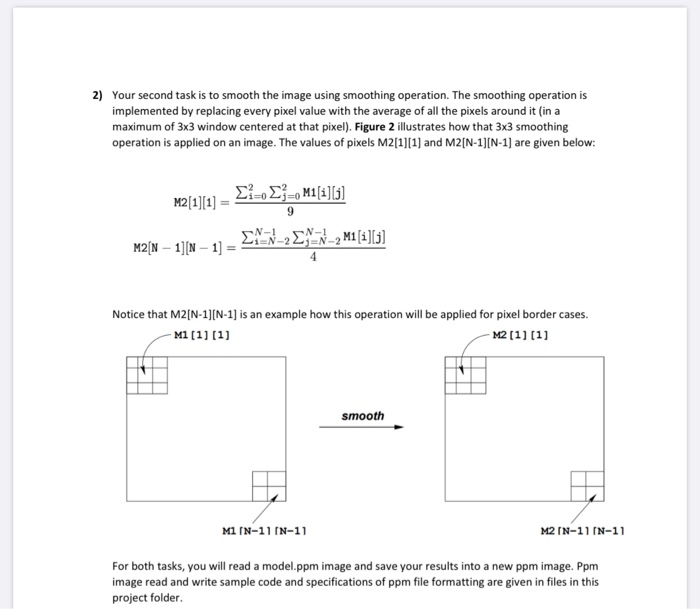
We will consider an image to be represented as a two-dimensional matrix M, where My denotes the value of M pixel of M. Pixel values are triples of red, green, and blue (RGB) values. We will only consider square images. Let N denote the number of rows (or columns) of an image (NxN square image). Rows and columns are numbered, in C-style, from 0 to N-1. Given this representation, the rotate operation can be implemented as the combination of the following two matrix operations: Transpose: For each (1) pair, My and M are interchanged. Exchange rows: Row i is exchanged with row N-1-1 1) Your first task is to rotate a given image counterclockwise in 90 degree. Use the model image given in the assignment folder for rotation. To do that, you will first transpose the image then exchange the rows. These operations are illustrated in the following figure. Notice how red pixel moved during matrix transpose and exchange rows matrix operations. (0,0) Rotate by 90 (counter-clockwise) (0,0) (0,0) Transpose Exchange Rows 2) Your second task is to smooth the image using smoothing operation. The smoothing operation is implemented by replacing every pixel value with the average of all the pixels around it in a maximum of 3x3 window centered at that pixel). Figure 2 illustrates how that 3x3 smoothing operation is applied on an image. The values of pixels M2[1][1] and M2[N-1)(N-1) are given below: M2[1][1] = 21:02 M2[N 1][N 1] - E-N-2E9N_2M1 [i][j] Notice that M2(N-1)(N-1) is an example how this operation will be applied for pixel border cases. M1[1] [1] M2 [1][1] smooth M1 IN-11 [N-11 M2 (N-11 [N-11 For both tasks, you will read a model.ppm image and save your results into a new ppm image. Ppm image read and write sample code and specifications of ppm file formatting are given in files in this project folder
Step by Step Solution
There are 3 Steps involved in it

Get step-by-step solutions from verified subject matter experts
 Study Help