







Question: Implement the html, css, and javascript for the picture, which is: 1. Make the left and right triangles react when the user hovers above them
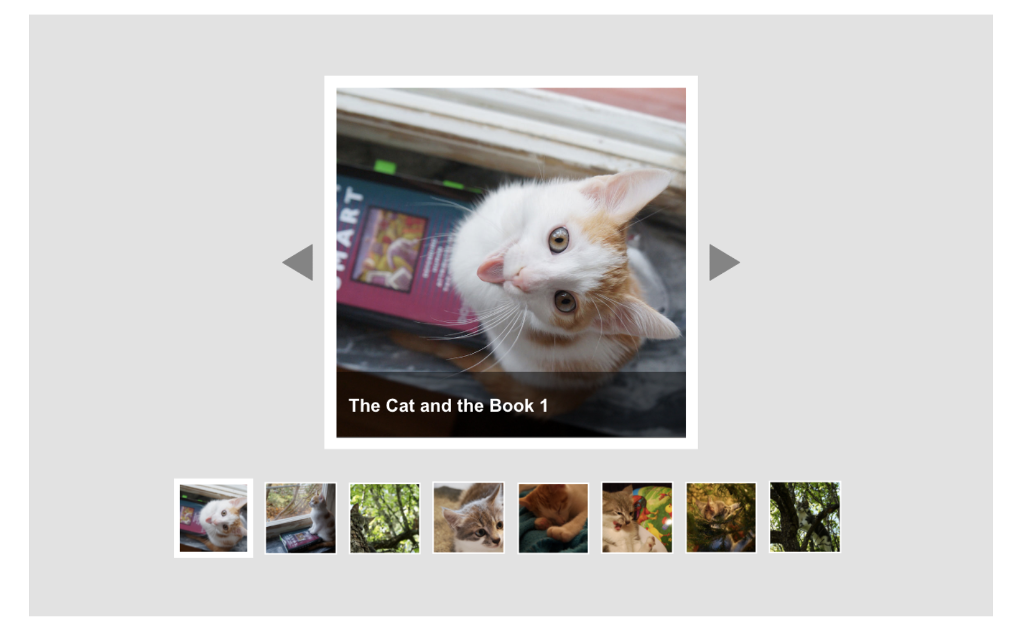 Implement the html, css, and javascript for the picture, which is:
1. Make the left and right triangles react when the user hovers above them with the mouse cursor. You could e.g. change the opacity, the color, the size etc.
2. Change the shape of the mouse cursor into a hand - this helps the user understand that he or she can click on a triangle.
3. Change the image shown in the middle square when the user clicks on the buttons. The slideshow should loop, i.e. when the user clicks show next image and the last image is being shown, the slideshow should look and show the first image.
4. Add a semi-opaque box that contains the title or a description of the currently shown image. See mockup below. And Also add thumbnails of the images below it as shown in the mockup. Clicking on one of the thumbnails should select and display the image represented by the thumbnail. Only show the text-box previously created when the user mouses over the main slide show image.
The Cat and the Book 1
Step by Step Solution
There are 3 Steps involved in it

Get step-by-step solutions from verified subject matter experts
 Study Help