







Question: implement the logical model (developed from Step 1 REA model below) into Microsoft Access database tables. create all needed tables, complete with key attributes (primary
implement the logical model (developed from Step 1 REA model below) into Microsoft Access database tables. create all needed tables, complete with key attributes (primary keys), foreign keys, and non-key attributes for the two business operating events you have chosen. Be sure to include the related resources, agents, and linking tables.Make sure your screenshot of your REA model from the Database Tools, Relationships field panel in Access, is shown in REA format, and all fields of the tables are visible.
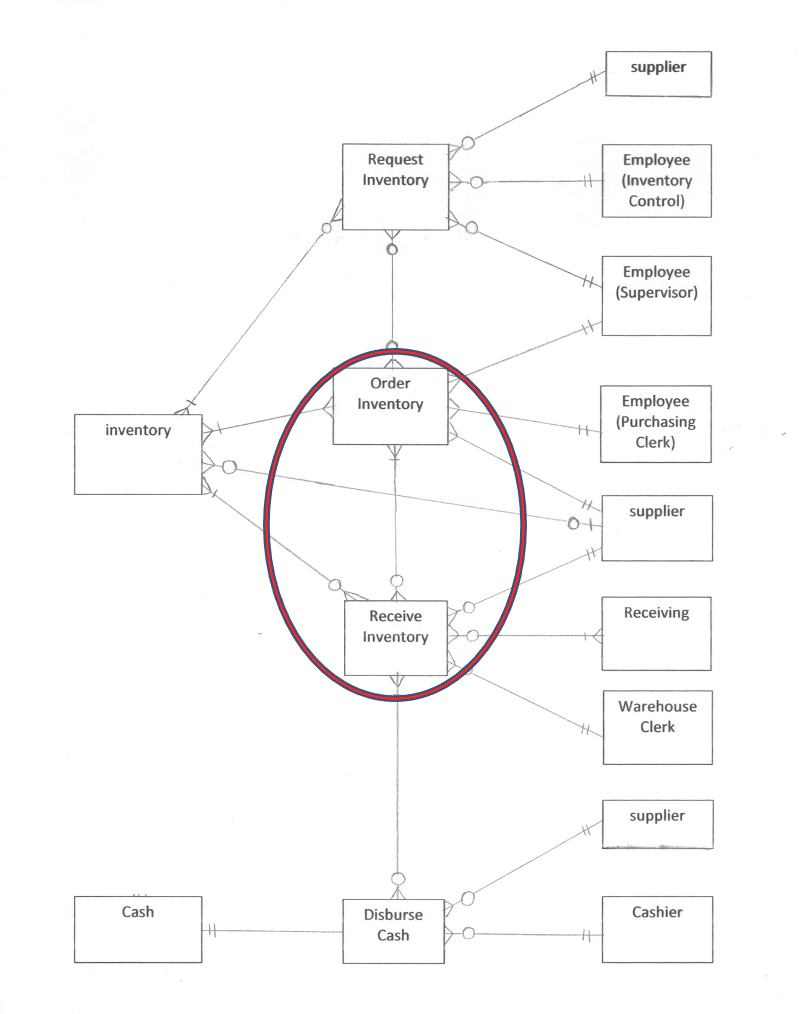
supplier Request Employee Inventory (Inventory Control) Employee (Supervisor) Order Inventory Employee H (Purchasing inventory Clerk) supplier Receive Receiving Inventory Warehouse Clerk supplier Cashier Cash Disburse Cash H
Step by Step Solution
There are 3 Steps involved in it

Get step-by-step solutions from verified subject matter experts
 Study Help