







Question: Implement this assignment using JAVA Language. Note: Implementation should be using JAVA. Problems/Assignments Banking System Create a Banking System, where a user can create new
Implement this assignment using JAVA Language.

Note: Implementation should be using JAVA.
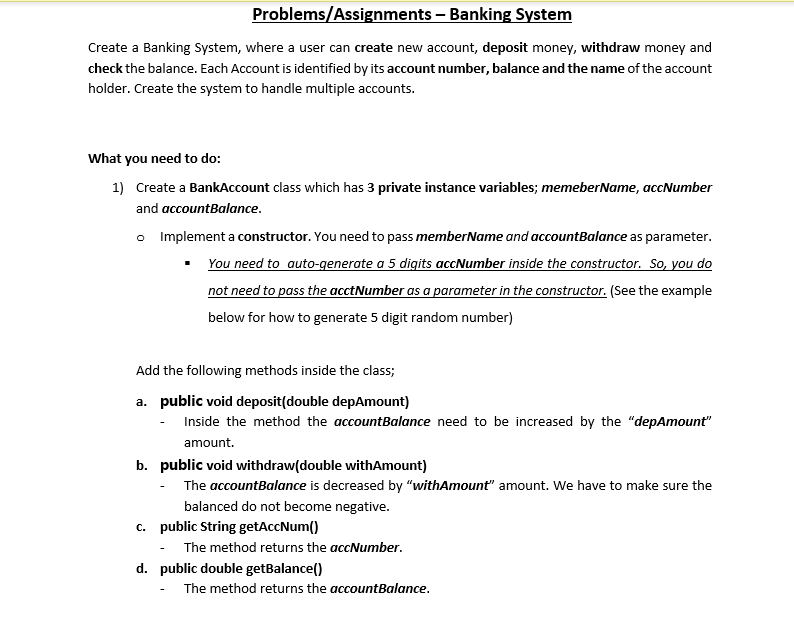
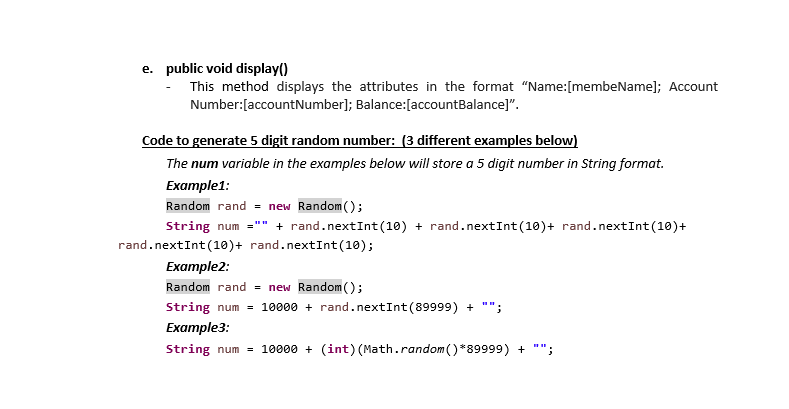
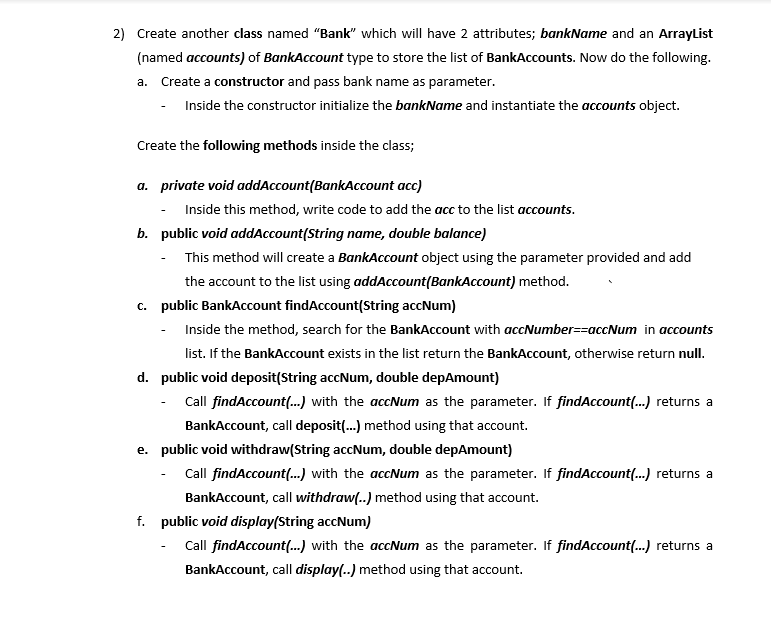
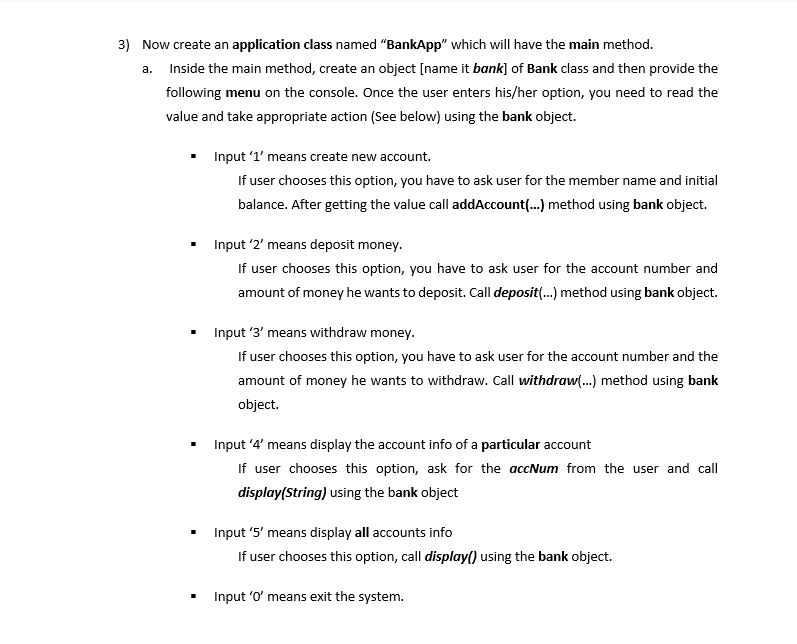
Problems/Assignments Banking System Create a Banking System, where a user can create new account, deposit money, withdraw money and check the balance. Each Account is identified by its account number, balance and the name of the account holder. Create the system to handle multiple accounts. What you need to do: 1) Create a BankAccount class which has 3 private instance variables; memeberName, accNumber and accountBalance. o Implement a constructor. You need to pass member Name and accountBalance as parameter. You need to auto-generate a 5 digits accNumber inside the constructor. So, you do not need to pass the acctNumber as a parameter in the constructor. (See the example below for how to generate 5 digit random number) Add the following methods inside the class; a. public void deposit(double depAmount) Inside the method the accountBalance need to be increased by the "depAmount" amount b. public void withdraw(double withAmount) The accountBalance is decreased by "withAmount" amount. We have to make sure the balanced do not become negative. c. public String getAccNum() The method returns the accNumber. d. public double getBalance() The method returns the accountBalance. e. public void display() This method displays the attributes in the format "Name:[membeName); Account Number:[account Number]; Balance:[accountBalance)". Code to generate 5 digit random number: (3 different examples below) The num variable in the examples below will store a 5 digit number in String format. Example1: Random rand = new Random(); String num="" + rand.nextInt(10) + rand.nextInt(10)+ rand.nextInt(10)+ rand.nextInt(10)+ rand.nextInt(10); Example2: Random rand = new Random(); String num = 10000 + rand.nextInt(89999) + ""; Example: String num = 10000 + (int) (Math.random()*89999) + ""; 2) Create another class named "Bank which will have 2 attributes; bankName and an ArrayList (named accounts) of BankAccount type to store the list of BankAccounts. Now do the following. a. Create a constructor and pass bank name as parameter. - Inside the constructor initialize the bankName and instantiate the accounts object. Create the following methods inside the class; a. private void addAccount(BankAccount acc) - Inside this method, write code to add the acc to the list accounts. b. public void addAccount(String name, double balance) This method will create a BankAccount object using the parameter provided and add the account to the list using addAccount(BankAccount) method. C. public BankAccount findAccount(String accNum) Inside the method, search for the BankAccount with accNumber=raccNum in accounts list. If the BankAccount exists in the list return the BankAccount, otherwise return null. d. public void deposit(String accNum, double depAmount) - Call findAccount(...) with the accNum as the parameter. If findAccount (...) returns a BankAccount, call deposit(...) method using that account. e. public void withdraw(String accNum, double depAmount) Call findAccount (...) with the accNum as the parameter. If findAccount(...) returns a BankAccount, call withdraw(..) method using that account. f. public void display(String accNum) Call findAccount(...) with the accNum as the parameter. If findAccount(...) returns a BankAccount, call display() method using that account. g. public void display() Inside the method, display info of all BankAccounts in "accounts" arraylist. Use BankAccount class's display() method to display each BankAccount's info. 3) Now create an application class named "BankApp" which will have the main method. a. Inside the main method, create an object [name it bank] of Bank class and then provide the following menu on the console. Once the user enters his/her option, you need to read the value and take appropriate action (See below) using the bank object. Input 'l' means create new account. If user chooses this option, you have to ask user for the member name and initial balance. After getting the value call addAccount(...) method using bank object. Input '2' means deposit money. If user chooses this option, you have to ask user for the account number and amount of money he wants to deposit. Call deposit (...) method using bank object. Input '3' means withdraw money. If user chooses this option, you have to ask user for the account number and the amount of money he wants to withdraw. Call withdraw...) method using bank object. Input '4' means display the account info of a particular account If user chooses this option, ask for the accNum from the user and call display(String) using the bank object Input '5' means display all accounts info If user chooses this option, call display() using the bank object. Input 'o' means exit the system
Step by Step Solution
There are 3 Steps involved in it

Get step-by-step solutions from verified subject matter experts
 Study Help