







Question: Implement using C++ confirm to new screen meaning: system(cls); and then print the data entered by the user The assignment problem: For the last assignment
Implement using C++
confirm to new screen meaning:
system("cls");
and then print the data entered by the user
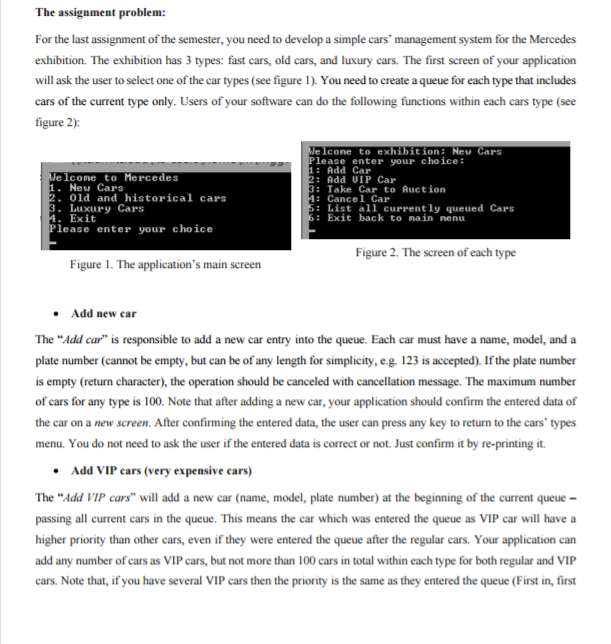
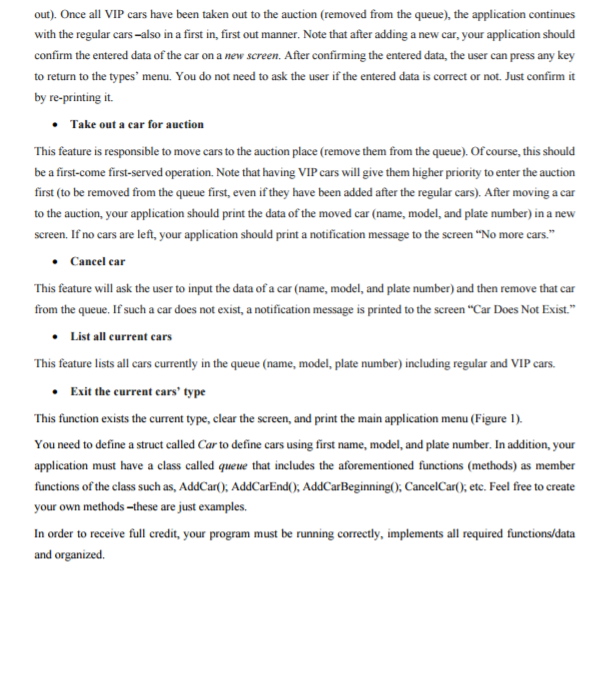
The assignment problem: For the last assignment of the semester, you need to develop a simple cars' management system for the Mercedes exhibition. The exhibition has 3 types: fast cars, old cars, and luxury cars. The first screen of your application will ask the user to select one of the car types (see figure You need to create aqueue for each type that includes cars of the current type only. Users of your software can do the following functions within each cans type (see figure 2) Cone to exhibition New Cars lease enter your choice: Add lcome to Mercedes Add UIP Car 1. New Cars Take Car to Auction 2. old and historical cars Cancel Car 3 Luxury Cars List all currently queued Cars Exit back to na in nenu A. Exit Please enter your choice Figure 2. The screen ofeach type Figure 1. The application's main screen Add new car The "Add car" is responsible to add a new car entry into the queue. Each car must have a name, model, and a plate number (cannot be empty, but can be of any length for simplicity, e.g. 123 is accepted). If the plate number is empty (return character, the operation should be canceled with cancellation message. The maximum number of cars for any type is 100. Note that after adding a new car, your application should confirm the entered data of the car on a new screen. After confirming the entered data, the user can press any key to return to the cars' types menu. You do not need to ask the user if the entered data is correct or not. Just confirm it by re-printing it. Add VIP cars (very expensive cars) The "Add VIP cars" will add a new car (name, model, plate number) at the beginning of the current queue passing all current cars in the queue. This means the car which was entered the queue as VIP car will have a higher priority than other cars, even if they were entered the queue after the regular cars. Your application can add any number of cars as VIP cars, but not more than 100 cars in total within each type for both regular and VIP cars. Note that, if you have several VIP cars then the priority is the same as they entered the queue (First in, first
Step by Step Solution
There are 3 Steps involved in it

Get step-by-step solutions from verified subject matter experts
 Study Help