







Question: implementing/fixing some of the code I have for my assignment. For the assignment we created a calculator in c++ using wxWidgets. I am currently in
implementing/fixing some of the code I have for my assignment. For the assignment we created a calculator in c++ using wxWidgets. I am currently in the process of refactoring my code. I completed a button factory for all my buttons, but I'm having some problems with the string tokenizer and the singleton processor. The picture of my instructions is down below.
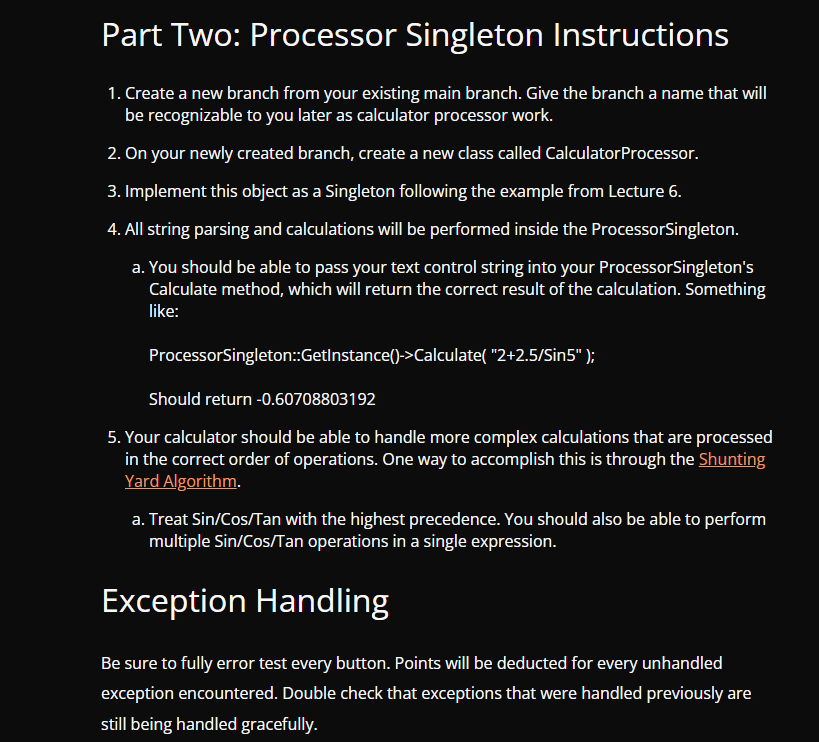
From the calculate result function I have within my Singleton processor class, whenever I plug in 2+2 into the calculator, it returns 6. It seems like its hitting my loop an extra time and I'm not sure if its because of my delimiter while tokenizing, or if it is an error with my logic. I've seen some examples of tokenizing where they break it into two different functions and store it within a vector, but I am not sure if that would be more complicated than fixing what I already have. I'm indifferent to the way we fix it, I just want to make sure that I get the calculator to return the correct results again. I will provide my files in a code block below, thank you for taking the time to read over my message and potentially help me. If there is anything I can do to provide more information on what I have tried or how we should go about it please let me know :)
Below is App.h ------------------------------- #pragma once #include "wx/wx.h" class Window; class App : public wxApp { Window* window = nullptr; public: virtual bool OnInit(); }; End of App.h ---------------------------------- App.Cpp #include "App.h" #include "window.h" //We want App to run first this is where we implement it wxIMPLEMENT_APP(App); //Lecture Example Setup Opening Window bool App::OnInit() { window = new Window("Calculator", wxDefaultPosition, wxSize(400,600)); window->Show(); return true; } End of App.cpp -------------------------------------- ButtonFactory.h #pragma once #include "wx/wx.h" class ButtonFactory { public: //initialize buttons with pointers //change main to take a label static wxButton* CreateButton(wxWindow* parent, wxWindowID id, const wxString& label); static wxButton* CreateNumButton(wxWindow* parent, wxWindowID id, const wxString& label); static wxButton* CreateAddButton(wxWindow* parent, wxWindowID id); static wxButton* CreateSubButton(wxWindow* parent, wxWindowID id); static wxButton* CreateMultButton(wxWindow* parent, wxWindowID id); static wxButton* CreateDivButton(wxWindow* parent, wxWindowID id); static wxButton* CreateModButton(wxWindow* parent, wxWindowID id); static wxButton* CreateDecButton(wxWindow* parent, wxWindowID id); static wxButton* CreateNegButton(wxWindow* parent, wxWindowID id); static wxButton* CreateClrButton(wxWindow* parent, wxWindowID id); static wxButton* CreateSinButton(wxWindow* parent, wxWindowID id); static wxButton* CreateCosButton(wxWindow* parent, wxWindowID id); static wxButton* CreateTanButton(wxWindow* parent, wxWindowID id); static wxButton* CreateBackButton(wxWindow* parent, wxWindowID id); static wxButton* CreateEqualButton(wxWindow* parent, wxWindowID id); private: static wxButton* CreateOperatorButton(wxWindow* parent, wxWindowID id, const wxString& label); }; End of ButtonFactory.h ------------------------------------------- ButtonFactory.cpp #include "ButtonFactory.h" wxButton* ButtonFactory::CreateButton(wxWindow* parent, wxWindowID id, const wxString& label) { return new wxButton(parent, id, label); } wxButton* ButtonFactory::CreateNumButton(wxWindow* parent, wxWindowID id, const wxString& label) { return CreateButton(parent, id, label); } wxButton* ButtonFactory::CreateAddButton(wxWindow* parent, wxWindowID id) { return CreateOperatorButton(parent, id, " + "); } wxButton* ButtonFactory::CreateSubButton(wxWindow* parent, wxWindowID id) { return CreateOperatorButton(parent, id, "-"); } wxButton* ButtonFactory::CreateMultButton(wxWindow* parent, wxWindowID id) { return CreateOperatorButton(parent, id, "*"); } wxButton* ButtonFactory::CreateDivButton(wxWindow* parent, wxWindowID id) { return CreateOperatorButton(parent, id, "/"); } wxButton* ButtonFactory::CreateModButton(wxWindow* parent, wxWindowID id) { return CreateOperatorButton(parent, id, "%"); } wxButton* ButtonFactory::CreateDecButton(wxWindow* parent, wxWindowID id) { return CreateButton(parent, id, "."); } wxButton* ButtonFactory::CreateNegButton(wxWindow* parent, wxWindowID id) { return CreateButton(parent, id, "Neg"); } wxButton* ButtonFactory::CreateClrButton(wxWindow* parent, wxWindowID id) { return CreateButton(parent, id, "Clear"); } wxButton* ButtonFactory::CreateSinButton(wxWindow* parent, wxWindowID id) { return CreateOperatorButton(parent, id, "sin"); } wxButton* ButtonFactory::CreateCosButton(wxWindow* parent, wxWindowID id) { return CreateOperatorButton(parent, id, "cos"); } wxButton* ButtonFactory::CreateTanButton(wxWindow* parent, wxWindowID id) { return CreateOperatorButton(parent, id, "tan"); } wxButton* ButtonFactory::CreateBackButton(wxWindow* parent, wxWindowID id) { return CreateButton(parent, id, " class ProcessorSingleton { public: static ProcessorSingleton* GetInstance(); double Calculate(const wxString& expression); private: ProcessorSingleton() = default; static ProcessorSingleton* instance; }; End of SingletonProcessor.h ---------------------------------- Below is SingletonProcessor.cpp //this is where the problem exists #include "SingletonProcessor.h" #include #include //pointers ProcessorSingleton* ProcessorSingleton::instance = nullptr; ProcessorSingleton* ProcessorSingleton::GetInstance() { if (!instance) { instance = new ProcessorSingleton(); } return instance; } double ProcessorSingleton::Calculate(const wxString& expression) { // Implement the Shunting Yard Algorithm for expression evaluation wxStringTokenizer tokenizer(expression, " "); double result = 0; wxString lastOp; while (tokenizer.HasMoreTokens()) { wxString token = tokenizer.GetNextToken(); if (token.IsNumber()) { double number; token.ToDouble(&number); // Perform calculations based on operators // Implement Shunting Yard logic here result += number; } else { lastOp = token; } } return result; } End of SingletonProcessor.cpp ------------------------------------------ Window.h #pragma once #include "wx/event.h" #include "wx/sizer.h" #include #include #include #include class Window : public wxFrame { public: Window(const wxString& title, const wxPoint& pos, const wxSize& size); private: wxTextCtrl* textBox; void OnButtonClicked(wxCommandEvent& event); wxDECLARE_EVENT_TABLE(); //24 buttons //6 Rows x 4 Columns }; End of Window.h -------------------------------------- Window.cpp #include "Window.h" #include #include #include #include "ButtonFactory.h" #include "SingletonProcessor.h" //THIS IS WHERE THE UI DESIGN TAKES PLACE wxBEGIN_EVENT_TABLE(Window, wxFrame) EVT_BUTTON(wxID_ANY, Window::OnButtonClicked) wxEND_EVENT_TABLE() //no parent window since this is beginning of UI(so we put nullptr) //normally you need to pass through ID but using ID Any since its the parent //then passes in title //wxPoint tells us where to create the window (based off of upper left hand corner) //then window size Window::Window(const wxString& title, const wxPoint& pos, const wxSize& size) : wxFrame(nullptr, wxID_ANY, "Calculator Window", wxPoint(250, 200), wxSize(465, 600)) { //create sizers for UI instead of hardcoded points like last time wxBoxSizer* calcSizer = new wxBoxSizer(wxVERTICAL); //textBox //with alignment parameters textBox = new wxTextCtrl(this, wxID_ANY, "", wxDefaultPosition, wxDefaultSize, wxTE_RIGHT); calcSizer->Add(textBox, 0, wxEXPAND | wxALL, 5); //6 rows 4 cloumns wxGridSizer* buttonGrid = new wxGridSizer(6, 4, 3, 3); //Create Other Buttons buttonGrid->Add(ButtonFactory::CreateAddButton(this, wxID_ANY), 0, wxEXPAND); buttonGrid->Add(ButtonFactory::CreateSubButton(this, wxID_ANY), 0, wxEXPAND); buttonGrid->Add(ButtonFactory::CreateMultButton(this, wxID_ANY), 0, wxEXPAND); buttonGrid->Add(ButtonFactory::CreateDivButton(this, wxID_ANY), 0, wxEXPAND); buttonGrid->Add(ButtonFactory::CreateModButton(this, wxID_ANY), 0, wxEXPAND); buttonGrid->Add(ButtonFactory::CreateClrButton(this, wxID_ANY), 0, wxEXPAND); buttonGrid->Add(ButtonFactory::CreateDecButton(this, wxID_ANY), 0, wxEXPAND); buttonGrid->Add(ButtonFactory::CreateSinButton(this, wxID_ANY), 0, wxEXPAND); buttonGrid->Add(ButtonFactory::CreateCosButton(this, wxID_ANY), 0, wxEXPAND); buttonGrid->Add(ButtonFactory::CreateTanButton(this, wxID_ANY), 0, wxEXPAND); buttonGrid->Add(ButtonFactory::CreateEqualButton(this, wxID_ANY), 0, wxEXPAND); buttonGrid->Add(ButtonFactory::CreateBackButton(this, wxID_ANY), 0, wxEXPAND); //Button factory for buttons //Create Num Buttons buttonGrid->Add(ButtonFactory::CreateNumButton(this, wxID_ANY, "0"), 0, wxEXPAND); buttonGrid->Add(ButtonFactory::CreateNumButton(this, wxID_ANY, "1"), 0, wxEXPAND); buttonGrid->Add(ButtonFactory::CreateNumButton(this, wxID_ANY, "2"), 0, wxEXPAND); buttonGrid->Add(ButtonFactory::CreateNumButton(this, wxID_ANY, "3"), 0, wxEXPAND); buttonGrid->Add(ButtonFactory::CreateNumButton(this, wxID_ANY, "4"), 0, wxEXPAND); buttonGrid->Add(ButtonFactory::CreateNumButton(this, wxID_ANY, "5"), 0, wxEXPAND); buttonGrid->Add(ButtonFactory::CreateNumButton(this, wxID_ANY, "6"), 0, wxEXPAND); buttonGrid->Add(ButtonFactory::CreateNumButton(this, wxID_ANY, "7"), 0, wxEXPAND); buttonGrid->Add(ButtonFactory::CreateNumButton(this, wxID_ANY, "8"), 0, wxEXPAND); buttonGrid->Add(ButtonFactory::CreateNumButton(this, wxID_ANY, "9"), 0, wxEXPAND); calcSizer->Add(buttonGrid, 1, wxEXPAND | wxALL, 5); SetSizer(calcSizer); //reate my own font //xFont myFont(16, wxFONTFAMILY_ROMAN, wxFONTSTYLE_NORMAL, wxFONTWEIGHT_BOLD); //extBox->SetFont(myFont); //extBox->SetMaxLength(15); } //tester to see if buttons are working void Window::OnButtonClicked(wxCommandEvent& event) { wxButton* button = wxDynamicCast(event.GetEventObject(), wxButton); if (button) { wxString label = button->GetLabel(); wxString currentText = textBox->GetValue(); if (label == " = ") { // Use Singleton Processor algorithim to calculate the result double result = ProcessorSingleton::GetInstance()->Calculate(currentText); currentText = wxString::Format("%.2f", result); } else { // Handle other button clicks similarly if (label.IsNumber()) { currentText += label; } else if (label == " + " || label == "-" || label == "*" || label == "/" || label == "%" || label == "sin" || label == "cos" || label == "tan") { currentText += " " + label + " "; } // Add more conditions for other buttons else if (label == "Clear") { currentText = ""; } // For custom buttons created in ButtonFactory // else if (label == "CustomButtonLabel") // { // // Handle the custom button // } } textBox->SetValue(currentText); } } End of Window.cpp Part Two: Processor Singleton Instructions 1. Create a new branch from your existing main branch. Give the branch a name that will be recognizable to you later as calculator processor work. 2. On your newly created branch, create a new class called Calculator Processor. 3. Implement this object as a Singleton following the example from Lecture 6. 4. All string parsing and calculations will be performed inside the ProcessorSingleton. a. You should be able to pass your text control string into your ProcessorSingleton's Calculate method, which will return the correct result of the calculation. Something like: Processor Singleton::GetInstance()->Calculate( "2+2.5/Sin5" ); Should return -0.60708803192 5. Your calculator should be able to handle more complex calculations that are processed in the correct order of operations. One way to accomplish this is through the Shunting Yard Algorithm. a. Treat Sin/Cos/Tan with the highest precedence. You should also be able to perform multiple Sin/Cos/Tan operations in a single expression. Exception Handling Be sure to fully error test every button. Points will be deducted for every unhandled exception encountered. Double check that exceptions that were handled previously are still being handled gracefully.
Step by Step Solution
There are 3 Steps involved in it

Get step-by-step solutions from verified subject matter experts
 Study Help