







Question: import javafx.geometry.Point2D; public class PartImage { private boolean[][] pixels; private boolean[][] visited; private int rows; private int cols; public PartImage(int r, int c) { rows
![import javafx.geometry.Point2D; public class PartImage { private boolean[][] pixels; private boolean[][]](https://dsd5zvtm8ll6.cloudfront.net/si.experts.images/questions/2024/09/66e3d97828cdc_37566e3d9778b0be.jpg)
![{ rows = r; cols = c; visited = new boolean[r][c]; pixels](https://dsd5zvtm8ll6.cloudfront.net/si.experts.images/questions/2024/09/66e3d97941d9f_37666e3d978d6456.jpg)
![= new boolean[r][c]; } public PartImage(int rw, int cl, byte[][] data) {](https://dsd5zvtm8ll6.cloudfront.net/si.experts.images/questions/2024/09/66e3d979cf124_37766e3d97981538.jpg)
import javafx.geometry.Point2D; public class PartImage { private boolean[][] pixels; private boolean[][] visited; private int rows; private int cols; public PartImage(int r, int c) { rows = r; cols = c; visited = new boolean[r][c]; pixels = new boolean[r][c]; } public PartImage(int rw, int cl, byte[][] data) { this(rw,cl); for (int r=0; r 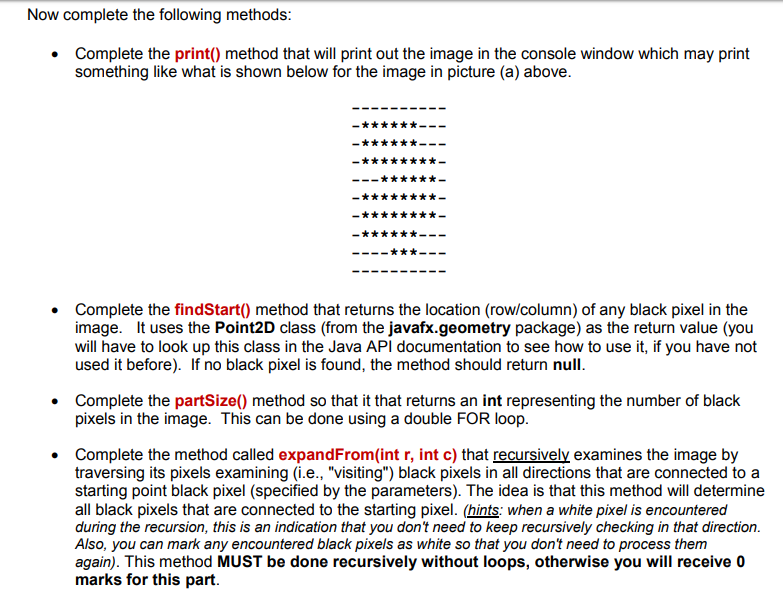
![main(String[] args) { PartImage piA = PartImage.exampleA(); PartImage piB = PartImage.exampleB(); PartImage](https://dsd5zvtm8ll6.cloudfront.net/si.experts.images/questions/2024/09/66e3d97b65308_37866e3d97ae5e04.jpg)
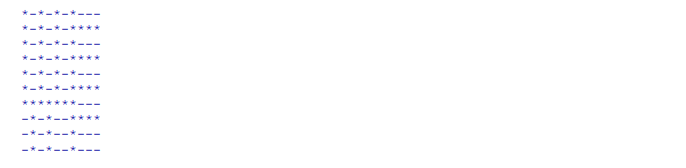
public class PartImageTester { public static void main(String[] args) { PartImage piA = PartImage.exampleA(); PartImage piB = PartImage.exampleB(); PartImage piC = PartImage.exampleC(); PartImage piD = PartImage.exampleD(); System.out.println(" Part A:"); System.out.println(" starts at: " + PartImage.exampleA().findStart()); System.out.println(" size: " + PartImage.exampleA().partSize()); System.out.println(" broken: " + PartImage.exampleA().isBroken()); System.out.println(" perimeter: " + PartImage.exampleA().perimeter() + " "); piA.print(); System.out.println(" Part B:"); System.out.println(" starts at: " + PartImage.exampleB().findStart()); System.out.println(" size: " + PartImage.exampleB().partSize()); System.out.println(" broken: " + PartImage.exampleB().isBroken()); System.out.println(" perimeter: " + PartImage.exampleB().perimeter() + " "); piB.print(); System.out.println(" Part C:"); System.out.println(" starts at: " + PartImage.exampleC().findStart()); System.out.println(" size: " + PartImage.exampleC().partSize()); System.out.println(" broken: " + PartImage.exampleC().isBroken()); System.out.println(" perimeter: " + PartImage.exampleC().perimeter() + " "); piC.print(); System.out.println(" Part D:"); System.out.println(" starts at: " + PartImage.exampleD().findStart()); System.out.println(" size: " + PartImage.exampleD().partSize()); System.out.println(" broken: " + PartImage.exampleD().isBroken()); System.out.println(" perimeter: " + PartImage.exampleD().perimeter() + " "); piD.print(); } } 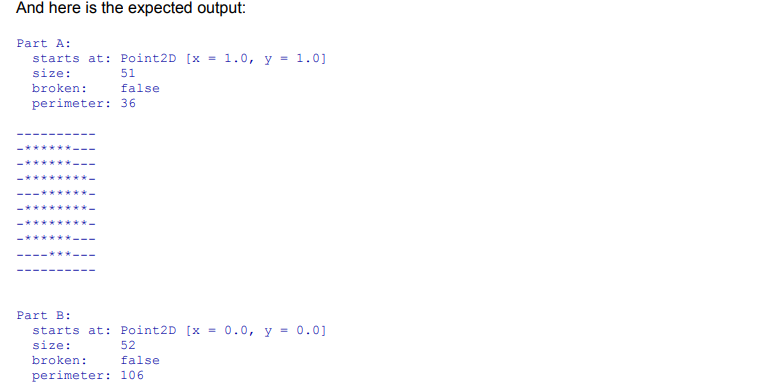
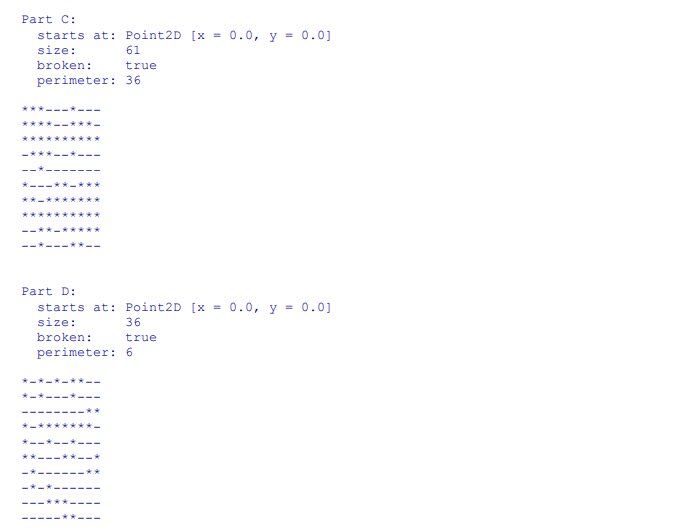
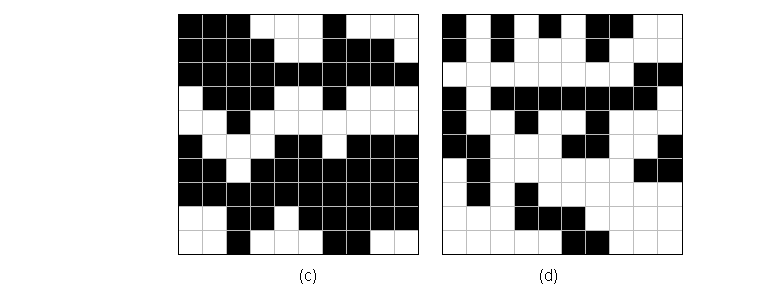
In this assignment, you will practice using recursion Assume that we have an assembly line that can take a picture of a machine part which moves along a conveyor belt. The picture (or image) is represented as a 2D grid of pixels which are either black or white. The pixels can be accessed by specifying the row and column of the pixel where rows and columns are specified by an integer value The machine examines the images and attempts to determine whether or not the parts are broken. A broken part will appear as a set of black pixels which are not all connected together (i.e., there is a separation between one or more sets of black pixel groups. Here are some examples of four possible images. Note that (c) and (d) represent images of broken parts. The red border represents the perimeter of a part composed of black pixels 10 rows 2 1 2 3 4 5 6 78 9 10 columns In this assignment, you will practice using recursion Assume that we have an assembly line that can take a picture of a machine part which moves along a conveyor belt. The picture (or image) is represented as a 2D grid of pixels which are either black or white. The pixels can be accessed by specifying the row and column of the pixel where rows and columns are specified by an integer value The machine examines the images and attempts to determine whether or not the parts are broken. A broken part will appear as a set of black pixels which are not all connected together (i.e., there is a separation between one or more sets of black pixel groups. Here are some examples of four possible images. Note that (c) and (d) represent images of broken parts. The red border represents the perimeter of a part composed of black pixels 10 rows 2 1 2 3 4 5 6 78 9 10 columns Step by Step Solution
There are 3 Steps involved in it
1 Expert Approved Answer
Step: 1 Unlock

Question Has Been Solved by an Expert!
Get step-by-step solutions from verified subject matter experts
Step: 2 Unlock
Step: 3 Unlock
 Study Help