







Question: import java.io.*; import java.util.*; public class HW2 { public static double y(double x) { double up = 9 * x * x * x -
import java.io.*;
import java.util.*;
public class HW2 {
public static double y(double x) {
double up = 9 * x * x * x - 27 * x * x - 4 * x + 12; // 9x^3 - 27x^2 - 4x + 12
double down = Math.sqrt(3 * x * x + 1) + Math.abs(5 - x * x * x * x); // sqrt(3x^2 + 1) + |5 - x^4|
return up / down;
}
public static void main(String[] args) throws Exception {
// open file for output
PrintWriter out = new PrintWriter(new FileWriter("HW2.txt"));
double closeTo10 = -3; // initial value
int pos = 0, neg = 0, zero = 0; // counters
double value = 1e6; // initial value
for (double x = -3; x
double t = y(x); // calculate y(x)
out.printf("X = %.1f \tY = %.3f\t", x, t); // print x and y(x)
if (t == 0.0) { // check if y(x) is zero
out.println("Y IS ZERO"); // print zero
zero++; // increment zero counter
} else if (t > 0) { // check if y(x) is positive
out.println("Y IS POSITIVE"); // print positive
pos++; // increment positive counter
} else { // otherwise, y(x) is negative
out.println("Y IS NEGATIVE"); // print negative
neg++; // increment negative counter
}
if (Math.abs(t - 10)
value = Math.abs(t - 10); // update value
closeTo10 = x; // update closest to 10
}
}
out.println("Optional part\t\tvalue"); // print optional part
out.printf("Closest to 10 is\t%.1f", closeTo10); // print closest to 10
out.println(); // print new line
out.printf("Number of positive\t%d", pos); // print number of positive
out.println(); // print new line
out.printf("Number of negative\t%d", neg); // print number of negative
out.println(); // print new line
out.printf("Number of zero\t\t%d", zero); // print number of zero
out.println(); // print new line
out.println("Done."); // print done
out.close();
}
}
in my code can take out else statements and the public static double y(double x) and the code run without it
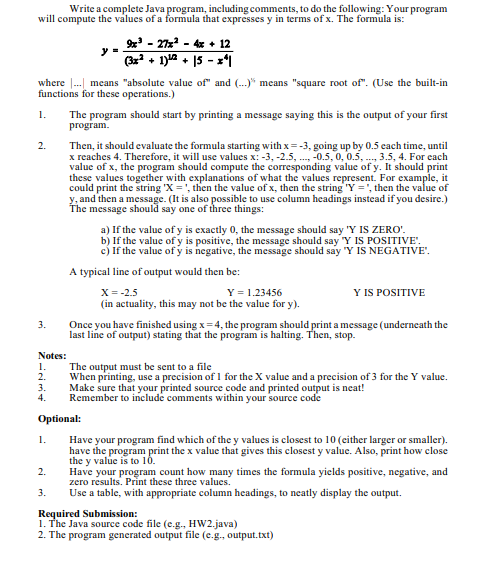
Write a complete Java program, including comments, to do the following: Your program will compute the values of a formula that expresses y in terms of x. The formula is: y=(3x2+1)12+5x49x327x24x+12 where means "absolute value of" and ()1/6 means "square root of". (Use the built-in functions for these operations.) 1. The program should start by printing a message saying this is the output of your first program. 2. Then, it should evaluate the formula starting with x=3, going up by 0.5 each time, until x reaches 4 . Therefore, it will use values x:3,2.5,,0.5,0,0.5,,3.5,4. For each value of x, the program should compute the corresponding value of y. It should print these values together with explanations of what the values represent. For example, it could print the string ' X= ', then the value of x, then the string 'Y = ", then the value of y, and then a message. (It is also possible to use column headings instead if you desire.) The message should say one of three things: a) If the value of y is exactly 0 , the message should say 'Y IS ZERO'. b) If the value of y is positive, the message should say 'Y IS POSITIVE". c) If the value of y is negative, the message should say "Y IS NEGATIVE". A typical line of output would then be: X=2.5Y=1.23456YISPOSITIVE (in actuality, this may not be the value for y ). 3. Once you have finished using x=4, the program should print a message (underneath the last line of output) stating that the program is halting. Then, stop. Notes: 1. The output must be sent to a file 2. When printing, use a precision of 1 for the X value and a precision of 3 for the Y value. 3. Make sure that your printed source code and printed output is neat! 4. Remember to include comments within your source code Optional: 1. Have your program find which of the y values is closest to 10 (either larger or smaller). have the program print the x value that gives this closest y value. Also, print how close the y value is to 10 . 2. Have your program count how many times the formula yields positive, negative, and zero results. Print these three values. 3. Use a table, with appropriate column headings, to neatly display the output. Required Submission: 1. The Java source code file (e.g., HW2.java) 2. The program generated output file (e.g., output.txt)
Step by Step Solution
There are 3 Steps involved in it

Get step-by-step solutions from verified subject matter experts
 Study Help