







Question: import java.io.*; public class Main { public static void main(String[] args) { // object creation test Mammal m1 = new Mammal(false, terrestrial, 4, herbivore); System.out.println(m1);
![import java.io.*; public class Main { public static void main(String[] args)](https://dsd5zvtm8ll6.cloudfront.net/si.experts.images/questions/2024/09/66f5a2ab6b6bc_99466f5a2aae915a.jpg)
import java.io.*;
public class Main {
public static void main(String[] args) {
// object creation test
Mammal m1 = new Mammal(false, "terrestrial", 4, "herbivore"); System.out.println(m1);
Mammal m2 = new Mammal(false, "aquatic", 0, "carnivore"); System.out.println(m2);
Horse h1 = new Horse("brown"); Horse h2 = new Horse("brown"); Horse h3 = new Horse("white");
System.out.println(h1.equals(h2)); System.out.println(h1.equals(h3));
// Code for Part 2:
Animal a1 = new Animal("omnivore", 10); System.out.println(a1);
Animal a2 = new Animal("carnivore", 8); System.out.println(a2);
Animal a3 = new Animal("herbivore", 4); System.out.println(a3);
Animal a4 = new Animal("carnivore", 30); System.out.println(a4);
Animal a5 = new Animal("omnivore", 2); System.out.println(a5);
} }
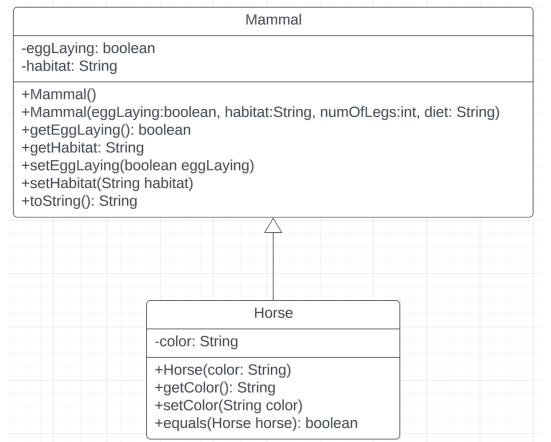
Download the zip file which contains the Main and Animal class. Main contains the main method which has a test program that should run without issue. a. Create the Mammal class following the UML below. Mammal is a subclass,of Animal. Important: - Default constructor should just call the default constructor in the Animal class. - The toString() method should display the toString0 method from the Animal class as well as the instance variables for Mammal, eggLaying and habitat. b. Create the Horse class following the UML below. Horse is a subclass of Mammal. - The default constructor should call the appropriate constructor in the Mammal class to set eggLaying to false, habitat to terrestrial, numOfLegs to 4 , and diet to herbivore. - Two horses are equal if both horses have the same color and if all of the conditions in the Animal class's equals method are met. \begin{tabular}{|l|} \hline \multicolumn{1}{|c|}{ Mammal } \\ \hline -eggLaying: boolean \\ -habitat: String \\ \hline +Mammal) \\ +Mammal(eggLaying:boolean, habitat:String, numOfLegs:int, diet: String) \\ +getEggLaying(): boolean \\ +getHabitat: String \\ +setEggLaying(boolean eggLaying) \\ +setHabitat(String habitat) \\ +toString(: String \\ \hline \end{tabular} \begin{tabular}{|l|} \hline \multicolumn{1}{|c|}{ Horse } \\ \hline -color: String \\ \hline +Horse(color: String) \\ +getColor(): String \\ + setColor(String color) \\ +equals(Horse horse): boolean \\ \hline \end{tabular} Download the zip file which contains the Main and Animal class. Main contains the main method which has a test program that should run without issue. a. Create the Mammal class following the UML below. Mammal is a subclass,of Animal. Important: - Default constructor should just call the default constructor in the Animal class. - The toString() method should display the toString0 method from the Animal class as well as the instance variables for Mammal, eggLaying and habitat. b. Create the Horse class following the UML below. Horse is a subclass of Mammal. - The default constructor should call the appropriate constructor in the Mammal class to set eggLaying to false, habitat to terrestrial, numOfLegs to 4 , and diet to herbivore. - Two horses are equal if both horses have the same color and if all of the conditions in the Animal class's equals method are met. \begin{tabular}{|l|} \hline \multicolumn{1}{|c|}{ Mammal } \\ \hline -eggLaying: boolean \\ -habitat: String \\ \hline +Mammal) \\ +Mammal(eggLaying:boolean, habitat:String, numOfLegs:int, diet: String) \\ +getEggLaying(): boolean \\ +getHabitat: String \\ +setEggLaying(boolean eggLaying) \\ +setHabitat(String habitat) \\ +toString(: String \\ \hline \end{tabular} \begin{tabular}{|l|} \hline \multicolumn{1}{|c|}{ Horse } \\ \hline -color: String \\ \hline +Horse(color: String) \\ +getColor(): String \\ + setColor(String color) \\ +equals(Horse horse): boolean \\ \hline \end{tabular}
Step by Step Solution
There are 3 Steps involved in it

Get step-by-step solutions from verified subject matter experts
 Study Help