







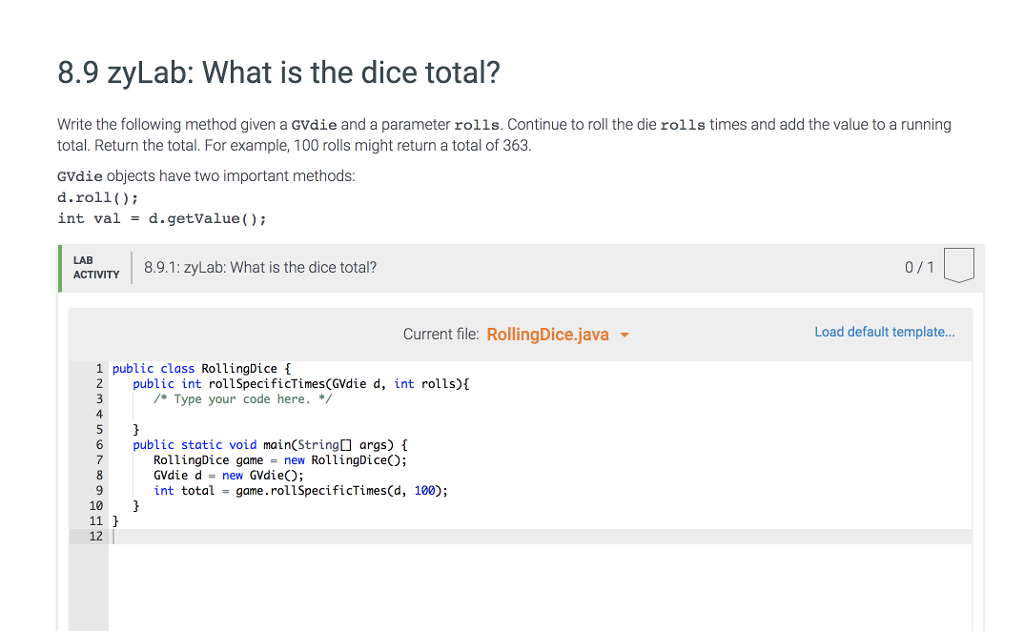
Question: import java.util.*; import java.awt.*; import java.awt.event.*; import javax.swing.*; import javax.swing.border.*; GVdice die1 = new GVdice(); die1.roll( ); int result = die1.getValue(); public class GVdie extends
import java.util.*; import java.awt.*; import java.awt.event.*; import javax.swing.*; import javax.swing.border.*; GVdice die1 = new GVdice(); die1.roll( ); int result = die1.getValue();
public class GVdie extends JPanel implements MouseListener, Comparable{ private int myValue, displayValue;
private Random rand;
public GVdie() { this(100); }
/ public void roll (){ myValue = rand.nextInt(6) + 1;
}
public int getValue(){ return myValue; }
public GVdie(int size) { mySize = size; held = false; dotSize = mySize / 5; int spacer = (mySize - (3*dotSize))/4; left = spacer; right = mySize - spacer - dotSize; middle = (mySize - dotSize) /2; setBackground(BACKGROUND); setForeground(Color.black); setSize(size,size); setPreferredSize(new Dimension(size, size)); setMinimumSize(new Dimension(size, size)); setMaximumSize(new Dimension(size, size));
Border raised = BorderFactory.createRaisedBevelBorder(); Border lowered = BorderFactory.createLoweredBevelBorder(); Border compound = BorderFactory.createCompoundBorder(raised, lowered); setBorder(compound);
displayValue = myValue = (int) (Math.random()*6)+1; setNumRolls(6); myTimer = new javax.swing.Timer(250, new Animator()); addMouseListener(this);
rand = new Random(); } public boolean isHeld(){ return held; }
public void setBlank(){ displayValue = 0; repaint(); }
public void setHeld(boolean h){ held = h; if(held){ setBackground(HELD_COLOR); }else{ setBackground(BACKGROUND); } repaint(); }
public void setForeground(Color c){ super.setForeground(c); }
public void setDelay (int msec){ if (msec > 0) myTimer = new javax.swing.Timer(msec, new Animator()); }
public void setNumRolls (int num){ NUM_ROLLS = 0; if (num > 0) NUM_ROLLS = num; }
public void setSeed(int seed){ rand.setSeed(seed);
}
public void paintComponent(Graphics g){ super.paintComponent(g);
// paint dots switch (displayValue){ case 1: g.fillOval (middle,middle,dotSize,dotSize); break; case 2: g.fillOval (left,left,dotSize,dotSize); g.fillOval (right,right,dotSize,dotSize); break; case 3: g.fillOval (middle,left,dotSize,dotSize); g.fillOval (middle,middle,dotSize,dotSize); g.fillOval (middle,right,dotSize,dotSize); break; case 5: g.fillOval (middle,middle,dotSize,dotSize); // fall throught and paint four more dots case 4: g.fillOval (left,left,dotSize,dotSize); g.fillOval (left,right,dotSize,dotSize); g.fillOval (right,left,dotSize,dotSize); g.fillOval (right,right,dotSize,dotSize); break; case 6: g.fillOval (left,left,dotSize,dotSize); g.fillOval (left,middle,dotSize,dotSize); g.fillOval (left,right,dotSize,dotSize); g.fillOval (right,left,dotSize,dotSize); g.fillOval (right,middle,dotSize,dotSize); g.fillOval (right,right,dotSize,dotSize); break; }
}
public void mouseClicked(MouseEvent e){ if(held){ held = false; setBackground(BACKGROUND); }else{ held = true; setBackground(HELD_COLOR); } repaint(); } public void mousePressed(MouseEvent e){} public void mouseReleased(MouseEvent e){} public void mouseExited(MouseEvent e){} public void mouseEntered(MouseEvent e){}
public int compareTo(Object o){ GVdie d = (GVdie) o; return getValue() - d.getValue(); }
private class Animator implements ActionListener{ int count = 0; public void actionPerformed(ActionEvent e){ //displayValue = (int) (Math.random()*6)+1; displayValue = rand.nextInt(6)+1; repaint(); count++; if (count == NUM_ROLLS){ count=0; myTimer.stop(); displayValue = myValue; repaint(); } } } }
import java.util.*; import java.awt.*; import java.awt.event.*; import javax.swing.*; import javax.swing.border.*; /***************************************************************** A graphical representation of a six-sided die with various controls over the appearance. Current value is constrained between 1 and 6. You can control the size and color of the dice.
An Example
GVdice die1 = new GVdice(); die1.roll( ); int result = die1.getValue();
@author Scott Grissom @version 1.4 October 10, 2006 *****************************************************************/ public class GVdie extends JPanel implements MouseListener, Comparable{ /** current value of the die */ private int myValue, displayValue;
/** Random number generator */ private Random rand;
/***************************************************************** * default constructor creates a die of size 100 X 100 pixels *****************************************************************/ public GVdie() { this(100); }
/***************************************************************** Updates the image after obtaining a random value in the range 1 - 6. @param none @return the new value between 1 - 6 *****************************************************************/ public void roll (){ myValue = rand.nextInt(6) + 1;
// start the animated roll // myTimer.restart(); }
/***************************************************************** gets the current value of the die (1 - 6)
@return the current value of the die *****************************************************************/ public int getValue(){ return myValue; }
private boolean held;
private int mySize;
private int dotSize;
private int left;
private int right;
private int middle;
/** color of the dice when held */ private Color HELD_COLOR = Color.pink;
/** default color of dice */ private Color BACKGROUND = Color.white;
/** repeats for animation */ private int NUM_ROLLS;
/** Timer for animation */ private javax.swing.Timer myTimer;
public GVdie(int size) { // initialize the die and determine display characteristics mySize = size; held = false; dotSize = mySize / 5; int spacer = (mySize - (3*dotSize))/4; left = spacer; right = mySize - spacer - dotSize; middle = (mySize - dotSize) /2; setBackground(BACKGROUND); setForeground(Color.black); setSize(size,size); setPreferredSize(new Dimension(size, size)); setMinimumSize(new Dimension(size, size)); setMaximumSize(new Dimension(size, size));
Border raised = BorderFactory.createRaisedBevelBorder(); Border lowered = BorderFactory.createLoweredBevelBorder(); Border compound = BorderFactory.createCompoundBorder(raised, lowered); setBorder(compound);
displayValue = myValue = (int) (Math.random()*6)+1; setNumRolls(6); myTimer = new javax.swing.Timer(250, new Animator()); addMouseListener(this);
rand = new Random(); } public boolean isHeld(){ return held; }
public void setBlank(){ displayValue = 0; repaint(); }
public void setHeld(boolean h){ held = h; if(held){ setBackground(HELD_COLOR); }else{ setBackground(BACKGROUND); } repaint(); }
public void setForeground(Color c){ super.setForeground(c); }
public void setDelay (int msec){ if (msec > 0) myTimer = new javax.swing.Timer(msec, new Animator()); }
public void setNumRolls (int num){ NUM_ROLLS = 0; if (num > 0) NUM_ROLLS = num; }
public void setSeed(int seed){ rand.setSeed(seed);
}
public void paintComponent(Graphics g){ super.paintComponent(g);
switch (displayValue){ case 1: g.fillOval (middle,middle,dotSize,dotSize); break; case 2: g.fillOval (left,left,dotSize,dotSize); g.fillOval (right,right,dotSize,dotSize); break; case 3: g.fillOval (middle,left,dotSize,dotSize); g.fillOval (middle,middle,dotSize,dotSize); g.fillOval (middle,right,dotSize,dotSize); break; case 5: g.fillOval (middle,middle,dotSize,dotSize); // fall throught and paint four more dots case 4: g.fillOval (left,left,dotSize,dotSize); g.fillOval (left,right,dotSize,dotSize); g.fillOval (right,left,dotSize,dotSize); g.fillOval (right,right,dotSize,dotSize); break; case 6: g.fillOval (left,left,dotSize,dotSize); g.fillOval (left,middle,dotSize,dotSize); g.fillOval (left,right,dotSize,dotSize); g.fillOval (right,left,dotSize,dotSize); g.fillOval (right,middle,dotSize,dotSize); g.fillOval (right,right,dotSize,dotSize); break; }
}
public void mouseClicked(MouseEvent e){ if(held){ held = false; setBackground(BACKGROUND); }else{ held = true; setBackground(HELD_COLOR); } repaint(); } public void mousePressed(MouseEvent e){} public void mouseReleased(MouseEvent e){} public void mouseExited(MouseEvent e){} public void mouseEntered(MouseEvent e){}
public int compareTo(Object o){ GVdie d = (GVdie) o; return getValue() - d.getValue(); }
private class Animator implements ActionListener{ int count = 0; public void actionPerformed(ActionEvent e){ //displayValue = (int) (Math.random()*6)+1; displayValue = rand.nextInt(6)+1; repaint(); count++; if (count == NUM_ROLLS){ count=0; myTimer.stop(); displayValue = myValue; repaint(); } } } }
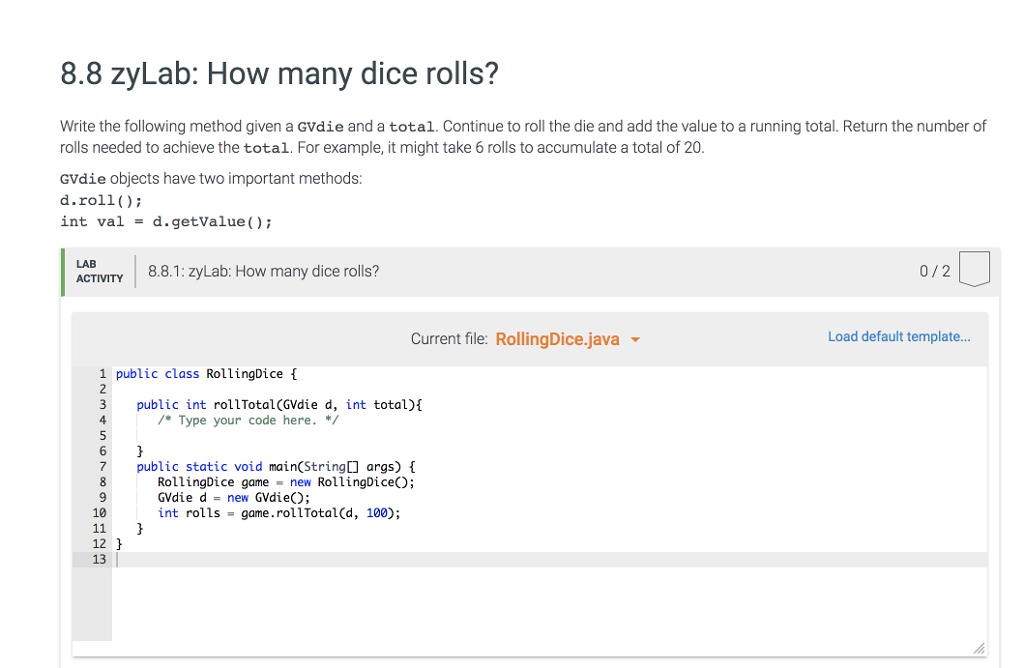
8.8 zyLab: How many dice rolls? Write the following method given a GVdie and a total. Continue to roll the die and add the value to a running total. Return the number of rolls needed to achieve the total. For example, it might take 6 rolls to accumulate a total of 20. GVdie objects have two important methods: d.roll int val -d.getValue) LAB ACTIVTY 8.8.1: zyLab: How many dice rolls? 0/2 Current file: RollingDice.java Load default template... 1 public class RollingDice f 2 3 public int rollTotal(GVdie d, int total)E 4 Type your code here. * 6 7public static void main(String[ args) 9 RollingDice game -new RollingDiceO; GVdie d-new GVdie; int rolls-game.rollTotal(d, 100); 10 12 13
Step by Step Solution
There are 3 Steps involved in it

Get step-by-step solutions from verified subject matter experts
 Study Help