







Question: import java.util.*; public class ListsManager { public ArrayList highPriority, lowPriority; // the two lists of tasks public TaskListGUI controller; // a reference to the main
import java.util.*;
public class ListsManager {
public ArrayList highPriority, lowPriority; // the two lists of tasks public TaskListGUI controller; // a reference to the main program, with the GUI
/* Constructs a ListManager object. */ public ListsManager(TaskListGUI ref) { // (you should not change the code in this method) controller = ref; initialiseLists(); }
/* Initialises both lists, to initially be empty. */ public void initialiseLists() {
}
/** * * @param task string to add at the end of the low Priority List */ public void addTask(String task) {
}
/* Removes the given task from the low-priority list. *PRE: index is a valid position in the relevant list. * @param index current position of the task * */ public void removeLowPriorityTask(int index) {
}
/* Removes the given task from the high-priority list. * PRE: index is a valid position in the relevant list. * @param index current position of the task i */ public void removeHighPriorityTask(int index) {
}
/** Changes the priority of the given task * HighPriority list is moved to the top of the low Priority list * low Priority List is moved to the end of the high Priority List * @param important indicates the priority of the task (true for high priority task) * @param index current position of the task in the relevant list of task */ public void changePriority(boolean important, int index) {
}
/* Produces a string that can be used to save the task lists. */ public String toString() {
return ""; // dummy return value (before this method is implemented) }
/* Pushes an important task one higher up. * @param index current position of the task in the relevant list of task */ public void promote(int index) {
} }
---------------------
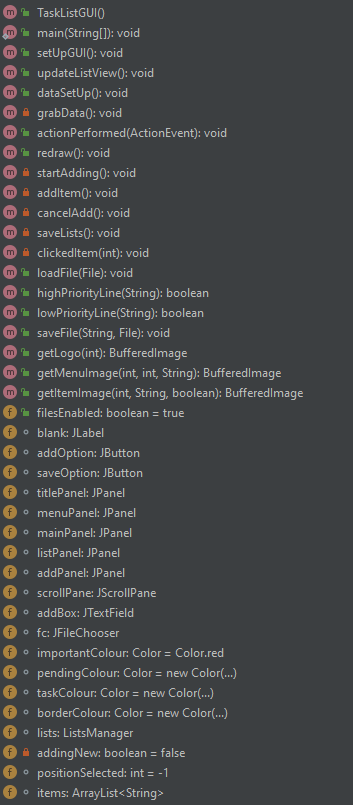
There is another file that controls the GUI (you don't have to see or edit that class), However, if you want to see the methods inside it:
Also pasting the code in Pastebin would be appreciated.
--------
More information: You have to complete the exercises on the code I provided above. There is also another .java class, where the GUI is implemented but you do not have to interact (edit/read) with that file. I've just put that as a piece of extra information.
Basically, it's an ArrayList exercise.
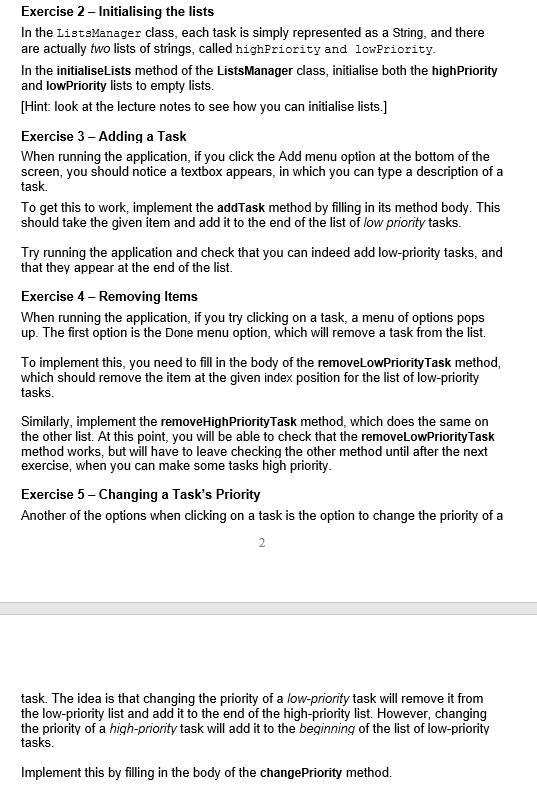
Exercise 2 Initialising the lists In the ListsManager class, each task is simply represented as a String, and there are actually two lists of strings, called highPriority and lowPriority. In the initialiseLists method of the Lists Manager class, initialise both the highPriority and lowPriority lists to empty lists. [Hint: look at the lecture notes to see how you can initialise lists.] Exercise 3 - Adding a Task When running the application, if you click the Add menu option at the bottom of the screen, you should notice a textbox appears, in which you can type a description of a task. To get this to work, implement the addTask method by filling in its method body. This should take the given item and add it to the end of the list of low priority tasks. Try running the application and check that you can indeed add low-priority tasks, and that they appear at the end of the list. Exercise 4 - Removing Items When running the application, if you try clicking on a task, a menu of options pops up. The first option is the Done menu option, which will remove a task from the list. To implement this, you need to fill in the body of the removeLowPriority Task method, which should remove the item at the given index position for the list of low-priority tasks. Similarly, implement the removeHighPriorityTask method, which does the same on the other list. At this point, you will be able to check that the removeLowPriority Task method works, but will have to leave checking the other method until after the next exercise, when you can make some tasks high priority. Exercise 5 - Changing a Task's Priority Another of the options when clicking on a task is the option to change the priority of a 2 task. The idea is that changing the priority of a low-priority task will remove it from the low-priority list and add it to the end of the high-priority list. However, changing the priority of a high-priority task will add it to the beginning of the list of low-priority tasks. Implement this by filling in the body of the change Priority method. mTaskListGUIO Em main(String[]); void m 1 setUpGUIO: void m 1 updateListView(): void m 1 dataSetUpO: void m. grabData(): void m 1 actionPerformed(ActionEvent): void m. redraw(): void I startAdding : void m. additem(: void m. cancelAdd(): void m. savelists(): void m . clickedItem(int): void m 1 loadFile(File): void m 1 highPriorityLine(String): boolean m lowPriorityLine(String): boolean saveFile(String, File): void m getLogo(int): Bufferedlmage m = getMenulmage(int, int, String): Bufferedlmage m = getItemImage(int, String, boolean): Bufferedlmage 1 filesEnabled: boolean = true o blank: JLabel o addOption: JButton o saveOption: JButton o titlePanel: JPanel o menuPanel: JPanel mainPanel: JPanel listPanel: JPanel o addPanel: JPanel scrollPane: JScrollPane addBox: JTextField o fc: JFileChooser o importantColour: Color = Color.red pendingColour: Color = new Color(...) taskColour: Color = new Color(...) borderColour: Color = new Color(...) lists: Lists Manager addingNew: boolean = false positionSelected: int = -1 o items: ArrayList
Step by Step Solution
There are 3 Steps involved in it

Get step-by-step solutions from verified subject matter experts
 Study Help