







Question: import java.util.Random; //a = 4 x 3 matrix. It means a has 4 row and 3 columns. There are 12 = 3 x 4 numbers
import java.util.Random; //a = 4 x 3 matrix. It means a has 4 row and 3 columns. There are 12 = 3 x 4 numbers (elements) //within the matrix A a[4][3] //Matrix is often used for graphics, solving equations. //5 * x + 3 * y + 2 * z = 20 //x + y - z = 5 //2 * x - y + z = 30 //To solve this equation, you have to eliminate x, y, or z step by step //For programming, it is hard to perform the elimination operation. Instead, //it uses matrix product format. //The coefficients: //[5 3 2 //1 1 -1 = A (3x3) //2 -1 1] //[ x //y = B (3x1) //z] //[20 //5 = C (3x1) //30] //Matrix product: A * B = C //For one element (x, y) of C, which means the number at the x-th column and y-th row in C //C[y][x] = The y-th row of matrix A * the x-th column of matrix B /*This class implements the Java Runnable interface that will calculate col_idx-th column of the result matrix */ class ColumnCalculator implements Runnable{ Matrix m1; Matrix m2; Matrix result; int col_idx; //specify which column of the result is going to be calculated ColumnCalculator(Matrix m_1, Matrix m_2, Matrix r, int col) { m1 = m_1; m2 = m_2; result = r; col_idx = col; } @Override public void run() { // TODO Auto-generated method stub //Implementation here... //calculating all the elements in the column of index (specified by "col_idx") of the result matrix } } public class Matrix { int rows; // Define the number of rows int cols; // Define the number of columns double values[][]; Random rand = new Random(); /*First constructor: with row and column as the input that creates a matrix with the specified size and * assign each elements with randomly generated number*/ Matrix(int r, int c) { rows = r; cols = c; values = new double[r][c]; for(int y = 0; y < rows; y++) { for(int x = 0; x < cols; x++) { values[y][x] = rand.nextDouble() * 10.0; //generating a double number between 0 and 10 } } } /*First constructor: with row, column, and a 2D array as the input. Similar to the first constructor * above, but instead of randomly generating, it assigns the elements with the third argument double 2D array. */ Matrix(int r, int c, double v[][]) { //Implementation here... } /*Output the matrix to the console*/ void print() { for(int y = 0; y < rows; y++) { for(int x = 0; x < cols; x++) { System.out.print(values[y][x] + ", "); } System.out.println(); } } /*Matrix product without thread: let the current matrix times the input argument matrix m * and return the result matrix * Below the multiplication is already provided but you need to add a few lines of code to * do the dimension check. If the input matrix does not satisfy the dimension requirement for * matrix product, you can print out a message and return a null matrix*/ Matrix multiplyBy(Matrix m) { //Implementation here... Matrix result = new Matrix(rows, m.cols); //Initialize the result matrix for(int y = 0; y < result.rows; y++) { for(int x = 0; x < result.cols; x++) { result.values[y][x] = 0; //the yth row of current matrix x the xth column of m for(int i = 0; i < cols; i++) { result.values[y][x] += values[y][i] * m.values[i][x]; } // A * B = result // [5, 3 [1, 2, 3 [? ? (y = 0, x = 1) ? // 2, 0] 4, 5, 6] ? ? ?] } } return result; } /*Implementation: instead using loops above to calculate each elements, * here you will use threads to accomplish the matrix product task. * Similar to the "multiplyBy()" above, the input matrix m represents * the second matrix that you will use the current matrix to times. The * returned Matrix will be the product result matrix. * The code below is just an example, which is not the real solution. * You need to create multiple threads to do the multiplication with each thread * computing one column within the result matrix*/ Matrix multiplyByThreads(Matrix m) { //Implementation here... Matrix result = null; Thread thread = new Thread(new ColumnCalculator(this, m, result, 5)); return result; } /* The main function for evaluation purpose*/ public static void main(String[] args) { Matrix m1 = new Matrix(250, 150); Matrix m2 = new Matrix(150, 200); System.out.println("Begin matrix product"); Matrix result = m1.multiplyBy(m2); System.out.println("Ending matrix product"); //Implementation here... //Test your multiplyByThreads() in both accuracy and time performance } }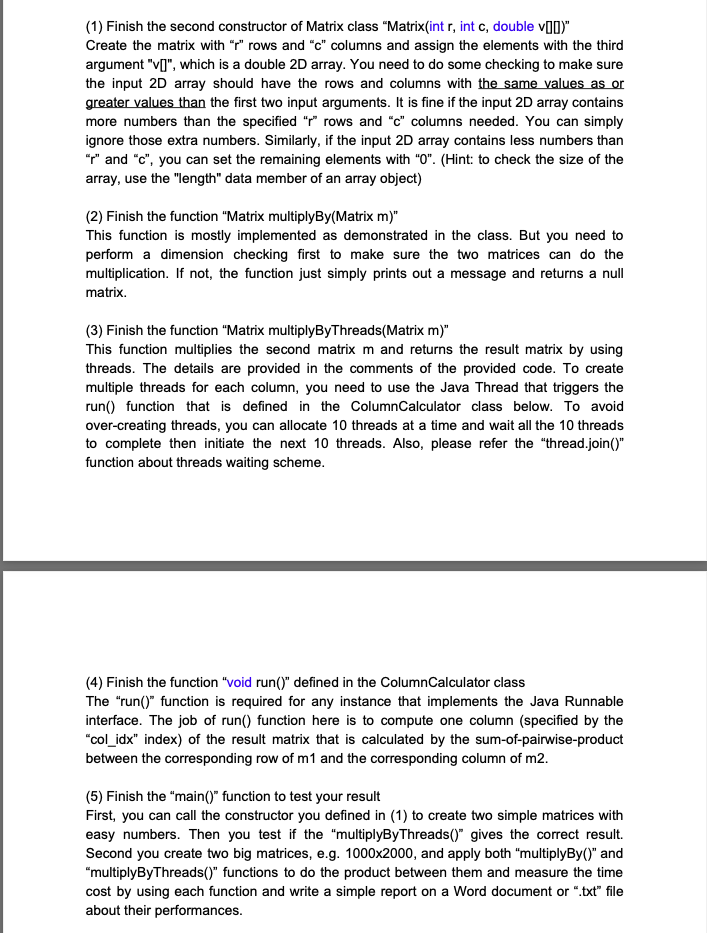
(1) Finish the second constructor of Matrix class "Matrix(int r, int c, double v(0)" Create the matrix with "z" rows and "c" columns and assign the elements with the third argument "[", which is a double 2D array. You need to do some checking to make sure the input 2D array should have the rows and columns with the same values as or greater values than the first two input arguments. It is fine if the input 2D array contains more numbers than the specified "p" rows and "c" columns needed. You can simply ignore those extra numbers. Similarly, if the input 2D array contains less numbers than "y" and "c", you can set the remaining elements with "0". (Hint: to check the size of the array, use the "length" data member of an array object) (2) Finish the function "Matrix multiplyBy(Matrix m)" This function is mostly implemented as demonstrated in the class. But you need to perform a dimension checking first to make sure the two matrices can do the multiplication. If not, the function just simply prints out a message and returns a null matrix. (3) Finish the function "Matrix multiplyByThreads(Matrix m)" This function multiplies the second matrix m and returns the result matrix by using threads. The details are provided in the comments of the provided code. To create multiple threads for each column, you need to use the Java Thread that triggers the run() function that is defined in the ColumnCalculator class below. To avoid over-creating threads, you can allocate 10 threads at a time and wait all the 10 threads to complete then initiate the next 10 threads. Also, please refer the "thread.join()" function about threads waiting scheme. (4) Finish the function "void run()" defined in the ColumnCalculator class The "run() function is required for any instance that implements the Java Runnable interface. The job of run() function here is to compute one column (specified by the "col_idx index) of the result matrix that is calculated by the sum-of-pairwise-product between the corresponding row of m1 and the corresponding column of m2. (5) Finish the main()" function to test your result First, you can call the constructor you defined in (1) to create two simple matrices with easy numbers. Then you test if the "multiplyByThreads()" gives the correct result Second you create two big matrices, e.g. 1000x2000, and apply both "multiplyBy()" and "multiplyByThreads()" functions to do the product between them and measure the time cost by using each function and write a simple report on a Word document or ".txt" file about their performances. (1) Finish the second constructor of Matrix class "Matrix(int r, int c, double v(0)" Create the matrix with "z" rows and "c" columns and assign the elements with the third argument "[", which is a double 2D array. You need to do some checking to make sure the input 2D array should have the rows and columns with the same values as or greater values than the first two input arguments. It is fine if the input 2D array contains more numbers than the specified "p" rows and "c" columns needed. You can simply ignore those extra numbers. Similarly, if the input 2D array contains less numbers than "y" and "c", you can set the remaining elements with "0". (Hint: to check the size of the array, use the "length" data member of an array object) (2) Finish the function "Matrix multiplyBy(Matrix m)" This function is mostly implemented as demonstrated in the class. But you need to perform a dimension checking first to make sure the two matrices can do the multiplication. If not, the function just simply prints out a message and returns a null matrix. (3) Finish the function "Matrix multiplyByThreads(Matrix m)" This function multiplies the second matrix m and returns the result matrix by using threads. The details are provided in the comments of the provided code. To create multiple threads for each column, you need to use the Java Thread that triggers the run() function that is defined in the ColumnCalculator class below. To avoid over-creating threads, you can allocate 10 threads at a time and wait all the 10 threads to complete then initiate the next 10 threads. Also, please refer the "thread.join()" function about threads waiting scheme. (4) Finish the function "void run()" defined in the ColumnCalculator class The "run() function is required for any instance that implements the Java Runnable interface. The job of run() function here is to compute one column (specified by the "col_idx index) of the result matrix that is calculated by the sum-of-pairwise-product between the corresponding row of m1 and the corresponding column of m2. (5) Finish the main()" function to test your result First, you can call the constructor you defined in (1) to create two simple matrices with easy numbers. Then you test if the "multiplyByThreads()" gives the correct result Second you create two big matrices, e.g. 1000x2000, and apply both "multiplyBy()" and "multiplyByThreads()" functions to do the product between them and measure the time cost by using each function and write a simple report on a Word document or ".txt" file about their performances
Step by Step Solution
There are 3 Steps involved in it
1 Expert Approved Answer
Step: 1 Unlock

Question Has Been Solved by an Expert!
Get step-by-step solutions from verified subject matter experts
Step: 2 Unlock
Step: 3 Unlock
 Study Help